Approvals reference
This page lists everything about approvals once they exist: who may decide them, what an approval carries, what each decision does, what happens when nobody decides, and what the console shows. To decide one, follow Decide an approval.
-
The roles rank
standard,senior,admin. Each approval has arequiredRole. A reviewer sees and decides the approvals that need their role or a lower one. -
An approval that needs a higher role doesn't show up in the list. Fetching or deciding it answers
not-found. -
Registering again changes the role.
kindgi reviewers unregister <reviewer-id>removes a reviewer, where<reviewer-id>is theidthatkindgi reviewers listshows. Their past decisions stay. -
The list names people. With authorization on, only a tenant admin or a reviewer reads it. Anyone else, such as a project's viewer, gets
permission-denied. -
A tenant admin reads approvals at every tier, with authorization on, through a session or an
adminkey not limited to a project, in the projects they may read:- not on the roster, they list and fetch approvals as an
adminreviewer would; - on it with a lower role, they list their own tier, and any tier they ask
for (
requiredRole), and fetch an approval of any tier.
Deciding still takes the roster. A key with no user, a
memberkey and a key limited to a project read nothing this way. The roster doesn't show such a reader; the access audit records the tenant-admin check each such read makes. - not on the roster, they list and fetch approvals as an
-
Anyone else who isn't a reviewer is refused:
Error [auth]: The caller isn't a reviewer: its token carries no reviewer role, and its user isn't registered as one (`kindgi reviewers register`). The approvals surface is reviewer-only. -
kindgi devleaves a role you set as it is. It doesn't register you again after you unregister yourself.
The Reviewers page
Section titled “The Reviewers page”A project's Approvals page in the console leads to Reviewers: the tenant's roster, with each reviewer's role, when they were added, and whether they're active. Like the list, it's shown to tenant admins and reviewers only. Anyone else reads "Who reviews approvals is shown to tenant admins and reviewers."
A tenant admin adds a reviewer with Add a reviewer:
- Find the person among the tenant's people, by name or email.
- Choose the role: "They decide approvals of this role and below."
- Confirm with the button, which names them, such as Make Eddie Park a standard reviewer.
Someone on the roster already isn't added again: "Eddie Park is already on the roster." Remove takes a reviewer off the roster at once, and their past decisions stay.
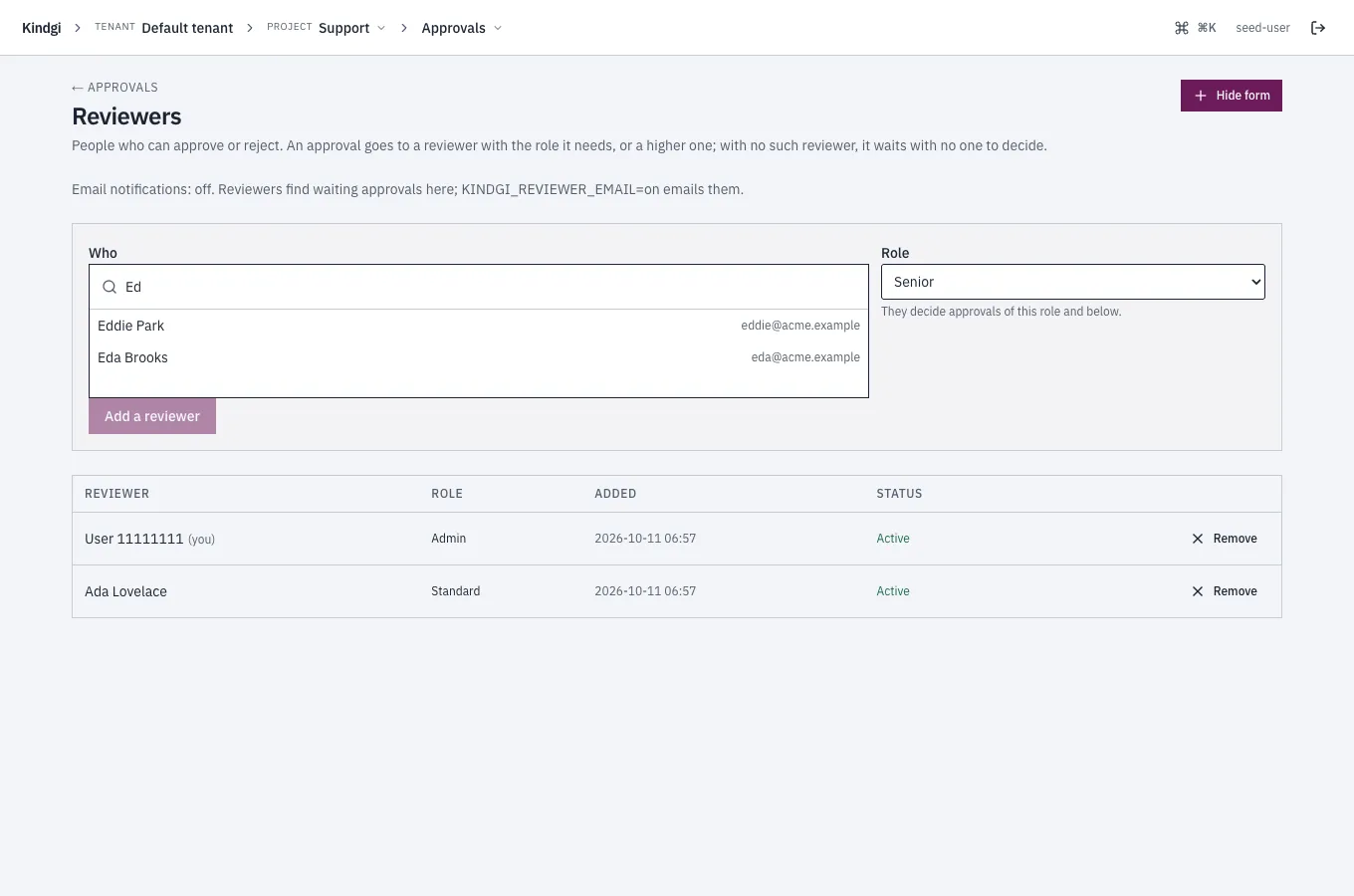
The page also says whether reviewers are emailed, as Reviewer email sets up: "Email notifications: off. Reviewers find waiting approvals here; KINDGI_REVIEWER_EMAIL=on emails them." When it's on, the page says that the first email goes at once, then a digest every five minutes at most.
An approval's fields
Section titled “An approval's fields”-
subjectKindis what waits:tool-call:pendingis a tool call. ItssubjectRefhas thetoolIdand thearguments.agent-turn:session-hitl-gateis a conversation that reached its turn limit. ItssubjectRefhas theconversationIdand theturnCount.
-
requiredRoleis the lowest role that may decide it. -
provenanceRef.runIdis the run that waits. -
decisionis there once someone decided it: the decision, the rationale, who decided, their role then, and when. Who isdecidedBy, asuser:<id>, and theirreviewerId. There's nodecisionwhile the approval is open, nor when it ended without one: it expired, or a timeout escalated it.deciderNameis the reviewer's name as it was when they decided, so a person renamed since still shows as they were. An older runtime's decisions don't have it.sessionProvideris the provider of the session they decided with:site:<id>for a site's sign-in, or an identity provider's id. It's absent for an API key, and on an older runtime's decisions.
"decision": {"decision": "approve","decidedBy": "user:26fc414a-b49f-4e1f-a022-162865770178","reviewerId": "974b5bb3-c690-4886-a609-c7fe0cbd5659","reviewerRoleAtDecision": "standard","decidedAt": "2026-10-05T16:25:52.878Z","rationale": "Confirmed with the on-call engineer"}Excerpt -
requestedByis who asked for it:user:<id>,service_account:<id>orsystem:<what>. -
separateApprover: truemeans whoever asked may not approve it. ComparerequestedBywith the caller'sactorfromidentity.whoami()to leave out an Approve button they can't use. -
escalatedFromandescalatedToare the approval ids an escalation came from and went to. -
withdrawnBecauseisrun-cancelledorrun-endedon an approval its run withdrew, as Withdrawn by its run describes.
Listing approvals
Section titled “Listing approvals”kindgi approvals list takes:
--status, one status or several, comma-separated, such as--status=assigned,in_review. Without it, the list includes decided approvals too.--assigned-to=me, the approvals assigned to you. Assigning one moves it toassigned.--decided-by=me, the approvals you decided (?decidedBy=mein the API,decided_by="me"in Python). An older runtime ignores it and lists them all; the CLI stops instead, and names the release the runtime needs.--order=asc, the oldest first. The list is newest first otherwise.
In the API, these are query parameters:
GET /v1/approvals?status=assigned,in_review&assignedTo=me&order=asc. The
page says which order it's in, as order. With ?decidedBy=me, every page
says it holds only yours, as decidedBy: "me"; a page from an older runtime
doesn't.
The clients' list also takes:
scope, one project's approvals or every project's in an org:{ kind: 'project', projectId }or{ kind: 'org', orgId }. In Python,scope_kind="project", scope_id=…. An agent's approval is in its turn's project. An approval stored without a project, by an older runtime, shows only in a list without a scope.runId, the approvals one run asked for. WithincludeDescendants: true, the approvals of the runs inside it too.waitTokenIds, the approvals behind given waits:wait_token_id=[...]in Python,?waitTokenId=over HTTP.
A run's waitingFor
Section titled “A run's waitingFor”From your app, runs.get(runId) answers what a suspended run waits for, as
waitingFor. It's the API's answer to the CLI's kindgi runs resume:
approvalsare the approvals still to be decided.otheris the rest: a child run to finish, an approval already decided, or a wait no approval is linked to.
{ "id": "45d986f1-8a8d-4341-a786-5ddcf239bb93", … "status": "suspended", … "waitingFor": { "approvals": [ { "approvalId": "b3fcf729-0137-430e-92a3-2ff10f4a6bde", "status": "pending", "requiredRole": "standard", "title": "HITL review required for Chat desk", "createdAt": "2026-10-11T07:55:48.728Z", "expiresAt": "2026-10-12T07:55:48.703Z", "subjectKind": "agent-turn:session-hitl-gate" } ], "other": [] }}Decisions
Section titled “Decisions”| Decision | The approval | The run |
|---|---|---|
approve |
approved |
Continues: the tool runs, or the turn runs. |
reject |
rejected |
A tool call: the tool doesn't run, and the agent gets the rejection as the tool's result. A turn: the run fails with hitl-rejected. |
escalate |
escalated, and a new approval for the next role up |
Keeps waiting for the new approval. |
withdraw |
withdrawn |
Ends: its turn fails with hitl-withdrawn. |
An approve, reject or withdraw resolves the run within the same call, so the run has moved on by the time the call returns.
A decision is refused, and nothing is recorded:
-
On an approval that's no longer waiting: decided, expired, or withdrawn by a reviewer or by its run's end. It's refused with
409 approval-terminal, saying how the approval ended:Approval … was withdrawn: its run was cancelledExcerpt -
On an approval whose run already ended: a tool call's or a turn's approval that's still open when that run, or a run it's a step of, has ended. It's refused with
409 run-already-terminal. Itsdetailsname the run that ended, which may be the run the approval's run is a step of, and itsstatus.
A decision recorded before its run ended stands, however close the two are.
The answer then has waitpointResolved: false and the run's runStatus.
A turn that ends at its approval fails with one of these codes. Each is a person's outcome, not an error:
hitl-rejected: a reviewer rejected the turn, at its session gate. A rejected tool call skips only the tool, and the turn goes on.hitl-withdrawn: a reviewer withdrew the approval.hitl-cancelled: nobody decided in time, so the approval expired at theadminrole.
A run cancelled while it waits ends cancelled, with no failure code.
Each decision goes into the audit trail as an hitl-decision event: who
decided, how it ended and the rationale. It's kept for good, even when the
runtime purges other audit events, as
Audit events describes.
Withdrawn by its run
Section titled “Withdrawn by its run”Cancelling a run withdraws the approvals it waits on by itself, as
Cancel a run
describes. Those approvals show withdrawnBecause: "run-cancelled". When a
run ends otherwise while they wait, such as when it fails, they show
run-ended. Either way, they have no decision.
An approval a run asked for without waiting on it names the run only as where it came from. A project-wide memory fact's review is one, and a memory erasure's is another. It stays pending after the run ends, and is decided as usual.
When nobody decides
Section titled “When nobody decides”Each approval has a deadline, its expiresAt. It's 24 hours after the
approval is asked for, or the agent's own hitl.timeoutMs. For one hour:
conversationPolicy: { hitl: { tools: {}, timeoutMs: 3_600_000 } }. When the
deadline passes with no decision:
-
At
standardorsenior, the approval becomesescalated, and a new one asks the next role up:senior, thenadmin. The new one's deadline is as long again. The run keeps waiting. -
At
admin, the approval becomesexpired, and the run's turn fails:"error":{"code":"hitl-cancelled","message":"Tool-call HITL cancelled for acme-desk.echo: timeout","reason":"timeout"}The run's
failuresays the same as data:code: "hitl-cancelled",reason: "timeout". Readreasonrather than the message.
A decision made before the deadline always wins. A deadline always escalates
this way: hitl.onTimeout takes only 'escalate', the default. An agent that
asks for anything else is refused when it's defined:
hitl.onTimeout 'auto-approve' isn't supported: an approval that times out escalates one reviewer tier, and at admin it expires (the turn fails with hitl-cancelled). Use 'escalate', or leave it out.The Inbox
Section titled “The Inbox”A reviewer's Inbox in the console lists every open approval they may decide, across the projects they can read, the one that has waited longest first. Its headline says how many and for how long, such as "4 approvals wait for you: the oldest for 3 h. 1 is assigned to you.", or "Nothing waits for you."
- Filters by project, tier, Assigned to you or No one assigned, kept in the page's link.
- Who it's assigned to reads "You", "A reviewer" or "No one", never a name.
- Choose one to see it beside the list, or in the list's place on a narrow screen, and decide it there. After a decision, the next one is chosen.
- Approve or reject several in one go, as Several in one go describes, and move through the list by keyboard, as By keyboard describes.
- It reads again every 15 seconds and when you come back to the tab. One that left without your decision says so: "No longer waiting: … (decided by someone else, withdrawn or expired)."
- One you asked for reads "You asked: someone else approves it".
- Past 500 open approvals, it holds those that have waited longest, and still lists every one assigned to you. The headline then says "More may wait than the inbox could read: it holds those that have waited longest. Each project's Approvals page lists them all."
An approval's own link, /console/approvals/<approval-id>, finds its
project by itself. One still waiting opens in your Inbox, chosen. A decided
one opens its own page. The link in a
reviewer email is that link.
Several in one go
Section titled “Several in one go”In the Inbox, choose approvals with their checkboxes, or with x. A bar says
how many are chosen, such as "3 chosen.", and offers Approve 3,
Reject 3 and Clear. Approving leaves out any you asked for that need
someone else's approval: "Approving leaves out 1 you asked for." You still
send on or withdraw an approval one at a time.
A step asks, for example, "Approve 3 approvals?", and takes one rationale for
all. Nothing is sent before you confirm. Then each approval is decided on its
own, in order, as if you'd decided it alone. Each keeps its own rules: its
tier, who asked, and who it's assigned to. Each rationale ends "Decided in a
batch of 3 (batch …).", with the batch's id. That's how you find a batch's
hitl-decision events in the audit trail. Stop after this one leaves the
rest unsent.
The step then says how each one went, with a line such as "1 approved; 1 refused; 1 not known (look before trying again)." Back in the Inbox, the line reads "In one go: …", and the decided ones leave the list.
- Refused means nothing was recorded for you, and it says why. One that closed while the batch ran says "It closed meanwhile (decided, withdrawn or expired); nothing was recorded for you."
- A rate limit is waited out, and the decision is tried again up to twice. One that's still limited after that is offered again with Try again what failed.
- Not known means the runtime failed or didn't answer, so the decision may or may not have been recorded: "Look at it before trying again." The batch never sends it again, and it stays chosen in the Inbox.
By keyboard
Section titled “By keyboard”The Inbox's keys work while the list has the focus, after you click a row or
Tab to it. They never work while you're typing in a field. ? lists them:
| Key | Does |
|---|---|
j / k |
Next / previous approval |
x |
Choose it for a batch |
a |
Approve: the rationale opens first; Enter records it |
r |
Reject: the same |
e |
Send on to the next tier: the same |
o |
Open its own page |
? |
These keys |
A key never decides by itself. a, r or e opens a step that asks, for
example, "Reject the next turn of acme.billing?", with the rationale box
focused. Enter records it, Shift+Enter starts a new line, and Esc leaves it.
If you can't make that decision, the step says why instead, such as "You
asked for this, so someone else approves it." or "It's at the top tier:
there's no one to send it on to."
Deciding in the console
Section titled “Deciding in the console”An approval's page, or the Inbox with it chosen, offers the decisions the reviewer may make, each saying what it does, and an optional rationale: "It goes to the audit log with your rationale." On a run's gate:
| Choice | What it says it does |
|---|---|
| Approve | "The waiting run goes on with it." |
| Reject | "The waiting run is told no: what it asked for does not happen." |
| Send to a senior reviewer | "A new approval opens for senior reviewers; the run waits for that one." |
| Withdraw this request | "Nothing is decided, and the run waiting on it ends: it fails, saying the approval was withdrawn." |
On an approval that needs a senior, the third choice reads Send to an
admin reviewer. An approval that needs an admin has none.
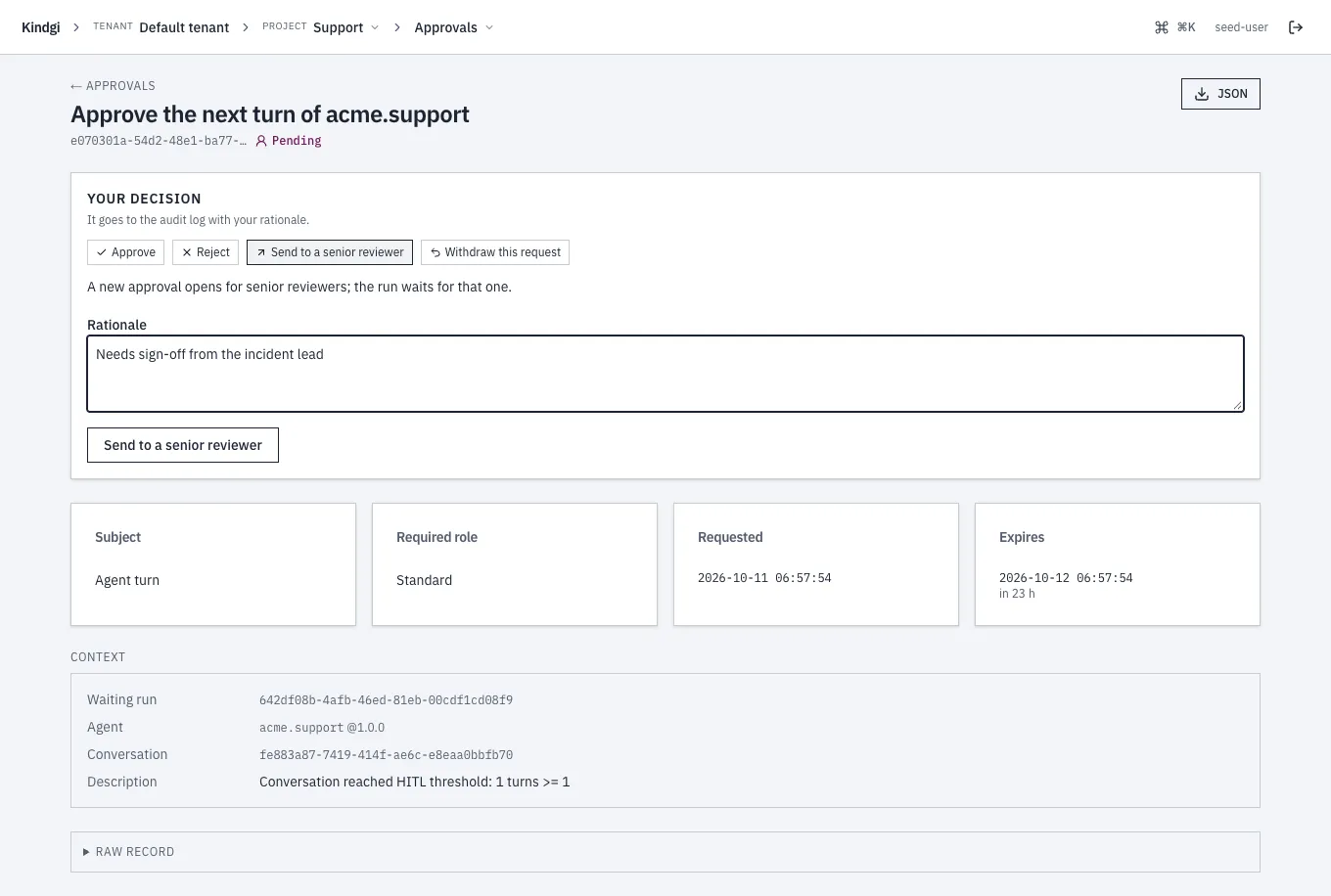
An agent promotion's approval says what each does to the version instead: "The version goes live where it was asked for.", or "The promotion is dropped; nothing changes where it runs." Once a decision is recorded, the page says what it did, such as "The waiting run continues." or "The waiting run is told no.", with Open the run.
- Someone who can't decide it reads why, in place of the choices: "You aren't on the reviewer roster, so you can't decide approvals. A tenant admin can add you.", or, to a reviewer of a lower role, "This one needs a senior reviewer."
- Whoever asked for it, a person or a service account, isn't offered
Approve when it needs someone else's (
separateApprover): "You asked for this, so someone else approves it." - A closed approval says why, when no decision does: "Withdrawn: its run was cancelled, so nothing is left to decide.", "Withdrawn: its run ended, so nothing is left to decide.", "Sent on to senior reviewers: that approval decides it.", or "It expired before anyone decided it." The sent on one links to the approval it went to, which links back.
- One decided or closed elsewhere while you were on it: "Someone decided it a moment ago: the page now shows how." or "It closed a moment ago: the page now shows why."
- One whose run already ended: the decision is refused, and the page says how the run ended and that nothing was recorded.
- The run, after a reject: its page says the run ended at its approval, as a review outcome, not an error: "A reviewer rejected it." Or it says that its approval was withdrawn, closed, or not decided in time. Your rationale is shown, as Start a run describes.
Sent to a senior reviewer
Section titled “Sent to a senior reviewer”After Send to a senior reviewer, the page says "A new approval is open for senior reviewers; the run waits for it.", with Open it. From then on it says "Sent on to senior reviewers: that approval decides it.", with Open the approval it went to:
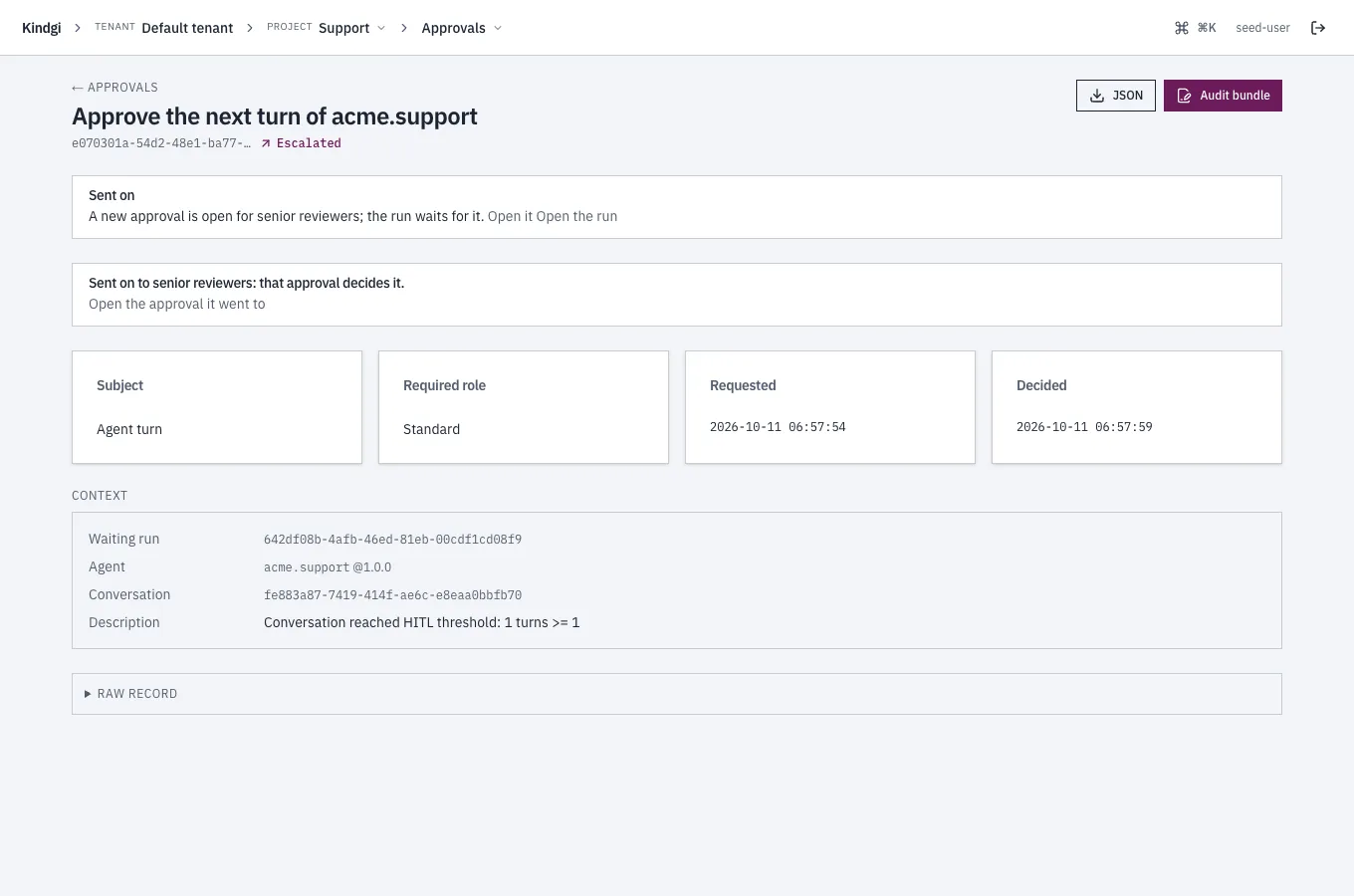
The new approval links back: "Sent on from an earlier approval: open it". It offers Send to an admin reviewer in its turn.
Withdrawn
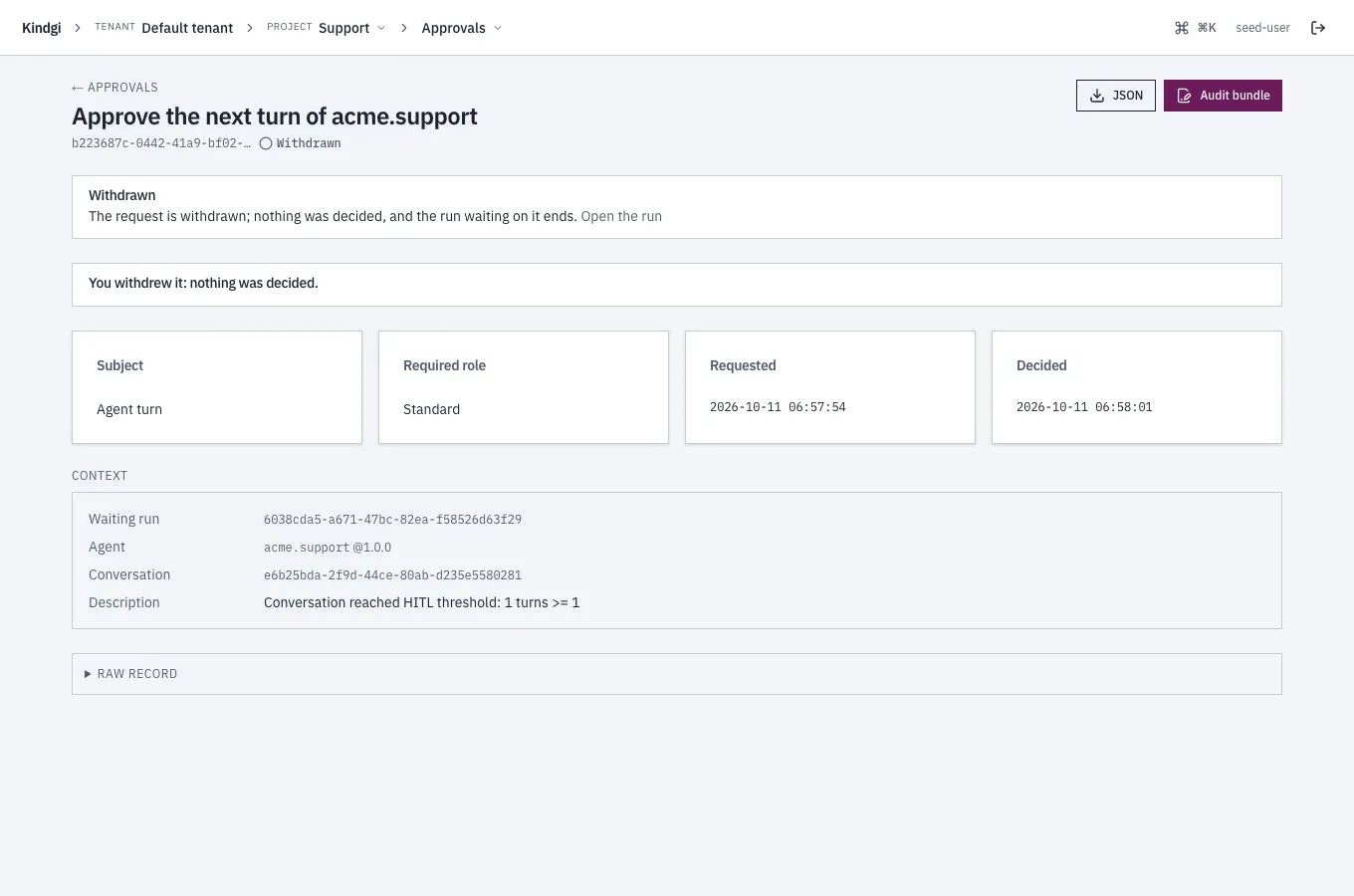
Section titled “Withdrawn”After Withdraw this request on a run's gate, the page says "The request
is withdrawn; nothing was decided, and the run waiting on it ends.", with
Open the run. From then on it says "You withdrew it: nothing was
decided." Its run fails with hitl-withdrawn: "The approval for the
session-HITL gate was withdrawn".