List runs
kindgi runs list --limit=2{ "data": [ { "id": "657512f8-97b5-41bb-a0cc-396bffe158f6", … "flowId": "acme.reserve-order", "flowVersion": "0.1.0", "status": "cancelled", … }, { "id": "365d7fd0-7801-43e5-a3c5-66f9479cf02d", … } ], "hasMore": true, "nextCursor": "eyJjcmVhdGVkQXQiOiIyMDI2LTEwLTAzVDIwOjE0OjE2Ljc0NFoiLCJpZCI6IjM2NWQ3ZmQwLTc4MDEtNDNlNS1hM2M1LTY2Zjk0NzljZjAyZCJ9"}Runs come newest first, 25 to a page by default (--limit, at most 100).
--cursor=<nextCursor> gets the next page. The list leaves out each run's
output; kindgi runs get <run-id> has it.
The CLI lists every run, including the agent turns inside flows (each one a
run of agent.turn, with a parentRunId); --agent=<agent-id> lists one
agent's turns (see below). The clients also filter by status, creation
time, flow and version, and scope (below).
From your app
Section titled “From your app”// The newest runs your app started, without the agent turns inside themconst page = await kindgi.runs.list({ topLevel: true, limit: 3 });for (const run of page.data) console.log(run.id, run.flowId, run.status);
// The next pageif (page.nextCursor !== undefined) { const next = await kindgi.runs.list({ topLevel: true, limit: 3, cursor: page.nextCursor }); console.log(next.data.length, next.hasMore);}f703bffb-367c-4abb-a699-006575b7c21a acme.reserve-order cancelled54e3258d-3cd3-444a-8175-c965ef6cf682 acme.reserve-order completed42b7c0c8-3c47-4962-9b08-3319ff887ada acme.review-order completed3 truefrom kindgi.client import paginate
# The newest runs your app started, without the agent turns inside thempage = kindgi.runs.list(top_level=True, limit=3)for run in page.data: print(run.id, run.flow_id, run.status)
# Every one of them, page after pageprint(sum(1 for _ in paginate(kindgi.runs.list, top_level=True)))969888a4-a1a8-43fc-8e83-63529ad580c2 acme.reserve-order cancelled197046c4-e220-4b6d-abcb-1703d6c6efd5 acme.reserve-order completededaf7625-0585-40c3-805c-0c098f6846b8 acme.review-order failed81topLevel: true(top_level=True) leaves out runs started inside other runs, such as agent turns: the runs your app and the CLI started.includeOutput: true(include="output") adds each run'soutput.scope(scope_kind/scope_id) lists one project's runs, or the runs of every project in an org:{ kind: 'project', projectId }(scope_kind="project", scope_id=…), or{ kind: 'org', orgId }.agentId(agent_id) lists one agent's turns; see below.statuslists the runs in one status, or in any of several:['failed', 'cancelled'](a list in Python too).createdAfter/createdBefore(created_after/created_before) list the runs created strictly after, or before, a time.flowId(flow_id) lists one flow's runs, andflowVersion(flow_version) one version's. An agent's turns run theagent.turnflow: useagentIdfor an agent's.- In Python,
paginatefollowsnext_cursorfor you.
A status that doesn't exist, a time that isn't one, an empty value, or a
version without its id is refused with 400 bad-input, naming it:
{ "error": { "code": "bad-input", "message": "`agentVersion` needs `agentId`", … } }The filters combine. The runs created in the last day that failed or were cancelled, leaving out the runs inside them:
const since = new Date(Date.now() - 24 * 3_600_000).toISOString();const ended = await kindgi.runs.list({ status: ['failed', 'cancelled'], createdAfter: since, topLevel: true,});for (const run of ended.data) console.log(run.id, run.status, run.agent?.version);c231451d-c304-4466-bb37-3b72145470ed cancelled 2.1.0from datetime import datetime, timedelta, timezone
since = (datetime.now(timezone.utc) - timedelta(days=1)).isoformat()ended = kindgi.runs.list(status=["failed", "cancelled"], created_after=since, top_level=True)for run in ended.data: print(run.id, run.status, run.agent.version if run.agent else None)c231451d-c304-4466-bb37-3b72145470ed cancelled 2.1.0The runs inside a run
Section titled “The runs inside a run”parentRunId (parent_run_id) lists the runs a run started: for a flow, its
agent steps' turns, each with the step it belongs to.
const run = await kindgi.runs.start({ flow: 'acme.process-order', input: { orderId: 'A-100' } });const children = await kindgi.runs.list({ parentRunId: run.id });for (const child of children.data) console.log(child.id, child.flowId, child.parentNodeId);eb59636f-aaae-4cd2-84ec-66cbcbf55f83 agent.turn noterun = kindgi.runs.start(flow="acme.process-order", input={"orderId": "A-100"})children = kindgi.runs.list(parent_run_id=run.id)for child in children.data: print(child.id, child.flow_id, child.parent_node_id)13237b2f-6cdd-4592-a94d-f5e751258790 agent.turn noteOne agent's turns
Section titled “One agent's turns”An agent's turn names its agent: agent carries the agent's id, the
version that ran and the conversation. That goes for an agent run and for
the turn a flow's agent step starts. kindgi runs list --agent=<agent-id>
lists one agent's turns, at every version, as do agentId (agent_id) in
the clients:
kindgi runs list --agent=acme.chat-desk --tableID STATUS FLOW / AGENT CREATED──────────────────────────────────── ───────── ──────────────────── ────────────────────────45d986f1-8a8d-4341-a786-5ddcf239bb93 completed acme.chat-desk@0.1.0 2026-10-11T07:55:48.520Z95674147-b935-4a63-a74c-cbffc0fb103a completed acme.chat-desk@0.1.0 2026-10-11T07:55:39.011Zconst turns = await kindgi.runs.list({ agentId: 'acme.desk-agent' });for (const run of turns.data) { console.log(run.id, run.agent?.version, run.agent?.conversationId, run.parentRunId ?? '-');}51f736ba-bdde-4558-bf5f-32270622b822 1.1.0 d8d51075-ee70-44bd-b93d-f15e450798b7 259f5e11-6ebe-4347-a590-e3db5c71cf7ff9745c06-9935-4641-bf41-77d11a7f1ffb 1.1.0 b3e40910-9a84-4fc5-a4f8-d2cced5dbb53 -d0f3817d-1166-462d-a666-7a193bc48f08 1.0.0 60c9d486-ff3b-4ef9-8fbe-be19ab1d7313 -turns = kindgi.runs.list(agent_id="acme.desk-agent")for run in turns.data: print(run.id, run.agent.version, run.agent.conversation_id, run.parent_run_id or "-")51f736ba-bdde-4558-bf5f-32270622b822 1.1.0 d8d51075-ee70-44bd-b93d-f15e450798b7 259f5e11-6ebe-4347-a590-e3db5c71cf7ff9745c06-9935-4641-bf41-77d11a7f1ffb 1.1.0 b3e40910-9a84-4fc5-a4f8-d2cced5dbb53 -d0f3817d-1166-462d-a666-7a193bc48f08 1.0.0 60c9d486-ff3b-4ef9-8fbe-be19ab1d7313 -The first turn is a flow's agent step (it has a parentRunId); add
topLevel: true to leave those out. It combines with scope too. Turns
that ran before Kindgi 0.1.3 don't name their agent: they have no agent,
and agentId doesn't list them.
Add agentVersion (agent_version) for one version's turns, e.g. how a new
version is doing. It needs agentId.
Read a run's journal to see what a turn did.
In the console
Section titled “In the console”A project's Runs page lists each agent run or flow run started in the project, newest first, with a flow's agent turns under it. It refreshes every 5 seconds.
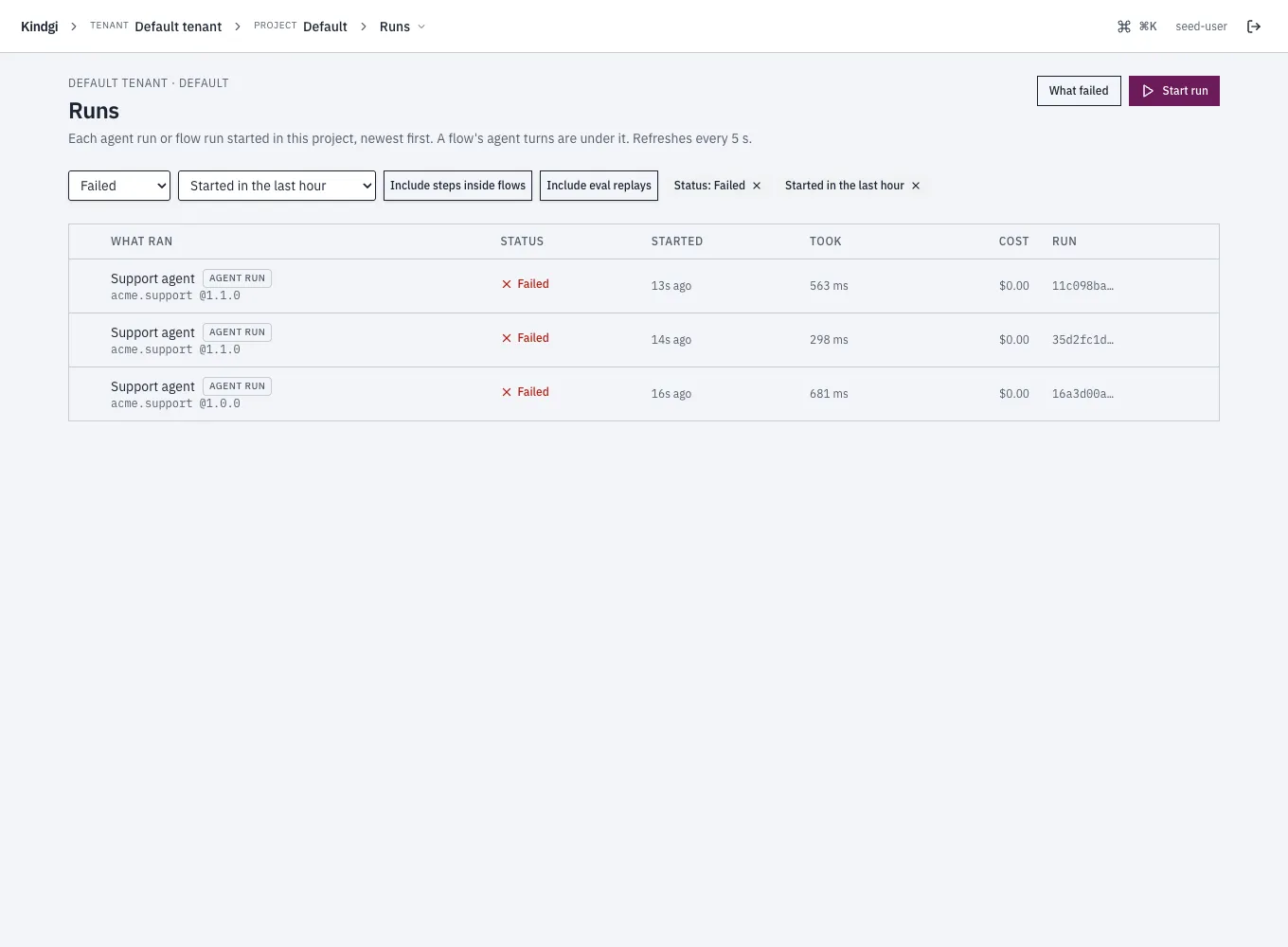
Its filters:
- Status: Pending, Running, Waiting (a run that waits, for example on an approval), Completed, Failed or Cancelled.
- Started: in the last hour, 24 hours, 7 days or 30 days.
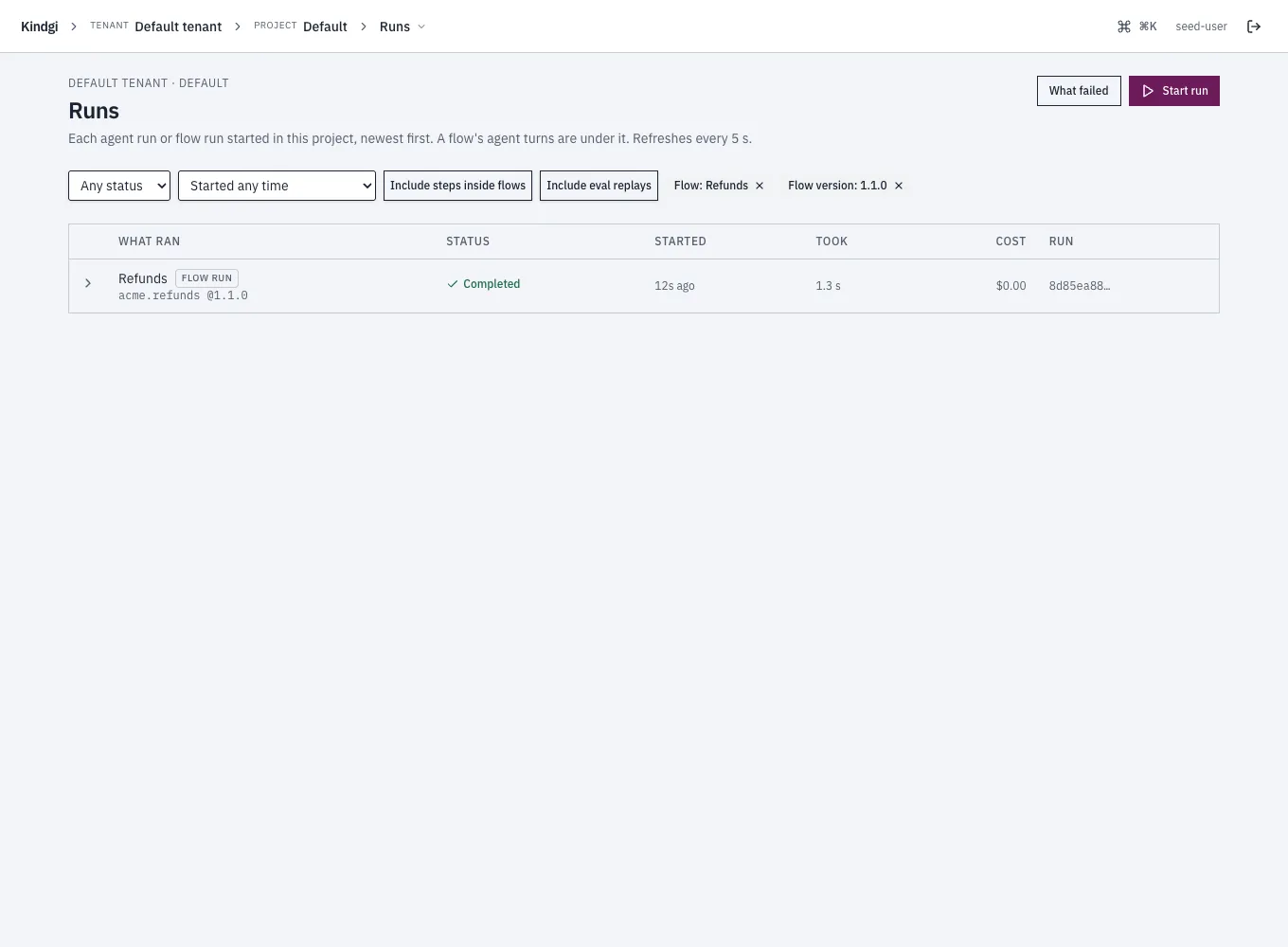
- An agent or a flow, and its version, from a link that names them: a flow's page links Its runs → and Runs of 1.1.0 → (the version it shows), a schedule's page links Its runs →, and Its failed runs on What failed names the agent or flow and its version. With an agent chosen, a Version choice appears (Every version, or one).
- Include steps inside flows and Include eval replays.
Each filter shows as a chip ("Status: Failed", "Started in the last hour", "Flow: Refunds"). Removing an agent's or a flow's chip removes its version too. The page's address keeps the filters, so a link opens the same list.
What failed
Section titled “What failed”What failed, from the Runs page, groups the project's failed runs by cause and by version, so a bad deploy shows. Approvals people decided are counted apart: they aren't errors.
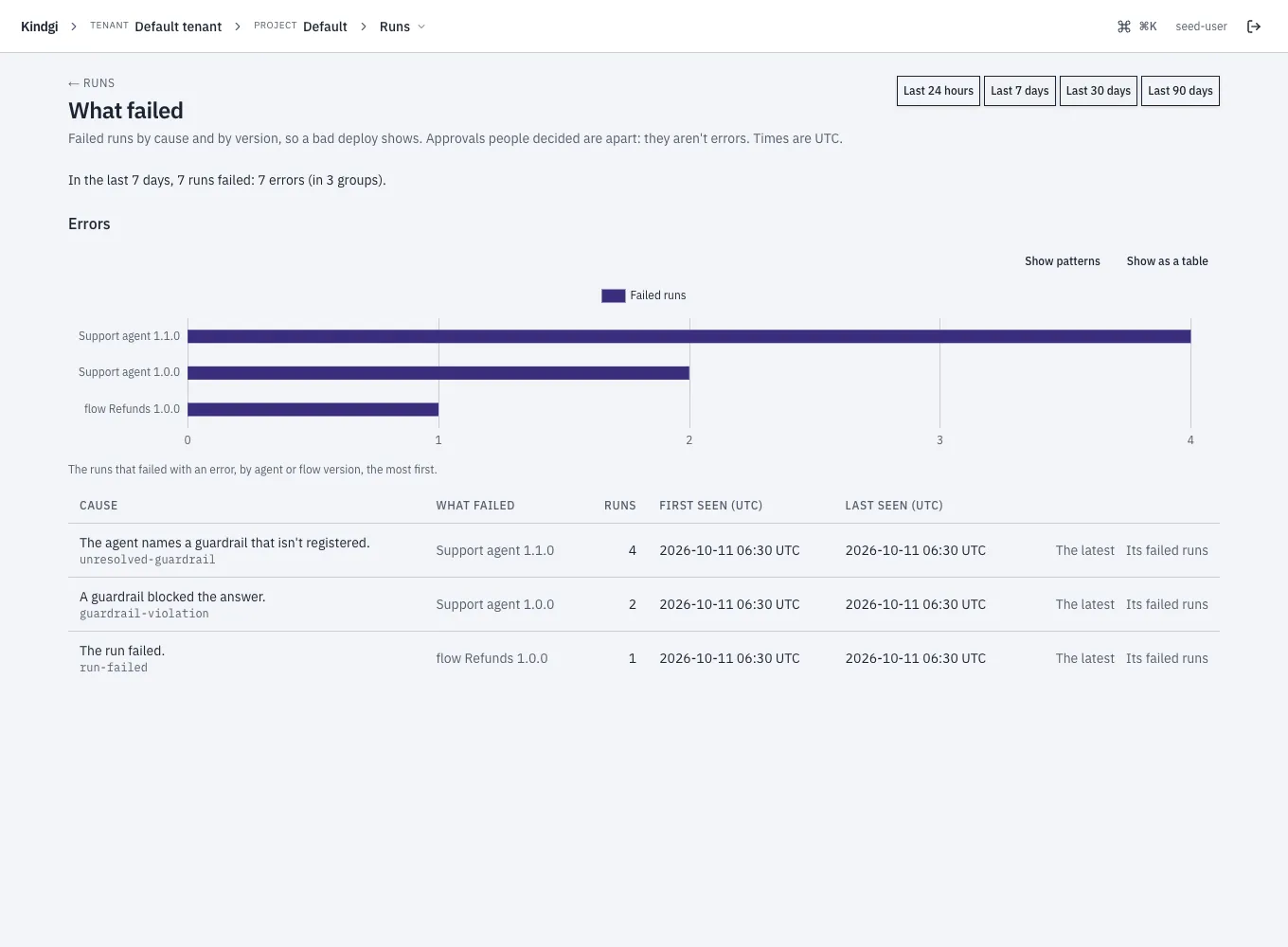
- The window: the last 24 hours, 7, 30 or 90 days.
- The headline: "In the last 7 days, 7 runs failed: 7 errors (in 3 groups)."
- The errors by version: bars of the runs that failed with an error, by agent or flow version, the most first (Show as a table for the numbers).
- One row per cause and version: the cause in a run page's words, with
its code ("A guardrail blocked the answer."
guardrail-violation), what failed at which version, how many runs, when it was first and last seen, The latest run, and Its failed runs on the Runs page.