People, API keys and service accounts
With authorization on, a tenant has people, each
with their own sign-in and API keys, and service accounts, which act for
a pipeline or an app. What each may do is kept in OpenFGA, so turn
authorization on first. A tenant admin adds them. The first one is the
runtime's seed user (KINDGI_SEED_USER_ID, or the API token's user), whom
the runtime makes a tenant admin at every start.
Who can do what
Section titled “Who can do what”- A tenant admin does everything in the tenant: adds and removes people, makes keys for anyone, and changes tenant-wide settings (providers, policies, signing keys, deployments, identity providers).
- A tenant member reads the tenant's settings (providers, policies, adapters, signing keys, deployments), not its projects. Everyone you add is one.
- A role on a project (
owner,admin,editororviewer) gives the work in it: its agents, runs and conversations (Project memberships). - A service account has only what it's granted. It isn't a tenant member unless you make it one.
Lists hold only what the caller may read.
Add a person
Section titled “Add a person”kindgi people add --name="Sam Rivera" --email=sam@acme.exampleIt prints the new person, and says on stderr what being added gives them:
{ "userId": "002ee784-0b05-47fb-918e-34d192be94c1", "displayName": "Sam Rivera", "email": "sam@acme.example"}Added to the tenant: they can read its settings. Give them a project role to work on its agents and runs, then their first key: kindgi tokens create --for=user:002ee784-0b05-47fb-918e-34d192be94c1An email another person already has is refused
(409 identity-user-email-taken).
Then give them a role on a project. A tenant admin, or an admin of that project, adds them by email or by id:
curl -X POST "$KINDGI_API_URL/v1/projects/<project-id>/memberships" \ -H "Authorization: Bearer $KINDGI_API_TOKEN" -H 'content-type: application/json' \ -d '{"email":"sam@acme.example","role":"editor"}'The email matches whatever its case, and the answer names the person. Here a
project admin added a viewer as GUS@acme.test:
{"projectId":"ea6e0f95-301e-4017-b2d4-82590cc6ec64","userId":"74e4beb8-6aa4-47ef-9f2a-e0245ee62343","role":"viewer"}Someone who isn't one of the tenant's people (or was removed) isn't added:
{"error":{"code":"identity-user-not-found","message":"No one with email \"outsider@example.com\" is a member of this tenant","requestId":"req-304865e8-9499-48cd-afca-2f8c87e8f05d"}}In the clients: projects.memberships.add(projectId, { email, role })
(TypeScript). Now they can sign in to the console, or use a
key you make them.
Make someone a tenant admin
Section titled “Make someone a tenant admin”kindgi people grant <user-id> --tenant-adminkindgi people ungrant <user-id> --tenant-adminThe grant holds from their next request. kindgi people grants <user-id> --table lists what someone holds: tenant admin, tenant member, project and
team roles, and a reviewer role, as granted directly (what a team or an org
gives isn't expanded). Sam, just added, holds only the tenant membership:
WHERE ROLE────── ───────────────────────────tenant member (reads its settings)Everyone's grants come in one read: the people list takes include=grants
(users.list({ includeGrants: true }) in TypeScript,
identity.users.list(include="grants") in Python). Each person then carries
grants, the same shape as their own grants read. A runtime without an
authorization store, or one before 0.1.6, lists the people without them.
Taking tenant admin away is refused in two cases:
409 last-tenant-admin: they're the only one. Make someone else a tenant admin first.409 seed-user-admin: they're the seed user, whom the runtime makes a tenant admin again at every start. UnsetKINDGI_SEED_USER_IDand restart the runtime first.
What you may do
Section titled “What you may do”GET /v1/identity/me/permissions answers what you, the caller, may do, with
your API key's limits applied. Unlike grants, it counts every way you hold
a role.
tenant:{admin, member}.reviewer: when you're a reviewer, your role, your reviewerid(an approval assigned to you names it inassignedTo; absent without a roster row, or from a runtime before 0.1.6), the approvals' roles you may decide (your rank and below), and whether you can decide at all.key: when you call with an API key, its role and the project it's limited to.tokenCapabilities: what your token itself carries for secret, env and signing-key writes. A sign-in session carries none; an API key carries those it was minted with (none by default).projects: each project you may read, with your highest role in it and every way you hold one (via):direct, or through ateam, withsincewhen the runtime keeps it;org-admin, as an admin of the org it sits in;tenant-admin.
orgsandteams: your own, with your role in each.capabilities: what each project role allows on the project and on each kind of object in it, read from the runtime's authorization model. Your project role's entry is what you may do there.readOnlyNotice: the line the console shows someone who may only view a project, when a tenant admin set one. It's in the tenant config,kind: 'config', keyconsole.readOnlyNotice, plain text on one line, at most 280 characters.
A key limited to a project sees that project alone. A member key is never
a tenant admin. You only see what you may read: no project you can't read,
no one else's role.
The console hides actions by it (The console, by role). The server still checks every call.
On a runtime without an authorization store it answers
501 permissions-unsupported. In the clients it's
client.identity.me.permissions() (TypeScript and Python).
API keys
Section titled “API keys”Everyone can make their own keys:
kindgi tokens create --label=laptop --expires=30dThe secret is printed once, there: store it, because nothing shows it again.
--expires takes 30d, 12h, 90m or a date; a key without it doesn't
expire.
- For someone else (a tenant admin only):
--for=user:<user-id>or--for=sa:<service-account-id>. --role=member(the default) takes no admin action on the tenant, even for a tenant admin. A project admin's member key still manages that project's members.--role=adminis made only by a tenant admin, and only for a tenant admin (403 role-exceeds-principalfor anyone else).--project=<project-id>limits the key to one project. A request that names another project is refused (403 key-project-mismatch).
A tenant admin made Sam's first key:
kindgi tokens create --for=user:<user-id> --label=laptop --expires=30d{ "meta": { "id": "16979e65-a65d-46aa-a348-1b64d1c7d41f", "principal": { "kind": "user", "id": "002ee784-0b05-47fb-918e-34d192be94c1" }, "role": "member", "capabilities": [], "label": "laptop", "createdBy": "user:11111111-3333-4333-8444-000000000402", "createdAt": "2026-10-09T12:20:34.217Z", "expiresAt": "2026-11-08T12:20:34.178Z" }, "secret": "kgi_ak_…"}⚠ The secret of key 16979e65-a65d-46aa-a348-1b64d1c7d41f is shown once, above: store it now.kindgi tokens list --tableID FOR ROLE PROJECT LABEL CREATED EXPIRES REVOKED LAST USED──────────────────────────────────── ───────────────────────────────────────── ────── ─────── ────── ──────────────────────── ──────────────────────── ─────── ─────────16979e65-a65d-46aa-a348-1b64d1c7d41f user:002ee784-0b05-47fb-918e-34d192be94c1 member laptop 2026-10-09T12:20:34.217Z 2026-11-08T12:20:34.178Zkindgi tokens list lists your keys; a tenant admin sees everyone's
(--for=user:<id> for one person's). Someone else's key reads as 404.
kindgi tokens revoke <token-id> refuses the key from its next request on,
with 401.
Service accounts
Section titled “Service accounts”A service account is for a pipeline or an app: it has no sign-in, only keys, and only the grants you give it.
kindgi service-accounts create acme-ci --description="Deploys from CI" --project=<project-id>:editor{ "serviceAccountId": "04da5350-4207-4563-a4f9-c3c3463f33cf", "name": "acme-ci", "description": "Deploys from CI", "grants": [ { "kind": "project", "projectId": "211244ea-cdac-45e5-be8c-30a3e0bc42f7", "role": "editor" } ], "createdBy": "user:11111111-3333-4333-8444-000000000402", "createdAt": "2026-10-09T12:20:35.334Z"}Then make it a key:
kindgi tokens create --for=sa:<service-account-id> --label=ci --expires=90dIts grants are written before create answers, so its first key works at
once. --tenant-admin, --tenant-member and --project=<id>:<role>
(repeatable) are what you can grant, now or later with
kindgi service-accounts grant and ungrant.
Give --tenant-member only to an account whose job reads the tenant's
settings. Without it, such a read is refused, and the refusal says how to
grant it.
kindgi service-accounts unregister <service-account-id> takes its grants
away, and its keys stop working.
Who sees the tenant's people
Section titled “Who sees the tenant's people”Only a tenant admin lists them. Anyone else gets:
{"error":{"code":"permission-denied","message":"Only a tenant admin lists the tenant's people","requestId":"req-6f9ecda9-4a1d-4ef4-83a8-c91d5c78e47f"}}A person's record and sessions are for a tenant admin, or that person.
Remove a person
Section titled “Remove a person”kindgi people remove <user-id>{ "user": { "userId": "002ee784-0b05-47fb-918e-34d192be94c1", "tenantId": "0b9f4c1e-4444-4a2b-8c3d-000000000402", "primaryEmail": "sam@acme.example", "displayName": "Sam Rivera", "createdAt": "2026-10-09T12:20:33.577Z", "unregisteredAt": "2026-10-09T12:20:36.482Z" }, "keysRevoked": 1, "sessionsRevoked": 0, "grantsRemoved": 1}Removed Sam Rivera: 1 key(s) and 0 session(s) revoked, 1 role(s) and membership(s) taken away.In one step, before it answers, their API keys are revoked, their sessions end, and every grant and membership is taken away. The next request with Sam's key:
{"error":{"code":"auth-missing","message":"Bearer token is not recognized","requestId":"req-ea8f3a9a-f1df-4365-9f7c-7bab23beea86"}}That's a 401. Their record stays, so runs, approvals and the audit trail still
say who they were. Adding their email again makes a new person, with nothing
granted.
It's refused for yourself and for the seed user
(identity-user-unregister-refused), and for the only tenant admin
(last-tenant-admin). Removed people are left out of lists;
kindgi people list --include-removed shows them too.
In the console
Section titled “In the console”-
API keys lists your keys (a tenant admin's, everyone's). Create a key makes one for you, or, for a tenant admin, for a person or a service account, with its role, project and expiry. The secret shows once, with a Copy button.
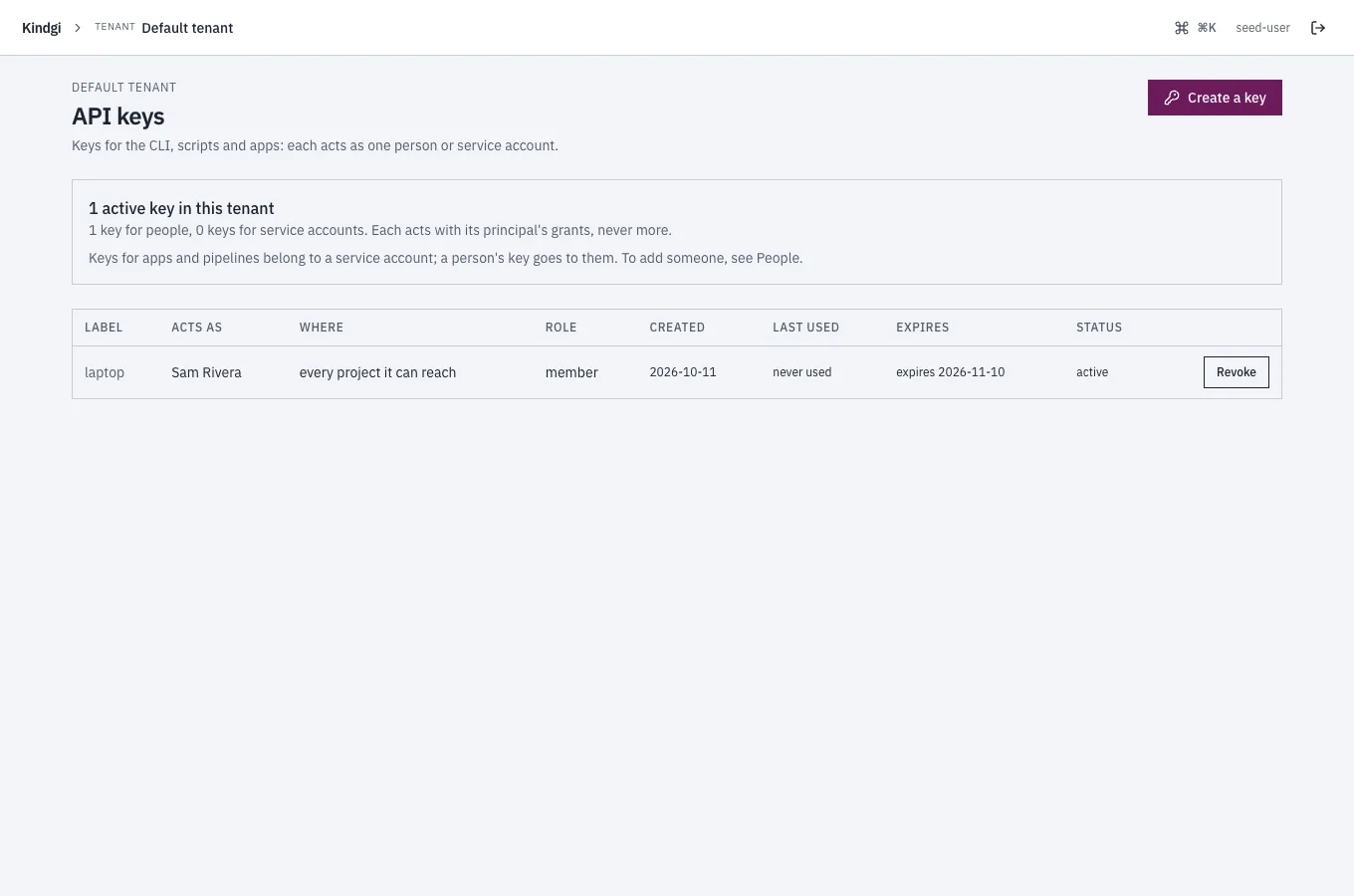
-
Service accounts (tenant admins): create one with its grants, change them, make it a key, unregister it.
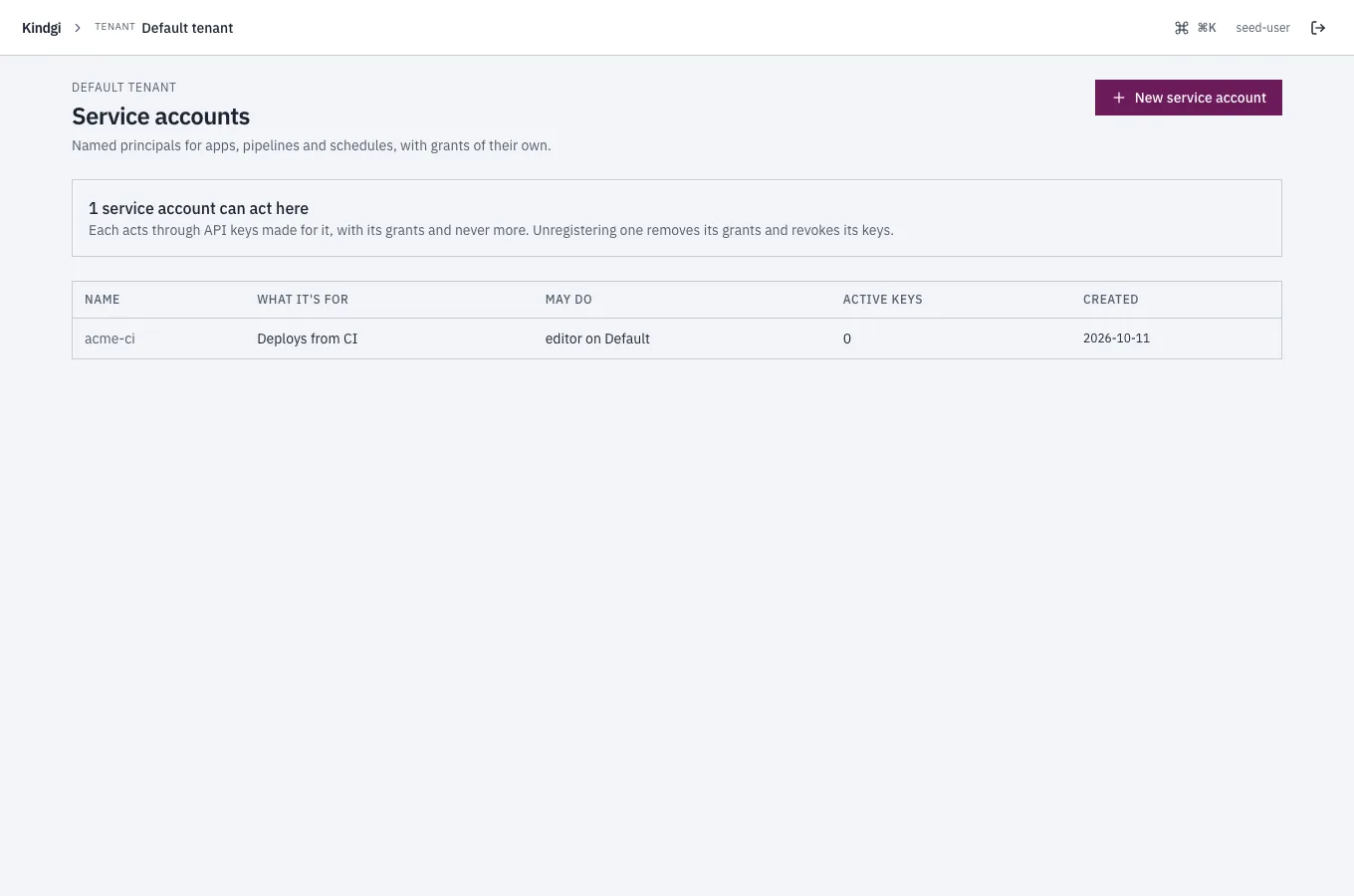
A project you have no role on shows No access, with the projects you can open.
People
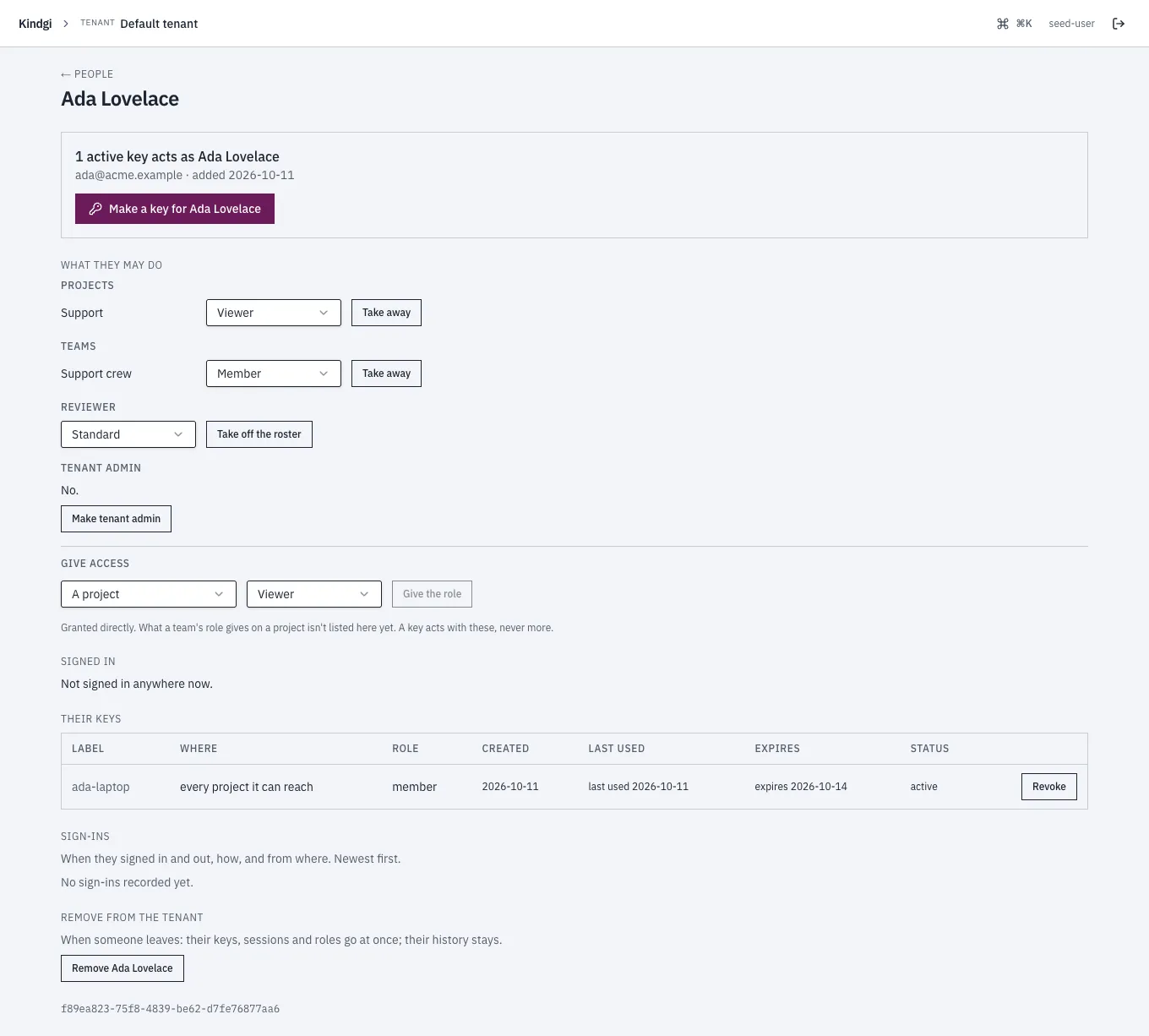
Section titled “People”People, for tenant admins, lists the tenant's people: each one's access in words, such as "reads the tenant's settings, viewer on Support, member of team Support crew, standard reviewer", their active keys, when they were last active, and when they were added. Access is what each was granted directly: what a team's role gives on a project isn't listed there yet. A search box, sorting, People who were removed and Columns narrow and order the list, and the page's address keeps them.
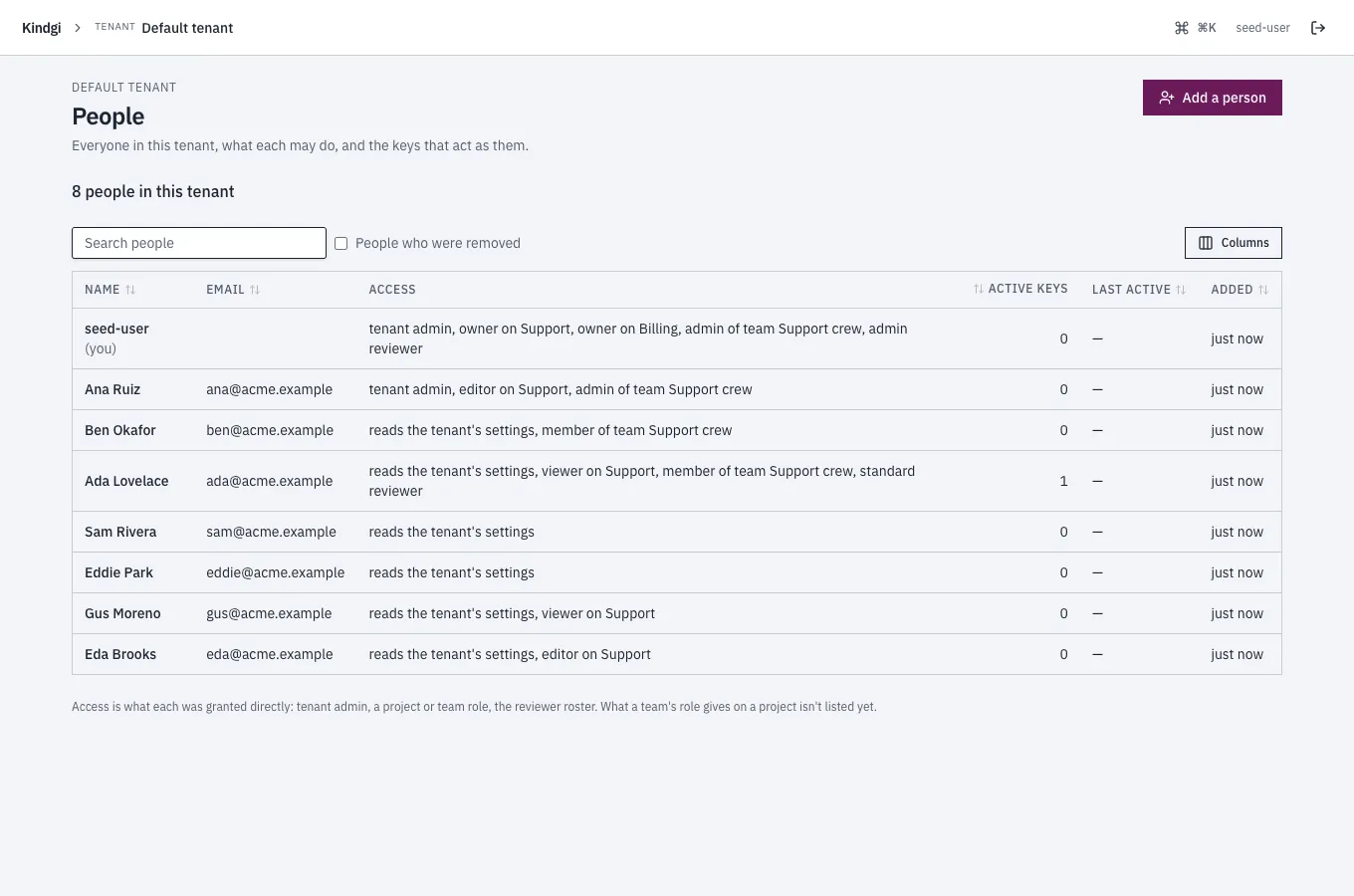
Add a person adds someone with their access in one step ("Give them their access now, in the same step."): a name, an email (optional; "One person per email in this tenant."), project roles, teams, a reviewer tier, and tenant admin.
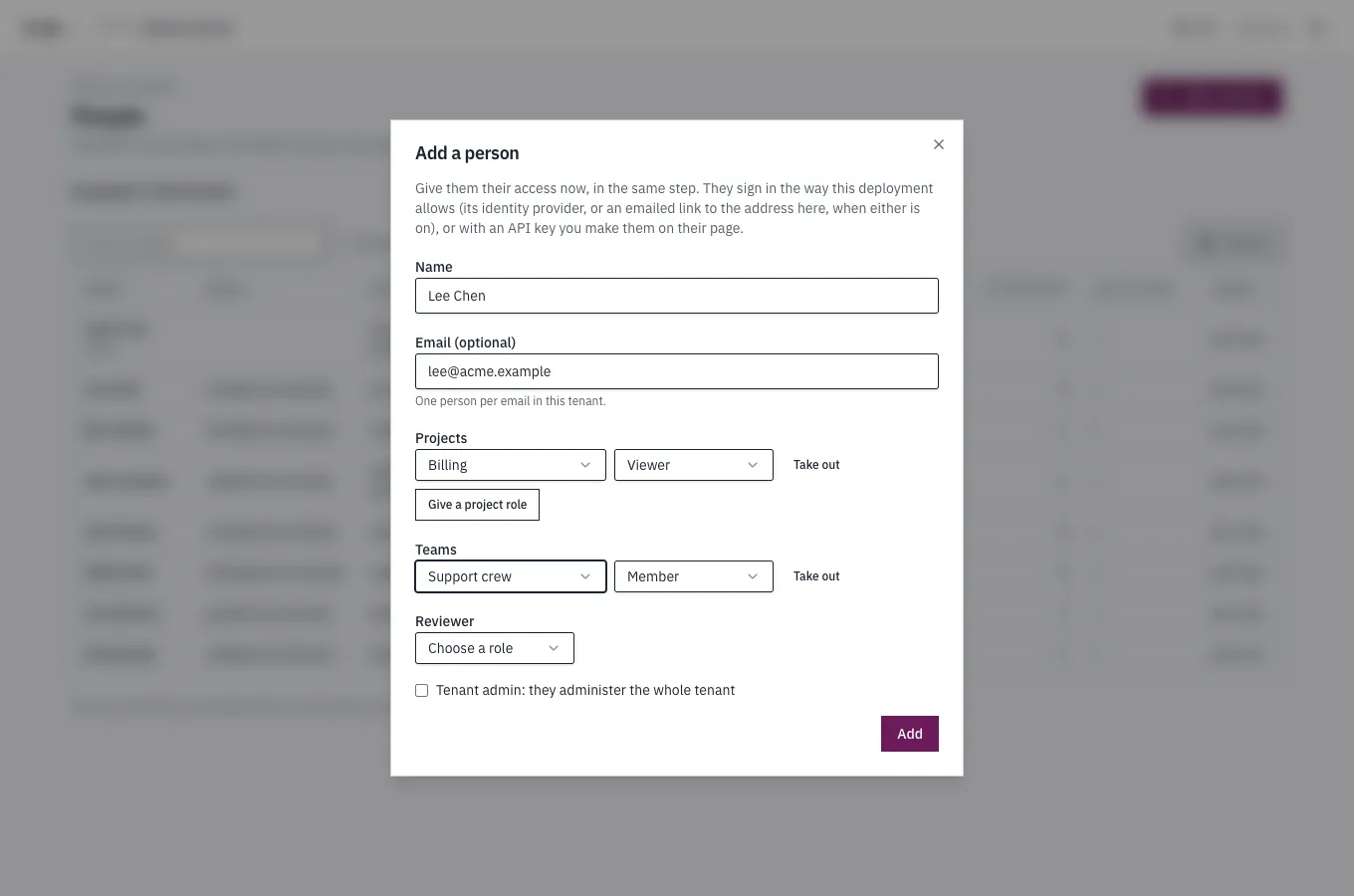
Each part is a step of its own. When they all work, the person's page opens. When one doesn't, the dialog says how each went:
- They weren't added, such as for an email someone has: "Sam Rivera wasn't added.", each step with why ("Someone in this tenant already has that email.") or "not tried: they weren't added", and Change and try again.
- They were added, but not everything was given: the steps that failed say why, with Try again what failed.
- It isn't known whether they were added, because the runtime didn't answer: it says so and offers Look in People, rather than adding them again.
A person's page says what they may do and changes it in place, each part where you may:
- Projects and teams: change a role, Take away one, or Give access to another project or team, with a role. Each project role says what it gives, such as "Also changes it: registers and runs agents, judges, publishes." for an editor.
- Reviewer: their tier, or none; Take off the roster.
- Tenant admin: making or unmaking one. "A tenant always keeps one admin: removing the only one is refused."
Taking something away asks first: "Take Ada Lovelace off Support? From their next request on, they can't work in Support. Their other access, and what they did there, stay." The page also lists their keys, with Make a key for them, where they're signed in, their sign-ins, and Remove from the tenant.
What needs you
Section titled “What needs you”A tenant admin's home in the tenant starts with what needs a look, such as "8 people in 3 projects and 1 team. 3 people have no project of their own; 1 key expires this week.", or "Nothing needs you right now.":
- No project of their own: people who aren't a tenant admin and have no project role given them directly. A project they reach through a team or as an org admin isn't counted yet.
- Keys: those that expire this week, or have gone unused for 90 days, with All keys.
- Recently refused: requests the access audit recorded as denied, with All refused requests. "Someone refused may be missing access they need."
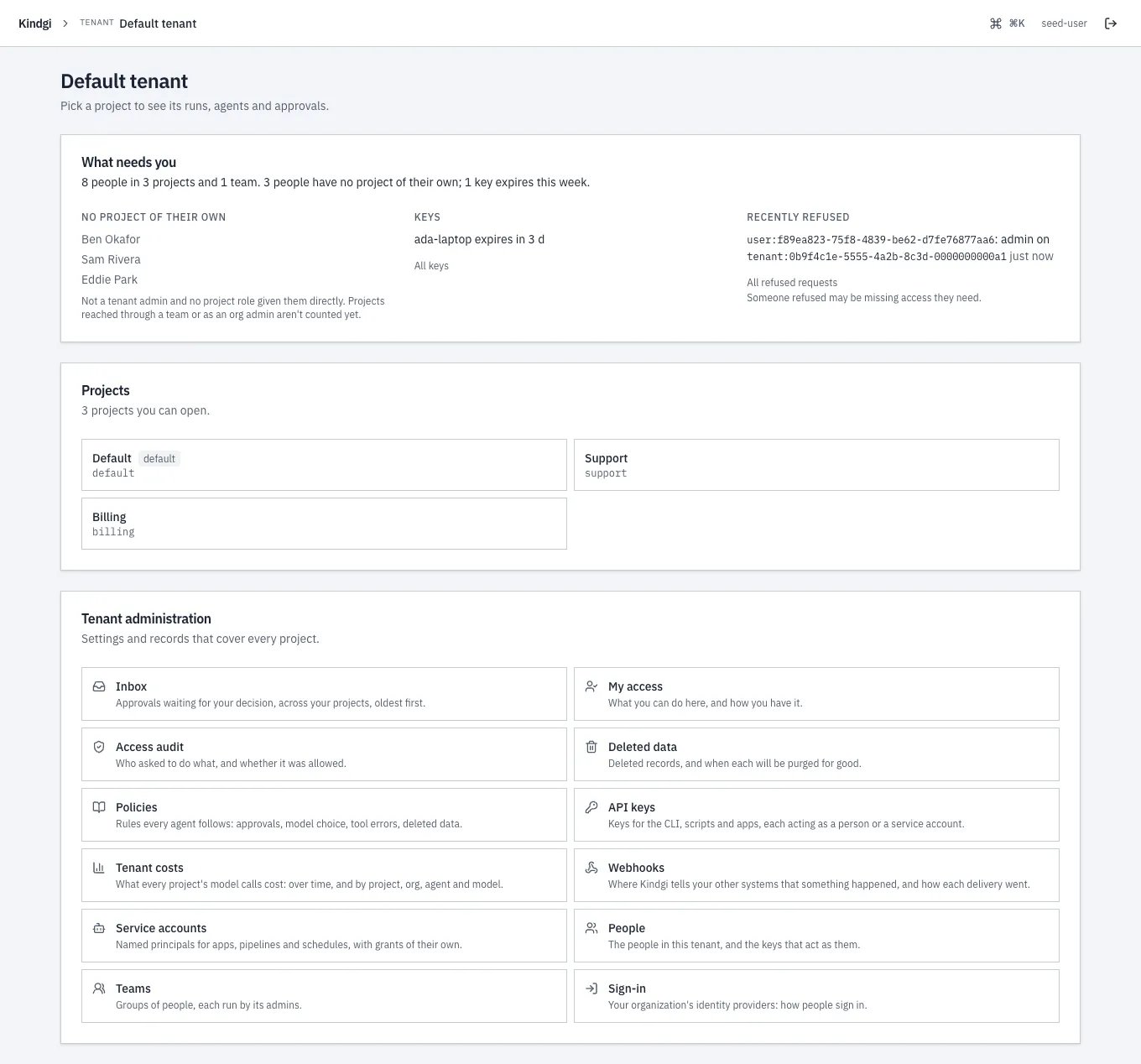
It counts everyone, and never says all is clear before it has read everything: while a read is still coming in, it says so, such as "Still reading everyone's access…", and one that failed is named ("… couldn't be read").
Recorded
Section titled “Recorded”Each change is kept as evidence: person-added, person-granted,
person-ungranted, person-unregistered, api-key-minted,
api-key-revoked, service-account-created, service-account-granted,
service-account-ungranted and service-account-unregistered. A key's
secret is never in one.