Run with authorization
A self-hosted runtime checks one thing on each request by default: the API token. Whoever holds it can do anything in its tenant. Authorization adds a second check, per resource, kept in OpenFGA: who may read, write or administer each project and what's in it.
What it gives today, and what it doesn't
Section titled “What it gives today, and what it doesn't”Authorization is for several people and teams sharing one deployment:
- People and service accounts, each with their own keys. A tenant admin
adds people, who sign in to the console and make their own
API keys, and service accounts for pipelines and apps
(People, API keys and service accounts). The
runtime's seed user (
KINDGI_SEED_USER_ID) is the first tenant admin. - Every request is checked against what its caller may do: tenant admin, tenant member, a role on a project, or a reviewer role. Lists hold only what the caller may read.
- Every decision is recorded, allowed or denied, with who asked, what for and why: the access audit, below.
- Registering an approval reviewer takes a tenant admin.
- A team can have a role on a project through the API (Team grants). The console doesn't offer it yet.
Turn it on when more than one person or system uses a deployment.
Leave it off if one operator is all you need: you'd run OpenFGA for
little else. kindgi dev runs without it.
Run OpenFGA next to the runtime
Section titled “Run OpenFGA next to the runtime”Run OpenFGA v1.22.0. The runtime also works with v1.9.0, but published
OpenFGA security advisories affect that version
(OpenFGA: security advisories).
OpenFGA keeps its data in Postgres:
give it its own database on the runtime's server. These commands continue
Self-host Kindgi (the kindgi network and the kindgi-db
container):
docker exec kindgi-db psql -U kindgi -c 'CREATE DATABASE openfga'
docker run --rm --network kindgi openfga/openfga:v1.22.0 migrate \  --datastore-engine postgres \  --datastore-uri "postgres://kindgi:$DB_PASSWORD@kindgi-db:5432/openfga?sslmode=disable"
docker run -d --name kindgi-openfga --network kindgi --restart unless-stopped \  openfga/openfga:v1.22.0 run \  --datastore-engine postgres \  --datastore-uri "postgres://kindgi:$DB_PASSWORD@kindgi-db:5432/openfga?sslmode=disable"
migration doneKeep OpenFGA on the private network, with no published port: the runtime
calls it without credentials. Back up its openfga database with the
runtime's (Back up Postgres).
An OpenFGA you already run
Section titled “An OpenFGA you already run”To move an OpenFGA from v1.9.0 to v1.22.0, run the new version's migrate
against its database, then restart OpenFGA on the new version:
docker run --rm --network kindgi openfga/openfga:v1.22.0 migrate \ --datastore-engine postgres \ --datastore-uri "postgres://kindgi:$DB_PASSWORD@kindgi-db:5432/openfga?sslmode=disable"docker stop kindgi-openfga && docker rm kindgi-openfgaand start it with the run command above. On Postgres it's one migration,
which builds an index without locking the table. In our upgrade, the model,
every tuple and every permission answer came through unchanged, and v1.9.0
still ran on the migrated database, so going back needs no schema step.
If you set OPENFGA_DATASTORE_MAX_IDLE_CONNS: from v1.11, Postgres's idle
connections are set with OPENFGA_DATASTORE_MIN_IDLE_CONNS instead
(OpenFGA: configuration).
Point the runtime at it
Section titled “Point the runtime at it”Set its address in kindgi.env, and
restart:
KINDGI_OPENFGA_API_URL=http://kindgi-openfga:8080Run runtime 0.1.4.1 or later with authorization on: 0.1.4 can leave permission changes unapplied after a redeploy (Runtime 0.1.4.1).
At its first start with it, the runtime creates an OpenFGA store for the
tenant (tenant-<tenant id>) and makes the seed user its admin. The startup
log says so:
User: 315d1376-7fbf-4310-83ba-11f204831423 (admin@tenant via FGA bootstrap)After an upgrade, a start that brings the store up to the new version's model logs one line for it (From 0.1.3 to 0.1.4).
When OpenFGA is unreachable, requests that need a check answer 500
(FGA Error: connect ECONNREFUSED …); they work again once it's back.
A denied request
Section titled “A denied request”A request the check refuses gets 403, with what was asked, on what, and why
in details:
{"error":{"code":"permission-denied","message":"Permission denied: actor user:3fc3b945-8957-485b-902d-2950ffbe3139 does not have can_admin on tenant:af0be8c3-f8c2-430a-ba2f-06d3edd574ff","details":{"action":"admin","resource":"tenant:af0be8c3-f8c2-430a-ba2f-06d3edd574ff","reason":"actor user:3fc3b945-8957-485b-902d-2950ffbe3139 does not have can_admin on tenant:af0be8c3-f8c2-430a-ba2f-06d3edd574ff"},"requestId":"req-58c6f372-8da1-45bf-ac11-8159c21fa973"}}The TypeScript client gives { code: 'auth', reason: 'forbidden' } with that
message; Python raises AuthError, with server_code permission-denied.
The console, by role
Section titled “The console, by role”The console offers only what your role lets you do. It reads that from
GET /v1/identity/me/permissions
(What you may do); the server still
checks every call.
- A project's viewer reads its pages and takes no action in them. A
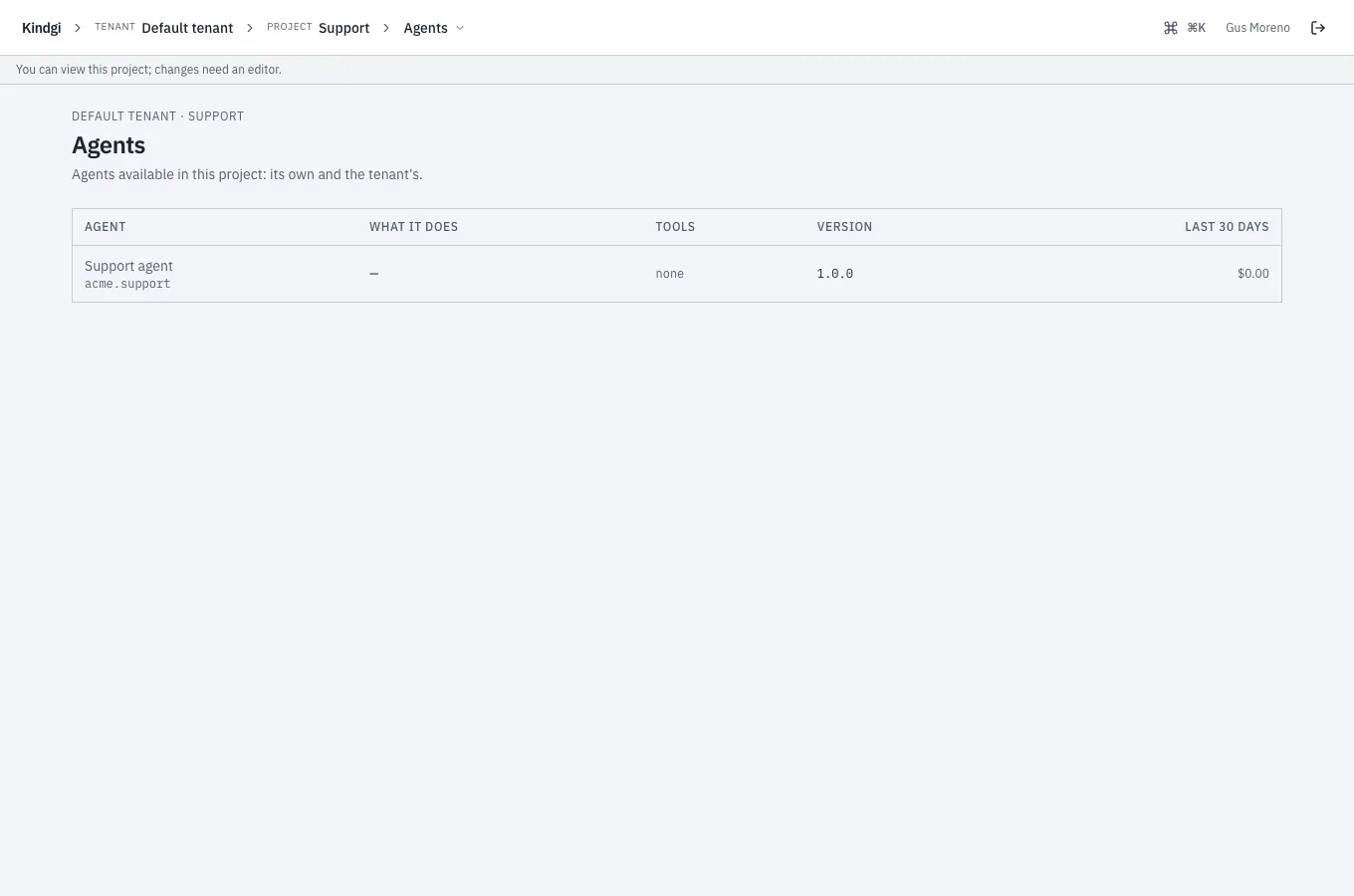
line under the console's header says so on each of the project's pages:
"You can view this project; changes need an editor.", or the tenant's own
line, when a tenant admin set one (
console.readOnlyNotice), such as "Ask Ana Ruiz for edit access." - An editor may also "run agents and flows, work on agent versions, publish data blocks, judge runs, compare versions on test sets", in the console's words. An agent's page offers them Register new version and Start run, which a viewer's doesn't.
- A project admin may also "promote versions, register agents and tools, build test sets, rescore comparisons, set judge classes", and changes who works in the project (Members).
- The tenant's sections show to those they're for: People, Service accounts, Policies, Webhooks, Sign-in, Access audit and the like to tenant admins; the Inbox and Approvals to reviewers; Teams to tenant admins and anyone in a team.
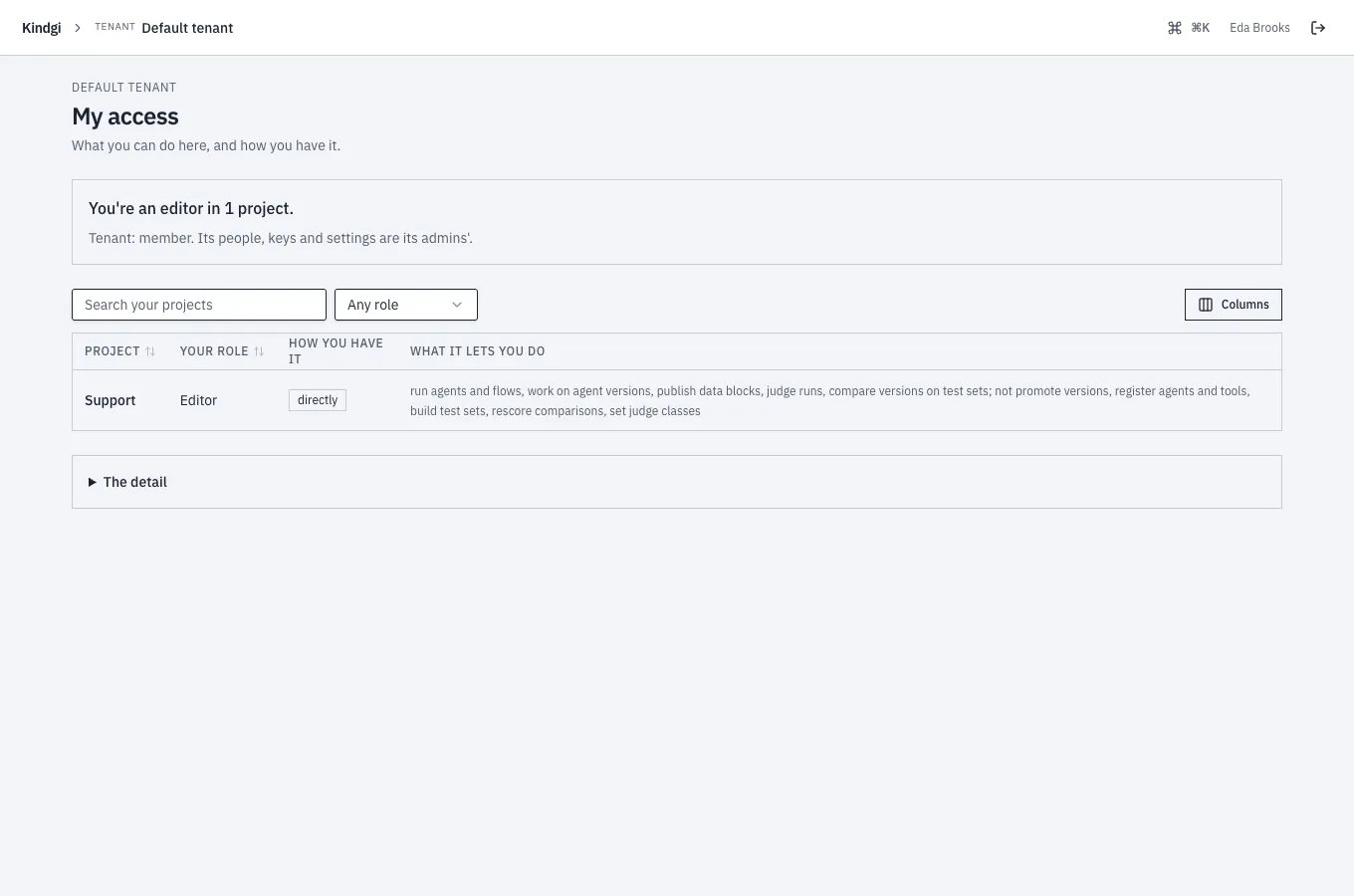
My access, in the tenant's sections, is what you may do and how you have it. It starts with a sentence, such as "You're an editor in 1 project.", then your tenant role ("Tenant: member. Its people, keys and settings are its admins'."), your reviewer role if you have one, and a table of your projects: your role, how you have it (directly, through a team, as an admin of the org, as a tenant admin), and what it lets you do and doesn't. The detail holds your ids and what each role allows on each kind of object.
Project memberships
Section titled “Project memberships”A project's members have a role: owner, admin, editor or viewer. Each
includes the next ones: an owner is also an admin, an editor and a viewer.
A role given as member before it was retired still reads back as member
and grants what viewer does; giving it now is a 400 that says to use
viewer. (An API key's member role is unchanged: see
People, API keys and service accounts.)
Adding, changing or removing a membership changes OpenFGA too:
curl -X POST "$KINDGI_API_URL/v1/projects/<project-id>/memberships" \ -H "Authorization: Bearer $KINDGI_API_TOKEN" -H 'content-type: application/json' \ -d '{"userId":"<user-id>","role":"editor"}'Give the person by email instead of userId if you like: it matches one
of the tenant's people, whatever its case
(Add a person).
PATCH …/memberships/<user-id> with {"role":"viewer"} changes the role, and
DELETE …/memberships/<user-id> removes the member. In the clients:
projects.memberships.add, updateRole and remove (update_role in
Python). Changing members takes admin on the project: a tenant admin, or
the project's own admins.
Adding someone who's a member already keeps their role. The same role answers
201 with the existing membership; another one is 409 membership-exists,
with the role they hold in details.role. Use PATCH to change it.
Listing a project's members takes write on it: its editors and admins. A
viewer sees the project, not who else works in it, and reads their own roles
through their grants
(GET /v1/identity/users/<user-id>/grants).
In the console, a project's admins do this on its Members page: see In the console: Members.
A team is a group of the tenant's people, each in it as a member or an
admin. A tenant admin makes one (POST /v1/teams, with a name, a
slug and an optional description), and holds its admin role. Its
admins, and tenant admins, add and take out its people
(…/teams/<team-id>/memberships), change their roles, and rename it
(PATCH /v1/teams/<team-id>). A team's role on a project reaches everyone
in it: see Team grants.
In the console: Teams
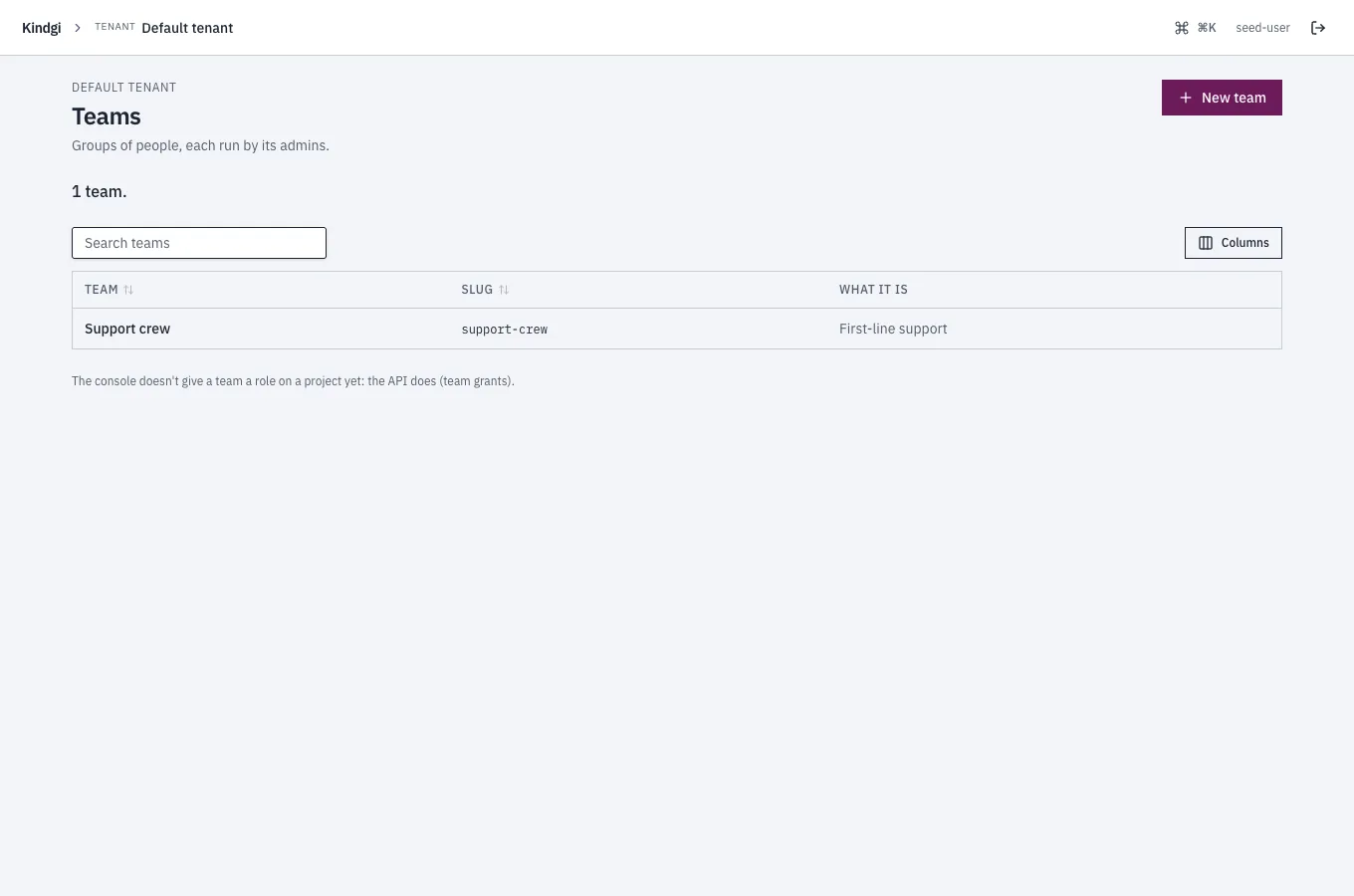
Section titled “In the console: Teams”Teams, in the tenant's sections, shows to tenant admins and anyone in a team, with the teams each may see. A tenant admin makes one with New team ("A group of people, run by its admins: they decide who is in it. You add the first people on its page."): its name, a slug ("Lowercase letters, digits and hyphens; unique in the tenant.") and what it is.
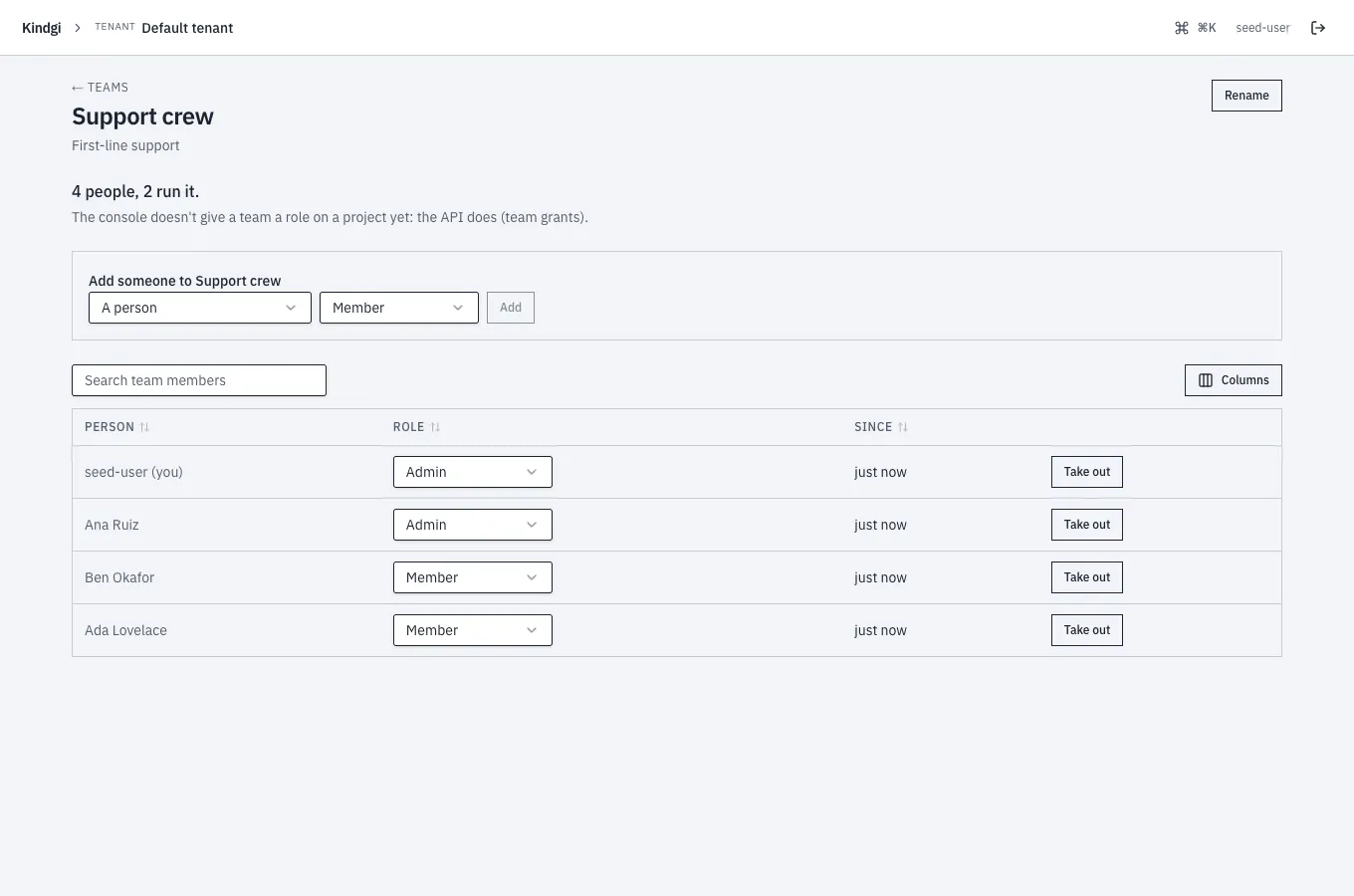
A team's page, for its admins and tenant admins, says how many are in it and how many run it, such as "4 people, 2 run it.", and lists them with their role and since when. There they rename it (the slug stays), change someone's role, take someone out (it asks first), and add someone from the tenant's people. Finding a person reads the tenant's people, so adding someone takes a tenant admin.
Anyone else in the team sees it, but not who else is in it: "You're in it. Who is in Support crew is shown to its admins."
The console doesn't delete a team, or give one a role on a project: both are the API's. Both Teams pages say so: "The console doesn't give a team a role on a project yet: the API does (team grants)."
Team grants
Section titled “Team grants”A team can have a role on a project: viewer, editor or admin. Every
member of the team then holds that role there, the team's admins included. A
team never owns a project; owner is a person's role.
curl -X POST "$KINDGI_API_URL/v1/projects/<project-id>/team-grants" \ -H "Authorization: Bearer $KINDGI_API_TOKEN" -H 'content-type: application/json' \ -d '{"teamId":"<team-id>","role":"editor"}'Giving a team a role takes admin on the project and read on the team:
you give your project only to a team you can see. Giving a team admin
hands "who works here" to the team's admins, since anyone they add to the
team gets it. Adding a role the team already holds answers 201 with the
existing grant; another role is 409 team-grant-exists. PATCH …/team-grants/<team-id> with
{"role":"viewer"} changes it, and DELETE …/team-grants/<team-id> takes it
away.
In the clients: projects.teamGrants.list, add, updateRole and remove
(projects.team_grants in Python), and teams.projectGrants.list
(teams.project_grants.list) for the projects a team works in.
Who sees the grants:
- A project's team grants (
GET …/team-grants): its editors and admins (write). - A team's project grants (
GET /v1/teams/<team-id>/project-grants) and its members (GET /v1/teams/<team-id>/memberships): the team's admins and tenant admins. A plain member sees the team, not who else is in it.
Deleting a team removes the access it gave: its members' roles and its project grants. Nobody keeps access through a team that's gone.
Who has access to a project
Section titled “Who has access to a project”GET /v1/projects/<project-id>/access lists everyone OpenFGA lets into the
project, people and service accounts, with their role and every way in. Here
the project's creator, Ana Ruiz (a tenant admin who's also a direct editor),
and Ben Okafor (in the team Support crew, an editor of the project):
{ "data": [ { "principal": { "kind": "user", "id": "7e8e9ff9-…" }, "displayName": "seed-user", "role": "owner", "via": [ { "kind": "direct", "role": "owner", "joinedAt": "2026-10-10T06:52:18.102Z" }, { "kind": "tenant-admin" }, { "kind": "team", "teamId": "8a88aabe-…", "teamName": "Support crew", "role": "editor" } ] }, { "principal": { "kind": "user", "id": "54293391-…" }, "displayName": "Ana Ruiz", "primaryEmail": "ana@acme.example", "role": "admin", "via": [ { "kind": "tenant-admin" }, { "kind": "direct", "role": "editor", "joinedAt": "2026-10-10T06:52:18.297Z" }, { "kind": "team", "teamId": "8a88aabe-…", "teamName": "Support crew", "role": "editor" } ] }, { "principal": { "kind": "user", "id": "06a1dcc9-…" }, "displayName": "Ben Okafor", "primaryEmail": "ben@acme.example", "role": "editor", "via": [ { "kind": "team", "teamId": "8a88aabe-…", "teamName": "Support crew", "role": "editor" } ] } ], "hasMore": false}roleis the highest any way in gives. An admin of the project's org (org-admin) and a tenant admin (tenant-admin) are admins of the project.- A tenant admin is an admin of every team too, so they're also listed through a team's grant, as Ana and the creator are here.
- A direct role with
joinedAtis a membership: change or remove it with…/memberships/<user-id>. One withoutjoinedAthas no membership behind it, such as the creator of a project made before 0.1.6. - A team's role is changed on its grant (
…/team-grants/<team-id>).
Reading it takes write on the project (its editors and admins); emails show
to its admins only. It's ordered by role, owner first, then by name, and pages
like other lists. In the clients: projects.access.list (the same in Python).
A runtime without OpenFGA answers 501 project-access-unsupported.
In the console: Members
Section titled “In the console: Members”A project's Members page shows its editors and admins everyone with access, and how. It starts with a count, each one counted once by the way their role comes from, such as "6 people and 1 service account have access to Support: 4 through a role of their own, 2 through a team, 1 as a tenant admin." Then each one, with their role and every way in: "Their own role (editor)", "Team Support crew (editor)", "Admin of Acme", "Tenant admin". A way the console can't name reads "Another way in". Emails show to the project's admins.
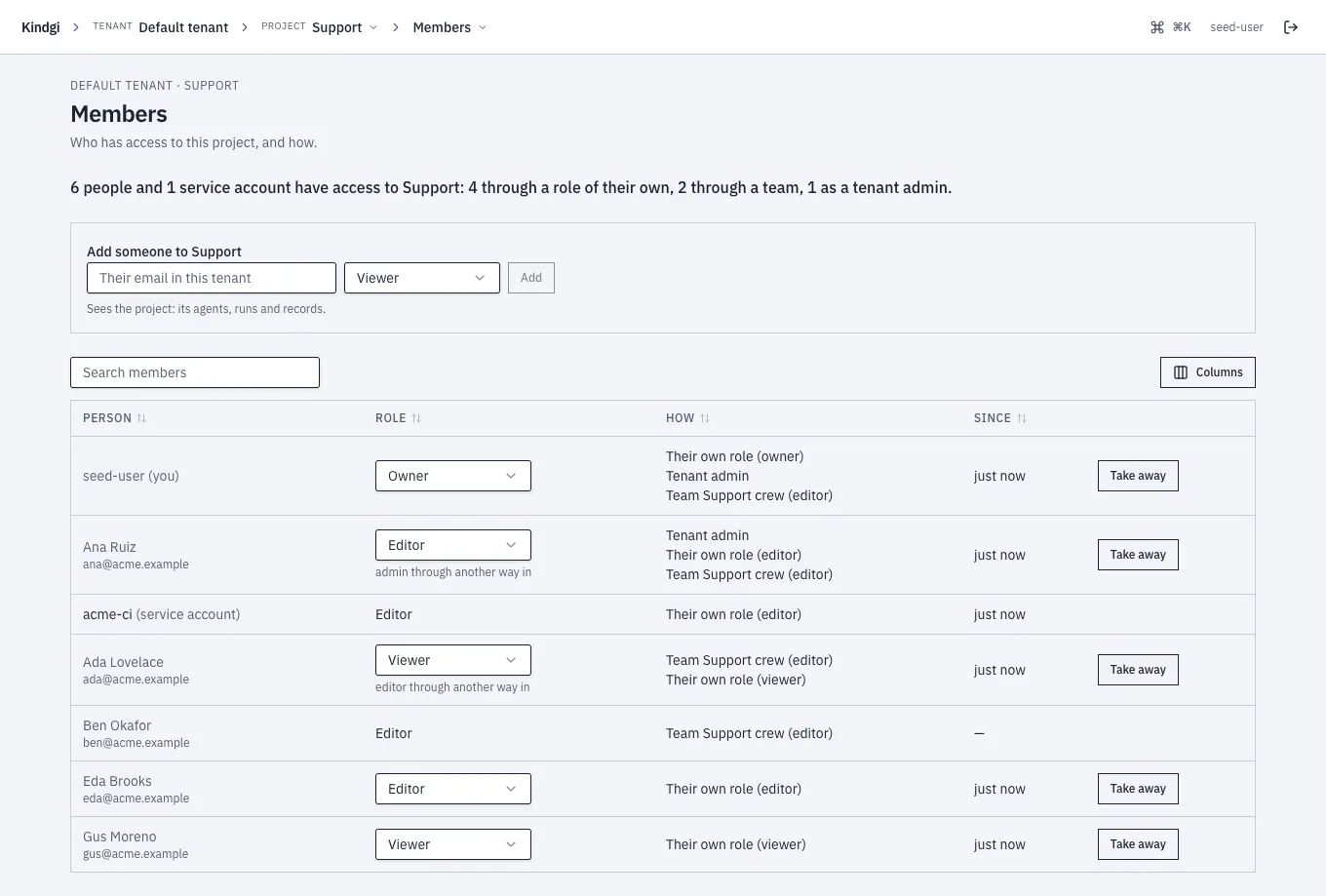
A project admin changes who works there:
- Add someone by their email in the tenant, with one of the four roles. An email that isn't one of the tenant's people isn't added: "No one with that email in this tenant: a tenant admin adds them on People first."
- Change a person's role of their own. When another way in gives them more, it says so under it, such as "editor through another way in". A role through a team, an org or tenant admin is changed where it comes from, and a service account's on its own page.
- Take away a person's role of their own. It asks first, and says what stays:
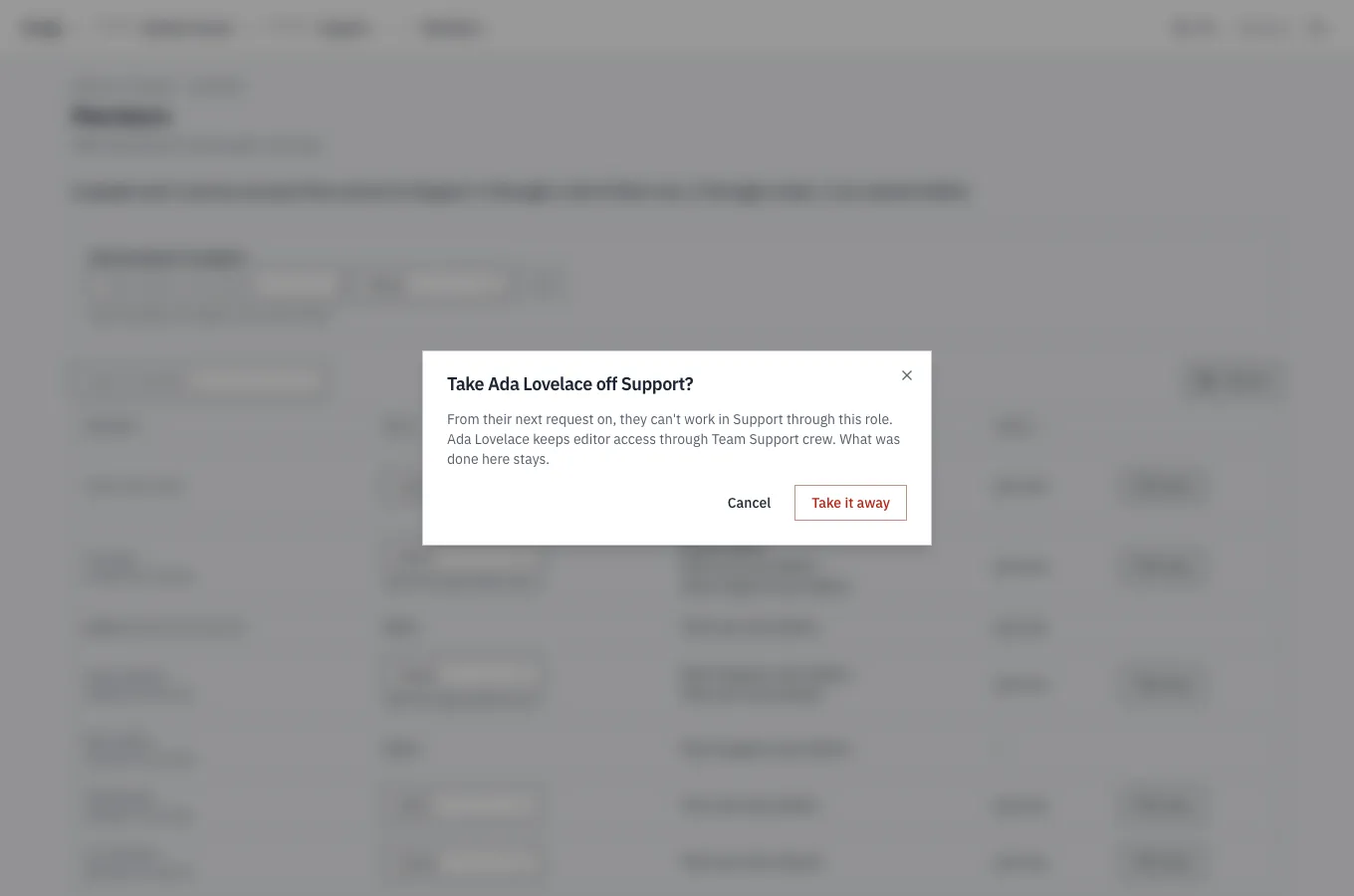
An editor reads the same list, with "Only an admin of Support changes who works here." A viewer doesn't see the section; at its address they read "Who works in Support is shown to its editors and admins.", and nothing more.
The access audit
Section titled “The access audit”Each decision the authorization model makes, allowed or denied, is kept, and
so is a refusal the API answers from its own checks: GET /v1/audit/authz
lists them, oldest first, for a tenant admin; order=desc lists the newest
first, and its cursor goes on in that order (order: 'desc' in TypeScript,
order="desc" in Python). They're kept for good, unless the runtime purges
audit events: with KINDGI_COMPLIANCE_CLASSIFIER=shipped, allowed ones after
90 days and denied ones after 365 (see
Audit events).
{ "timestamp": "2026-10-06T13:25:01.475Z", "actorSubject": "user:315d1376-7fbf-4310-83ba-11f204831423", "action": "admin", "resource": "project:2358e0ee-b8ba-42fb-9704-781f14b2351f", "outcome": "allowed", "reason": "actor user:315d1376-7fbf-4310-83ba-11f204831423 has can_admin on project:2358e0ee-b8ba-42fb-9704-781f14b2351f", …}actorSubject, action, resource, outcome (allowed or denied), from, to and runId narrow the list.
Refusals the API decides before it asks the authorization model are kept too,
with a reason that says which check refused (runtime 0.1.6 or later):
- what the caller's API key rules out: a
memberkey asking for a tenant admin's action, a key limited to a project acting on another project's resource, a key without the capability a write needs (env:write,secrets:write, …); - a request that names a project other than its key's, and a key limited to
a project minting one that isn't (
key-project-mismatch); - minting a key with capabilities you don't hold;
- a caller who isn't a reviewer, on the approvals routes, or who may not
judge as a restricted judge class (
judge-class-not-allowed); - the operator's identity-provider lock (
identity-providers-operator-managed); - console token sign-in's refusals (
token-sign-in-not-allowed,token-sign-in-off); - a stdio MCP endpoint where the deployment runs no commands
(
host-access-denied).
Never kept, since they don't refuse the caller: signer-not-trusted,
csrf-origin-mismatch and role-exceeds-principal (a limit on the key being
minted). Nor is a refusal of a request with no principal behind it: a public
run token used outside its two progress routes, or judging without a user or a
service token. A 401 (an unknown caller) never is.
In the console
Section titled “In the console”Access audit, for tenant admins (the only people its API answers), lists
the same decisions, 50 at a time, newest first:
Next page leads to the older ones. A denied one has a ✗ and a red row. Narrow
the list by who, on what, action, result (allowed or denied), and time with
From and To, which are in UTC like the times in the list. The filters are in
the page's address, so you can copy it to share what you see. Clicking a row
shows the decision: allowed or denied, the part that failed (such as
actor), how long the check took, the reason, the request's correlation id,
and the check it asked OpenFGA (the evidence).