Turn on sign-in
People sign in to the console with their email first. The sign-in page then offers the ways in this deployment has: the workspace's own identity provider, Continue with Google / Microsoft / GitHub, or a link sent by email. This page is for whoever runs the runtime. What a person sees is in Sign in to the console, and connecting a workspace's own identity provider is in Set up SSO.
Whatever way someone signs in, the runtime lets in only people already added to a workspace, by an email their provider has proved. Nobody is created by signing in, and roles stay Kindgi's.
Turn it on
Section titled “Turn it on”Sign-in needs a secret of its own, the address people reach the runtime at, and a secrets store:
openssl rand 32 > auth-secret && chmod 600 auth-secret# kindgi.envKINDGI_AUTH_SECRET_PATH=/run/secrets/auth-secretKINDGI_PUBLIC_URL=https://kindgi.acme.comKINDGI_AUTH_SECRET takes the same 32 bytes, base64-encoded, where a file
can't be mounted. KINDGI_PUBLIC_URL is where identity providers send people
back, so it's the address in every redirect URI below. The start log says
it's on, with /auth under that address:
[sso] sign-in with identity providers is on: <KINDGI_PUBLIC_URL>/auth.
Without the public URL, the runtime doesn't start:
Sign-in with identity providers (KINDGI_AUTH_SECRET_PATH) needs KINDGI_PUBLIC_URL: the URL people reach the runtime at, where identity providers send them back.Without the secret, sign-in is off, and the settings below are refused, naming the one to set first.
Signing in with an API token
Section titled “Signing in with an API token”Pasting an API token into the console's sign-in page is off by default,
except under kindgi dev. To keep it, set:
KINDGI_CONSOLE_TOKEN_SIGN_IN=onThe token signs in once and becomes a session: the browser never keeps the
token. Only a person's own full key signs in; a service account's key, or one
narrowed to a role or a project, is refused (token-sign-in-not-allowed).
That refusal, and token-sign-in-off while it's off, is also in the access
audit (GET /v1/audit/authz).
API tokens work for the API, the CLI and the SDKs whatever this setting says.
The startup output says which ways in the console has. With only the token:
Console sign-in: an API token (KINDGI_CONSOLE_TOKEN_SIGN_IN)With neither, it warns, and so does kindgi doctor:
⚠ Console sign-in: nobody can sign in to the console. KINDGI_CONSOLE_TOKEN_SIGN_IN=on allows an API token; KINDGI_AUTH_SECRET_PATH turns on sign-in with identity providers.Which domains find a workspace's identity provider
Section titled “Which domains find a workspace's identity provider”A workspace's own identity provider is offered to an email only when the email's domain is verified for that workspace. Otherwise a workspace could claim another company's domain and catch its people.
-
A runtime that serves one workspace routes that workspace's domains with nothing to set.
-
A runtime that serves several routes a domain only once you list it:
Terminal window KINDGI_AUTH_VERIFIED_DOMAINS=acme.com:acme,acme.co.uk:acmeEach entry is a domain and the workspace it belongs to (its id, or its slug). The runtime checks the list when it starts: an entry it can't read, a domain listed twice, or a workspace it doesn't serve stops it, naming the entry.
The startup output lists what routes:
Sign-in domains: the tenant's own, and acme-live.example (KINDGI_AUTH_VERIFIED_DOMAINS)A domain that isn't verified can still sign in through its provider's own
link: kindgi sso providers test prints it.
Who manages a workspace's identity providers
Section titled “Who manages a workspace's identity providers”By default, each workspace's admins add, change and remove its own identity
providers, from the console's Sign-in page or kindgi sso providers
(Set up SSO). The startup output says so:
Identity providers: each tenant's admins set up their own (KINDGI_AUTH_TENANT_PROVIDERS=off keeps that to this deployment's own token)To manage sign-in yourself, for every workspace (from your deployment's own scripts, say), turn that off:
# kindgi.envKINDGI_AUTH_TENANT_PROVIDERS=off Identity providers: the operator's (KINDGI_AUTH_TENANT_PROVIDERS=off): only this deployment's own token adds, changes or removes them; the ones there keep signing people in-
Only the deployment's own token (
KINDGI_API_TOKEN) can then add, change or remove a provider. A workspace admin's change is refused with403 identity-providers-operator-managed:This deployment's operator manages sign-in (KINDGI_AUTH_TENANT_PROVIDERS=off): identity providers can't be added, changed or removed here, except with the deployment's own token (KINDGI_API_TOKEN). -
The providers already there keep signing people in, and anyone may still read them: the list says
changes: operator. -
The console's Sign-in page says who manages it, and lists the providers with Try only:
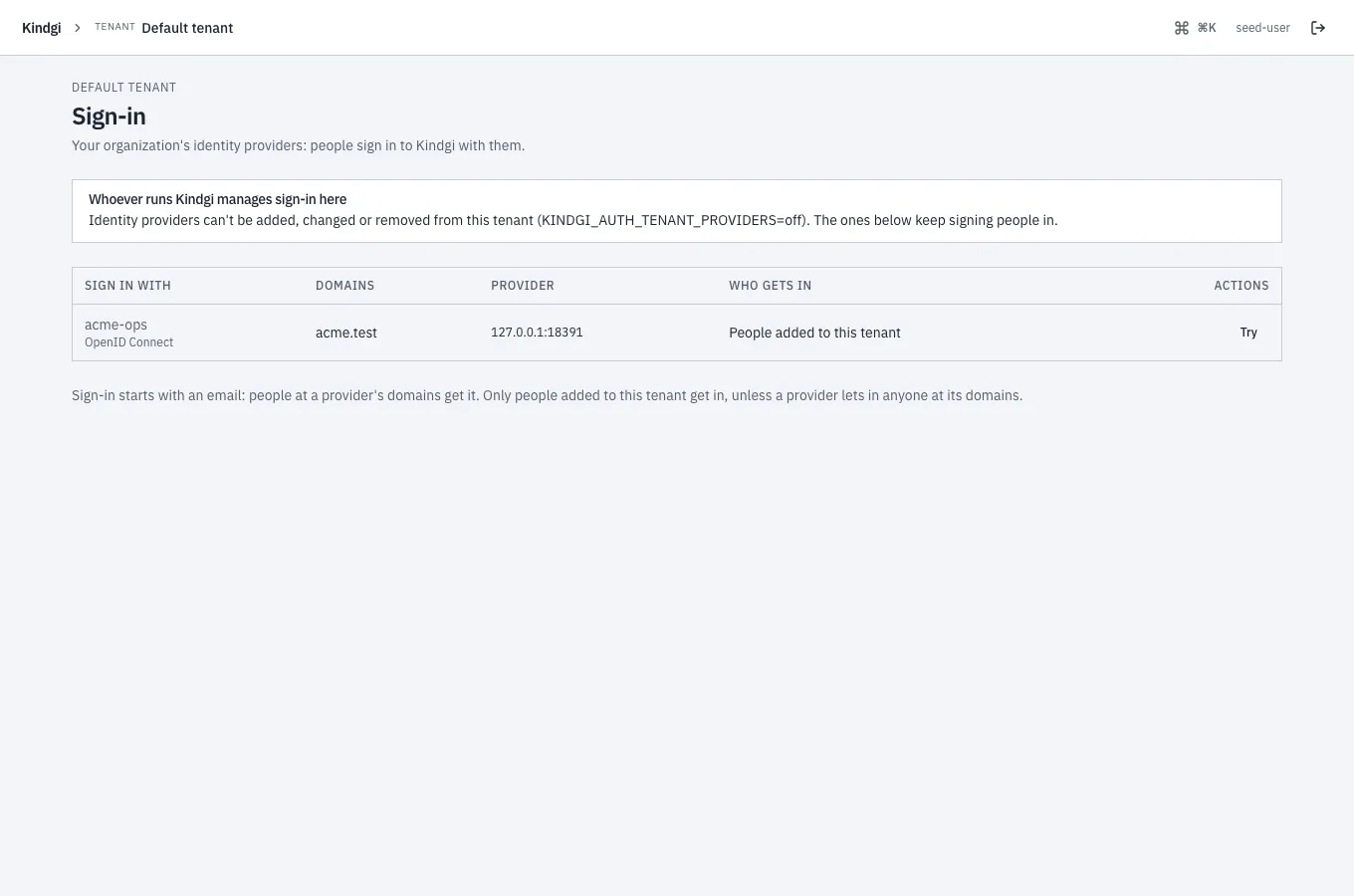
on is the default. Like the other settings here, it needs sign-in on.
Continue with Google, Microsoft or GitHub
Section titled “Continue with Google, Microsoft or GitHub”The deployment's own apps let people sign in with their Google, Microsoft or GitHub account. Each needs an app you register with that provider, with this redirect URI:
<KINDGI_PUBLIC_URL>/auth/kindgi/social/callback/<google | microsoft | github>The runtime logs the exact URI for each one it turns on, when it starts.
Store each app's secret as a file (mode 0600) and give the runtime its
path:
KINDGI_AUTH_GOOGLE_CLIENT_ID=…KINDGI_AUTH_GOOGLE_CLIENT_SECRET_PATH=/run/secrets/google-client-secretThe same pair exists for MICROSOFT and GITHUB. A …_CLIENT_SECRET
variable takes the value itself, where a file can't be mounted. The startup
output names the apps it has:
Continue with: Google, Microsoft, GitHub (the deployment's own apps)In the Google Cloud console, under APIs & Services → Credentials, create an OAuth client of type Web application. Under Authorized redirect URIs, Add URI with the URI above, then Save (it can take a few minutes to apply). Who may sign in with it is set on its consent screen (Google: Manage App Audience).
Microsoft
Section titled “Microsoft”In the Microsoft Entra admin center, Applications → App registrations → New registration:
- Supported account types: accounts in any organizational directory
(and personal Microsoft accounts, if you want them). Not "this
organizational directory only": these sign-ins go through Microsoft's
commonendpoint, which a single-directory app can't use. - Redirect URI: platform Web, the URI above.
- Overview → Application (client) ID is the client id.
- Token configuration → Add optional claim, token type ID:
emailandxms_edov.xms_edovsays the email's domain is verified by the person's own directory. Without it, every Microsoft sign-in is refused. - Certificates & secrets → New client secret: copy the Value column, not "Secret ID". It's shown once.
(This is for Continue with Microsoft. A workspace that uses Microsoft Entra ID as its own identity provider sets up a different, single-directory app: Microsoft Entra ID.)
GitHub
Section titled “GitHub”Settings → Developer settings → OAuth Apps → New OAuth App, with the public URL as its homepage and the URI above as its callback. GitHub sign-ins use the account's primary email, which must be verified.
Who gets in
Section titled “Who gets in”The buttons a person sees depend only on their email's domain, and grant nothing. Access is decided after the provider signs them in:
- The provider proves the email: Google's verified email, with its ID
token checked; a verified GitHub email; Microsoft's
xms_edov. - Google and Microsoft speak for a work email only through the company's
own accounts. Google: Gmail, or a Google Workspace account of that
domain. Microsoft: a work account, or a personal account only on
outlook.com, hotmail.com, live.com or msn.com. A personal account made on
a work address is refused (
email-not-managed). - A workspace with its own identity provider signs its people in with
it. On a domain verified to such a workspace, sign-in offers and accepts
only that provider and the Google or Microsoft accounts the domain
manages: GitHub and the emailed link are refused
(
identity-provider-required, audited). Guests on personal domains, such as gmail.com, keep every way in. - That email belongs to someone already added to a workspace this
runtime serves, and not removed. Several workspaces: they choose one.
None: refused (
not-invited). - The first sign-in links the provider account to the person. A
different account with the same email is refused afterwards
(
account-mismatch), so an address that later moves to someone else can't take the person over.
No provider token is kept, and the session is stored by its hash.
When a sign-in doesn't complete
Section titled “When a sign-in doesn't complete”The person sees "Sign-in didn't complete" (or, when the email can't be proved, the message for that). The runtime's log says why, and at which step, without logging a token or a code:
[sso] "Continue with Microsoft" didn't complete, <step>: <reason>The steps are "at the provider", "exchanging the code", "checking the ID token", "reading the account" and "proving the email". For Microsoft, the reason names the optional claim to add.
Sign-in links by email
Section titled “Sign-in links by email”A person can ask for a link instead. It works once, for ten minutes, and signs them in to the console. The runtime sends it through any SMTP service:
KINDGI_AUTH_EMAIL_SMTP_URL_PATH=/run/secrets/smtp-url # smtps://<user>:<password>@<host>:465KINDGI_AUTH_EMAIL_FROM=Kindgi <sign-in@acme.com>The From address must be on a domain your SMTP service has authenticated (SPF and DKIM), or the mail lands in spam. Use a key that may only send mail.
From a runtime at http://localhost:18096, the email read:
From: Kindgi <sign-in@acme-live.example>Subject: Your sign-in link for Kindgi
Sign in to Kindgi with this link:
http://localhost:18096/console/login?sign-in-link=…
It works once and expires in 10 minutes.If you didn't ask to sign in, ignore this email: nobody can sign in without the link.
The page always answers the same, for any email, so it can't be used to
find out who has an account. An address gets at most one link a minute and
three per 15 minutes, with a backstop of 20 a day per address and client
network (KINDGI_AUTH_EMAIL_LINK_DAILY_CAP). The browser that already got a
link for an address isn't held by the 15 minutes, so someone else's
requests can't keep that person out. Each client may ask 3 times a minute.
Past 200 links in an hour across the whole deployment, the runtime logs a warning, at most one every 10 minutes. Links still go out; it's an alert, not a limit:
[sso] emailed link: more than 200 links this hour across the deployment: check the sign-in-link-sent audit events for abuse, and turn on Turnstile if it's offA link opened in the browser asks the person to continue before it signs them in, so a mail scanner that opens it doesn't use it up.
A captcha in front: Cloudflare Turnstile. Add a widget (mode Managed) whose hostname is the console's, and give the runtime its keys:
KINDGI_AUTH_TURNSTILE_SITE_KEY=…KINDGI_AUTH_TURNSTILE_SECRET_PATH=/run/secrets/turnstile-secretA runtime that serves several workspaces doesn't start without it; with one workspace it's optional. The startup output says how links go out:
Emailed sign-in link: on, from Kindgi <sign-in@acme-live.example> (Turnstile; 3 per 15 minutes and at most 20 a day per address)With one of Cloudflare's test secrets, every request passes, and the start log says so:
[sso] Turnstile uses one of Cloudflare's test secrets: every request passes. Use your widget's own secret outside a test.Without Turnstile, on a console others can reach (a KINDGI_PUBLIC_URL that
isn't on this machine), the startup output recommends it:
Emailed sign-in link: on, from Kindgi <sign-in@acme-live.example> (no captcha: KINDGI_AUTH_TURNSTILE_SECRET adds one; 3 per 15 minutes and at most 20 a day per address) ⚠ Emailed sign-in link without a captcha on a console others can reach: Turnstile is recommended (KINDGI_AUTH_TURNSTILE_SECRET, KINDGI_AUTH_TURNSTILE_SITE_KEY).Behind a load balancer
Section titled “Behind a load balancer”Sign-in's rate limits and records use the client's address. Behind a load
balancer or an ingress, set KINDGI_TRUSTED_PROXIES, or every client counts
as the proxy: see
Behind a load balancer or ingress.
Sessions
Section titled “Sessions”A session lasts 12 hours (KINDGI_SESSION_TTL_MS) and ends after an hour
without use (KINDGI_SESSION_IDLE_TIMEOUT_MS).
Sessions has the rest.