Start a run
From the CLI
Section titled “From the CLI”pnpm exec kindgi runs start --flow=acme.review-order --input='{"orderId":"A-200"}'pnpm exec kindgi runs start --flow=acme.review-order --input=@order.jsonuv run kindgi runs start --flow=acme.review-order --input='{"orderId":"A-200"}'uv run kindgi runs start --flow=acme.review-order --input=@order.json./kindgiw runs start --flow=acme.review-order --input='{"orderId":"A-200"}'./kindgiw runs start --flow=acme.review-order --input=@order.json./kindgiw runs start --flow=acme.review-order --input='{"orderId":"A-200"}'./kindgiw runs start --flow=acme.review-order --input=@order.json--input is the run's input as JSON, or @ and a file to read it from. The
command waits for the run to finish, however long it takes, and prints it.
Ctrl+C stops the waiting, not the run:
Stopped waiting. Run f91ff793-b029-48e8-9ce4-f9fa70bd0c40 goes on: kindgi runs get f91ff793-b029-48e8-9ce4-f9fa70bd0c40With --no-wait, it prints the run as soon as it exists:
pnpm exec kindgi runs start --flow=acme.reserve-order --input='{"orderId":"A-300"}' --no-waituv run kindgi runs start --flow=acme.reserve-order --input='{"orderId":"A-300"}' --no-wait./kindgiw runs start --flow=acme.reserve-order --input='{"orderId":"A-300"}' --no-wait./kindgiw runs start --flow=acme.reserve-order --input='{"orderId":"A-300"}' --no-wait{ "id": "1b1f6486-3faf-4ab7-8506-c09f50f989bc", … "flowId": "acme.reserve-order", "flowVersion": "0.1.0", "status": "pending", "dryRun": false, …}kindgi runs get <run-id> shows it again, with its output once it's done.
--agent-version=<version> (or --flow-version) runs that version instead of
the latest, and --project=<project-id> runs in that project instead of the
agent's or flow's own, which is Default for what kindgi deploy registers
(kindgi projects list lists the projects with their ids). With
authorization on, naming a project needs write on it:
pnpm exec kindgi runs start --agent=acme.order-desk --agent-version=0.1.0 --project=<project-id> --input='{"userMessage":"Where is order A-1002?"}'uv run kindgi runs start --agent=acme.order-desk --agent-version=0.1.0 --project=<project-id> --input='{"userMessage":"Where is order A-1002?"}'./kindgiw runs start --agent=acme.order-desk --agent-version=0.1.0 --project=<project-id> --input='{"userMessage":"Where is order A-1002?"}'./kindgiw runs start --agent=acme.order-desk --agent-version=0.1.0 --project=<project-id> --input='{"userMessage":"Where is order A-1002?"}'A --project that isn't a project in your tenant stops before anything runs,
with No project with id "<project-id>" in this tenant (the API answers 404
project-not-found). One that isn't an id at all, like --project=support,
gets `projectId` must be a project id (a UUID).
From your app
Section titled “From your app”Create a client. With no arguments it reads the API's URL and a token from
KINDGI_API_URL and KINDGI_API_TOKEN, which you set in your env file
(.env / .env.local). In development, when they aren't set, it uses the
running kindgi dev, which writes both to .kindgirc.json, and warns once
that you should set them. In production (NODE_ENV or KINDGI_ENV set to
production) it never does, so set them there.
Ask your coding agent: "I want my app to start runs on Kindgi." For reference, the client it creates looks like this:
import { createClient } from '@kindgi/sdk/client';
const kindgi = createClient(); // KINDGI_API_URL, KINDGI_API_TOKEN, or the running kindgi devfrom kindgi.client import Kindgi
kindgi = Kindgi() # KINDGI_API_URL, KINDGI_API_TOKEN, or the running kindgi devimport com.kindgi.client.Kindgi;
Kindgi kindgi = Kindgi.create(); // KINDGI_API_URL, KINDGI_API_TOKEN, or the running kindgi devThe Java client is com.kindgi:kindgi-client on Maven Central
(Call Kindgi from a Java app).
import com.kindgi.client.Kindgi
val kindgi = Kindgi.create() // KINDGI_API_URL, KINDGI_API_TOKEN, or the running kindgi devA Scala app calls Kindgi with the Java client, com.kindgi:kindgi-client
(libraryDependencies += "com.kindgi" % "kindgi-client" % "<version>"). Its
methods take Java collections, so convert a Scala Map with .asJava.
Each example below is a whole file, with its imports.
Wait for the result
Section titled “Wait for the result”Ask your coding agent: "I want my app to start a run and wait for its result." For reference, the code looks like this:
import { createClient } from '@kindgi/sdk/client';
const kindgi = createClient();
const run = await kindgi.runs.start({  flow: 'acme.review-order',  input: { orderId: 'A-200' },});console.log(run.status, run.output);
completed { status: 'held', orderId: 'A-200' }from kindgi.client import Kindgi
kindgi = Kindgi()
run = kindgi.runs.start(flow="acme.review-order", input={"orderId": "A-200"})print(run.status, run.output)completed {'status': 'held', 'orderId': 'A-200'}package com.acme.app;
import com.kindgi.client.Kindgi;import com.kindgi.client.models.Run;import com.kindgi.client.models.StartRunBody;import java.util.Map;
public final class StartAndWait { public static void main(String[] args) { Kindgi kindgi = Kindgi.create();
Run run = kindgi.runs().start(StartRunBody.WithFlow.builder() .flow("acme.review-order") .input(Map.of("orderId", "A-200")) .build()); System.out.println(run.status() + " " + run.output()); }}completed {status=held, orderId=A-200}package acme.app
import com.kindgi.client.Kindgiimport com.kindgi.client.models.StartRunBodyimport scala.jdk.CollectionConverters._
object StartAndWait { def main(args: Array[String]): Unit = { val kindgi = Kindgi.create()
val run = kindgi.runs().start(StartRunBody.WithFlow.builder() .flow("acme.review-order") .input(Map("orderId" -> "A-200").asJava) .build()) println(s"${run.status} ${run.output}") }}completed {status=held, orderId=A-200}start returns when the run completes, fails or waits for something (a
person's approval, for example: status is then suspended). Use it when the
run is short and the caller needs the answer.
Each client waits for an answer up to its timeout: 30 seconds in TypeScript
(timeoutMs, on createClient or on one call to start), 60 seconds in
Python (timeout=, on Kindgi(...) or on one call), 60 seconds in Java and
Scala (Kindgi.builder().timeout(…)). A waited start whose run takes longer
fails on the client, and the run's id never arrives, though the run may still
be going:
The run didn't end within 30 s, the client's timeout (timeoutMs). A waited start answers only when the run ends, so the run may still be going, and its id didn't arrive. Start a run that can take longer with `options: { wait: false }`: the answer carries its id at once. Then follow it with `runs.stream(runId)` or `runs.get(runId)`. Or raise `timeoutMs`.A NetworkError, after 60 seconds:
The run didn't end within 60 s, the client's timeout (timeout). A waited start answers only when the run ends, so the run may still be going, and its id didn't arrive. Start a run that can take longer with `options={"wait": False}`: the answer carries its id at once. Then follow it with `runs.stream(run_id)` or `runs.get(run_id)`. Or raise `timeout`.A ConflictException, just after 60 seconds. The client sends a start again
after a timeout, with the same idempotency key, and the server answers that
the first one is still running:
com.kindgi.client.ConflictException: A request with this Idempotency-Key is still running. Retry after it answers (Retry-After), and you'll get its answer.The Java client's ConflictException, just after 60 seconds. The client sends
a start again after a timeout, with the same idempotency key, and the server
answers that the first one is still running:
com.kindgi.client.ConflictException: A request with this Idempotency-Key is still running. Retry after it answers (Retry-After), and you'll get its answer.So start a run that can take longer than the timeout in the background (below), and follow it, rather than waiting on it or sending the start again.
Start it in the background
Section titled “Start it in the background”With wait: false, start returns as soon as the run exists, with status
pending, and the run finishes on the server. Ask your coding agent: "I want
my app to start a run without waiting, and check on it until it ends." For
reference, the code looks like this:
import { createClient } from '@kindgi/sdk/client';
const kindgi = createClient();
let run = await kindgi.runs.start({  flow: 'acme.reserve-order',  input: { orderId: 'A-300' },  options: { wait: false },});console.log(run.id, run.status);
while (run.status === 'pending' || run.status === 'running') {  await new Promise((resolve) => setTimeout(resolve, 1000));  run = await kindgi.runs.get(run.id);}console.log(run.status, run.output);
dbcf7457-0d25-49b9-9112-b03c9b44e9e8 pendingcompleted { attempt: 3, orderId: 'A-300', reserved: true }import time
from kindgi.client import Kindgi
kindgi = Kindgi()
run = kindgi.runs.start( flow="acme.reserve-order", input={"orderId": "A-300"}, options={"wait": False})print(run.id, run.status)
while run.status in ("pending", "running"): time.sleep(1) run = kindgi.runs.get(run.id)print(run.status, run.output)0ed299be-e04d-47bb-84b8-2ff9a4286822 pendingcompleted {'attempt': 3, 'orderId': 'A-300', 'reserved': True}package com.acme.app;
import com.kindgi.client.Kindgi;import com.kindgi.client.models.Run;import com.kindgi.client.models.StartRunBody;import java.util.Map;
public final class StartInBackground { public static void main(String[] args) throws InterruptedException { Kindgi kindgi = Kindgi.create();
Run run = kindgi.runs().start(StartRunBody.WithFlow.builder() .flow("acme.reserve-order") .input(Map.of("orderId", "A-300")) .options(StartRunBody.WithFlow.Options.builder().wait_(false).build()) .build()); System.out.println(run.id() + " " + run.status());
while (run.status().value() == Run.Status.Value.PENDING || run.status().value() == Run.Status.Value.RUNNING) { Thread.sleep(1000); run = kindgi.runs().get(run.id()); } System.out.println(run.status() + " " + run.output()); }}4bfea550-9f61-42aa-a0b8-48333d209773 pendingcompleted {attempt=3, orderId=A-300, reserved=true}wait is a Java keyword, so its builder method is wait_.
package acme.app
import com.kindgi.client.Kindgiimport com.kindgi.client.models.{Run, StartRunBody}import scala.jdk.CollectionConverters._
object StartInBackground {  def main(args: Array[String]): Unit = {    val kindgi = Kindgi.create()
    var run = kindgi.runs().start(StartRunBody.WithFlow.builder()      .flow("acme.reserve-order")      .input(Map("orderId" -> "A-300").asJava)      .options(StartRunBody.WithFlow.Options.builder().wait_(false).build())      .build())    println(s"${run.id} ${run.status}")
    while (Set(Run.Status.Value.PENDING, Run.Status.Value.RUNNING).contains(run.status.value)) {      Thread.sleep(1000)      run = kindgi.runs().get(run.id)    }    println(s"${run.status} ${run.output}")  }}
cc0443f5-537f-4701-a9d3-d1bd911e8e74 pendingcompleted {attempt=3, orderId=A-300, reserved=true}Polling works, but there are better ways to learn that a run ended: follow its events, or have Kindgi send your app a webhook when it finishes.
Agent runs take options: { wait: false } (StartRunBody.WithAgent in Java
and Scala) too: the turn then runs in the
background. Start an agent with agent instead of flow, and its input
({ "userMessage": "…" }, see
Give an agent its input).
What you get back
Section titled “What you get back”| Field | |
|---|---|
id |
The run's id: for get, cancel, the journal and the event stream. |
status |
pending, running, suspended, completed, failed or cancelled. kindgi runs resume <run-id> says what a suspended run waits for (details). |
output |
What the run returned, once it completed. |
failure |
Why it failed: its code and message (an agent's turn has its own code, such as budget-exceeded; any other failure is run-failed). See why runs failed. |
flowId, flowVersion |
The flow and the version the run is pinned to. An agent's turn reports agent.turn, and its agent is in agent. |
agent |
For an agent's turn: the agent's id, the version that ran, and the conversationId. A flow's run has none. |
dryRun |
Whether it was a dry run. |
publicAccessToken |
A read-only token for this run, for a browser, when the deployment issues them (details). Only start returns it. |
The client references have every field and option:
TypeScript,
Python,
Java (the
README of kindgi-client, which Scala apps use too), and the
CLI. In Java, a run's fields are the record's
methods (run.status(), run.output()), and status() prints as its wire
value (completed).
When it fails
Section titled “When it fails”A run that fails is still a run: start returns it, with status: "failed"
and its failure. A request the API refuses (a flow that doesn't exist,
a malformed input) raises an error instead, and no run exists. Ask your
coding agent: "I want my app to handle a run that fails, and a start that's
refused." For reference, the code looks like this:
import { KindgiApiError, createClient } from '@kindgi/sdk/client';
const kindgi = createClient();
const run = await kindgi.runs.start({ flow: 'acme.review-order', input: { orderId: 'Z-9' } });if (run.status === 'failed') console.log(run.failure?.code, run.failure?.message);
try {  await kindgi.runs.start({ flow: 'acme.no-such-flow', input: {} });} catch (err) {  if (err instanceof KindgiApiError) console.log(err.error.code, err.message);}
run-failed handler-error: Tool "acme.get-order" handler threw: handler-throw: Handler for tool "acme.get-order" threw: Error: No order Z-9not-found No flow "acme.no-such-flow" is registered in this tenant.from kindgi.client import Kindgi, NotFoundError
kindgi = Kindgi()
run = kindgi.runs.start(flow="acme.review-order", input={"orderId": "Z-9"})if run.status == "failed" and run.failure is not None: print(run.failure.code, run.failure.message)
try: kindgi.runs.start(flow="acme.no-such-flow", input={})except NotFoundError as err: print(err)run-failed handler-error: Tool "acme.get-order" handler threw: handler-throw: Handler for tool "acme.get-order" threw: ValueError: No order Z-9No flow "acme.no-such-flow" is registered in this tenant.package com.acme.app;
import com.kindgi.client.Kindgi;import com.kindgi.client.NotFoundException;import com.kindgi.client.models.Run;import com.kindgi.client.models.StartRunBody;import java.util.Map;
public final class StartFailures { public static void main(String[] args) { Kindgi kindgi = Kindgi.create();
Run run = kindgi.runs().start(StartRunBody.WithFlow.builder() .flow("acme.review-order") .input(Map.of("orderId", "Z-9")) .build()); if (run.status().value() == Run.Status.Value.FAILED) { System.out.println(run.failure().code() + " " + run.failure().message()); }
try { kindgi.runs().start(StartRunBody.WithFlow.builder() .flow("acme.no-such-flow") .input(Map.of()) .build()); } catch (NotFoundException e) { System.out.println(e.serverCode() + " " + e.getMessage()); } }}run-failed handler-error: Tool "acme.get-order" handler threw: handler-throw: Handler for tool "acme.get-order" threw: java.lang.IllegalArgumentException: No order Z-9flow-not-found No flow "acme.no-such-flow" is registered in this tenant.package acme.app
import com.kindgi.client.{Kindgi, NotFoundException}import com.kindgi.client.models.{Run, StartRunBody}import scala.jdk.CollectionConverters._
object StartFailures { def main(args: Array[String]): Unit = { val kindgi = Kindgi.create()
val run = kindgi.runs().start(StartRunBody.WithFlow.builder() .flow("acme.review-order") .input(Map("orderId" -> "Z-9").asJava) .build()) if (run.status.value == Run.Status.Value.FAILED) { println(s"${run.failure.code} ${run.failure.message}") }
try { kindgi.runs().start(StartRunBody.WithFlow.builder() .flow("acme.no-such-flow") .input(Map.empty[String, Any].asJava) .build()) } catch { case e: NotFoundException => println(s"${e.serverCode} ${e.getMessage}") } }}run-failed handler-error: Tool "acme.get-order" handler threw: handler-throw: Handler for tool "acme.get-order" threw: java.util.NoSuchElementException: No order Z-9flow-not-found No flow "acme.no-such-flow" is registered in this tenant.A request that times out on your side may have started the run anyway. Retry a start safely shows how to retry without starting it twice.
In the console
Section titled “In the console”A failed run's page says what happened in a sentence, then the runtime's own words and the code:
The turn ran out of its budget.Agent turn steps budget exceeded (limit 1, observed 1)Code budget-exceeded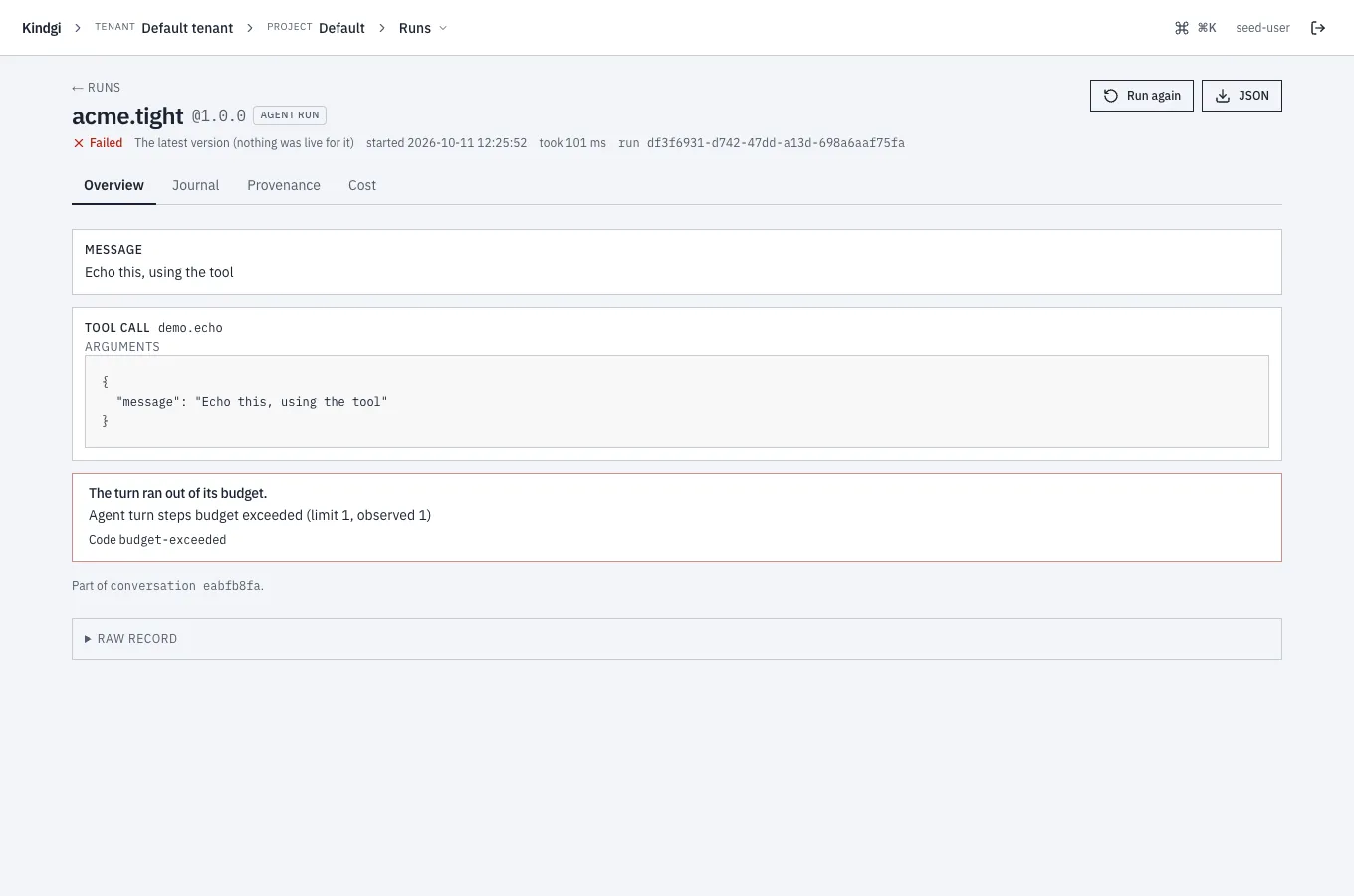
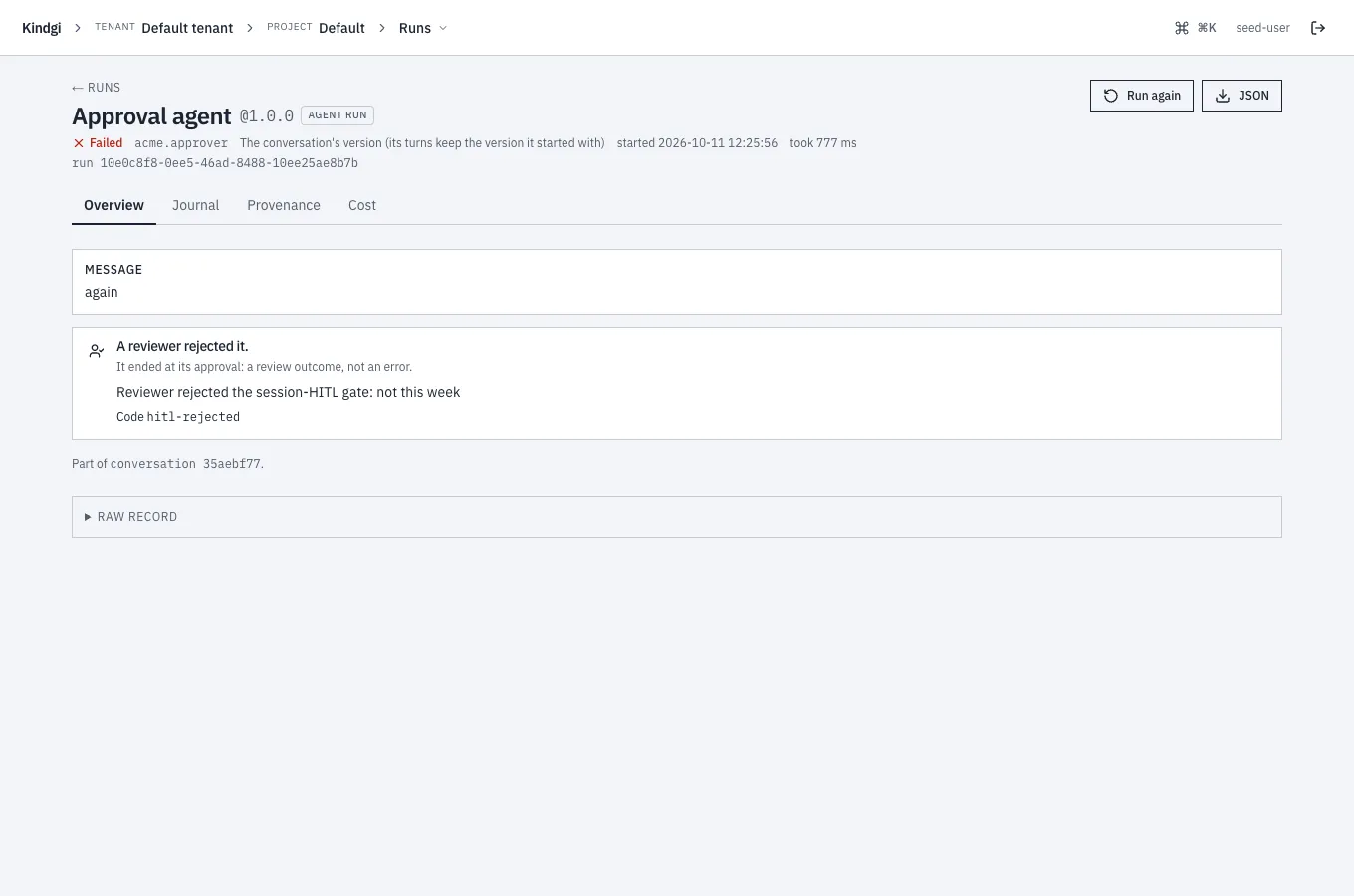
A run that ended at its approval didn't go wrong: someone, or the approval's deadline, decided. Its page says which, not in red: "A reviewer rejected it.", "Its approval was withdrawn.", "No one decided its approval in time." or "Its approval was closed before anyone decided.", then "It ended at its approval: a review outcome, not an error.", the reviewer's rationale and the code (Decide an approval).
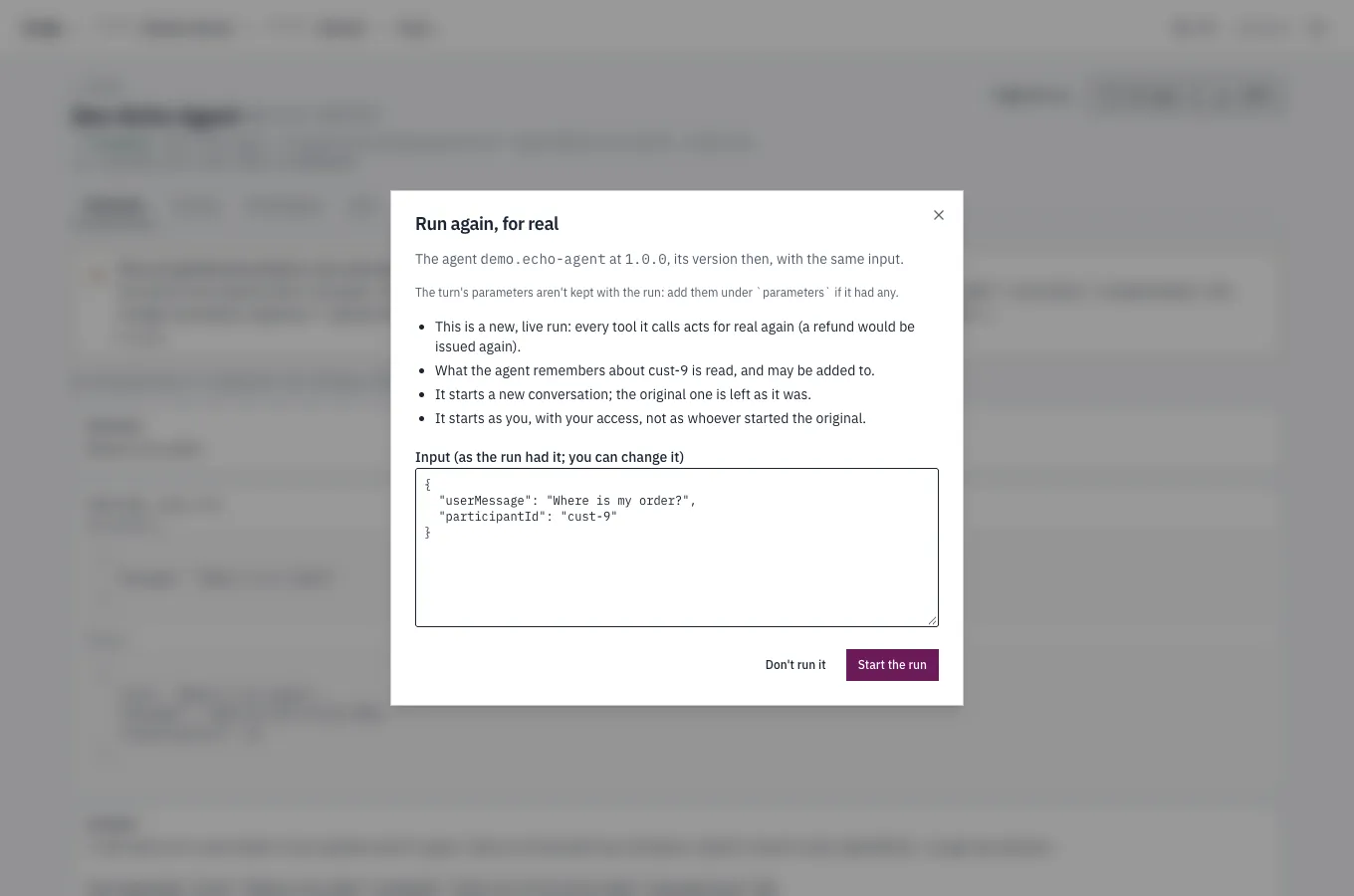
Run it again
Section titled “Run it again”A finished run's page has Run again for whoever may run its agent or flow. A step inside a flow has none. The dialog, Run again, for real, says what the new run is and does, for that run:
The agent demo.echo-agent at 1.0.0, its version then, with the same input.The turn's parameters aren't kept with the run: add them under `parameters` if it had any.This is a new, live run: every tool it calls acts for real again (a refund would be issued again).What the agent remembers about cust-9 is read, and may be added to.It starts a new conversation; the original one is left as it was.It starts as you, with your access, not as whoever started the original.The input is the run's, and you can change it before Start the run.