

Cost per run and per customer
This guide reads what a run's model calls cost, sums one customer's month, and gets each run's total when it finishes.
Kindgi records every model call a run makes: the model, the tokens, and what the call cost at the prices its provider was registered with, as Models describes. These costs are Kindgi's estimates from the vendors' published prices. Your provider's invoice is what you pay.
Before you start
Section titled “Before you start”- A runtime, such as
kindgi dev, with Kindgi 0.1's client: Node 22.12 or later, Python 3.11 or later, or Java 17 or later. KINDGI_API_URLandKINDGI_API_TOKENset, or a runningkindgi dev, which the client finds.- A run's id, to read its calls.
kindgi runs listshows it.
A run's calls
Section titled “A run's calls”Read the records of one run. Ask your coding agent: "I want to see what each model call in a run cost." For reference, the code looks like this. Each script takes the run's id as its first argument:
import { createClient } from '@kindgi/sdk/client';import type { RunId } from '@kindgi/sdk/types';
const kindgi = createClient(); // KINDGI_API_URL, KINDGI_API_TOKEN, or the running kindgi dev
const calls = await kindgi.cost.usage.query({ runId: process.argv[2] as RunId });for (const call of calls.data) { console.log(call.step, call.model, call.status, call.usage?.promptTokens, call.usage?.completionTokens, call.costUsd);}import sys
from kindgi.client import Kindgi
kindgi = Kindgi() # KINDGI_API_URL, KINDGI_API_TOKEN, or the running kindgi dev
calls = kindgi.cost.records.list(run_id=sys.argv[1])for call in calls.data: usage = call.usage print(call.step, call.model, call.status, usage and usage.prompt_tokens, usage and usage.completion_tokens, call.cost_usd)package com.acme.app;
import com.kindgi.client.Kindgi;import com.kindgi.client.models.CostRecord;import com.kindgi.client.models.CostRecordCollectionPage;import com.kindgi.client.resources.CostRecordsListParams;import java.util.UUID;
public final class RunCost { public static void main(String[] args) { Kindgi kindgi = Kindgi.create(); // KINDGI_API_URL, KINDGI_API_TOKEN, or the running kindgi dev
CostRecordCollectionPage calls = kindgi.cost().records().list( CostRecordsListParams.builder().runId(UUID.fromString(args[0])).build()); for (CostRecord call : calls.data()) { System.out.println(call.step() + " " + call.model() + " " + call.status() + " " + (call.usage() == null ? null : call.usage().promptTokens()) + " " + (call.usage() == null ? null : call.usage().completionTokens()) + " " + call.costUsd()); } }}package acme.app
import com.kindgi.client.Kindgiimport com.kindgi.client.resources.CostRecordsListParamsimport java.util.UUIDimport scala.jdk.CollectionConverters._
object RunCost { def main(args: Array[String]): Unit = { val kindgi = Kindgi.create() // KINDGI_API_URL, KINDGI_API_TOKEN, or the running kindgi dev
val calls = kindgi.cost().records().list(CostRecordsListParams.builder().runId(UUID.fromString(args(0))).build()) for (call <- calls.data.asScala) { val usage = Option(call.usage) println(s"${call.step} ${call.model} ${call.status} ${usage.map(_.promptTokens).orNull} " + s"${usage.map(_.completionTokens).orNull} ${call.costUsd}") } }}For an agent turn that called a tool once, each prints two model calls, the newest first:
2 claude-sonnet-5-5 ok 606 152 0.0027321 claude-sonnet-5-5 ok 513 57 0.0015960000000000002Each record is one model call:
{ "id": "bfe7ccd4-ca6c-411c-918f-e605b4943bdd", "tenantId": "c963c8d8-5afc-403f-8c4b-8617327c424e", "category": "llm.inference", "providerId": "anthropic", "runId": "f3835200-e4c6-4579-a3fc-4b70f7444333", "agentId": "acme.order-desk", "conversationId": "936af311-f1c8-4260-a1ed-973876b4ac71", "quantity": 570, "unit": "tokens", "costUsd": 0.0015960000000000002, "occurredAt": "2026-10-08T15:13:23.128Z", "callId": "00a26a40-58c5-41ce-af41-a5c583a577a6", "projectId": "18af3731-67e6-4720-aa50-0972ff4b5eca", "rootRunId": "f3835200-e4c6-4579-a3fc-4b70f7444333", "agentVersion": "0.1.0", "nodeId": "model-call", "step": 1, "model": "claude-sonnet-5-5", "servedModel": "claude-sonnet-5-5", "status": "ok", "usage": { "promptTokens": 513, "completionTokens": 57, "cacheReadTokens": 0, "cacheWriteTokens": 0 }, "durationMs": 1438, "finishReason": "tool-use", "providerRequestId": "req_011CfpzCE92VRAVmBURYMRFu", "attempts": 1}| Field | What it is |
|---|---|
model, servedModel |
The model the agent asked for, and the exact version the provider answered with. |
usage |
The tokens: promptTokens, completionTokens, and the cache and reasoning counts. A count the provider reports is there, 0 included; one it doesn't report is absent. |
costUsd |
The call's cost in US dollars. |
status |
ok, or failed (see A failed call). |
step |
The model call's number in the turn. |
runId, rootRunId |
The run that made the call, and the run at the top of its tree. |
flowId |
For an agent step in a flow, the flow. An agent run on its own has none. |
projectId, agentId, agentVersion, conversationId |
Where the call belongs. |
providerRequestId |
The provider's id for the request, to quote to its support. Not every provider sends one. |
callId |
The call's id. The model call's node in the turn's provenance has the same callId. |
To see the usage exactly as the provider sent it, add includeRawUsage: true,
or include="rawUsage" in Python. Each record then has rawUsage:
"rawUsage": { "provider": "anthropic", "model": "claude-sonnet-5-5", "usage": { "input_tokens": 513, "output_tokens": 57, "cache_read_input_tokens": 0, "cache_creation_input_tokens": 0, … }}A flow's whole run
Section titled “A flow's whole run”Each agent step of a flow runs as a run of its own, under the flow's run. The
flow's run makes no model calls itself, so ask for its whole tree with
rootRunId. Ask your coding agent: "I want the cost of a flow's whole run."
For reference, the call looks like this, where flowRunId is the flow run's
id:
const calls = await kindgi.cost.usage.query({ rootRunId: flowRunId });calls = kindgi.cost.records.list(root_run_id=flow_run_id)CostRecordCollectionPage calls = kindgi.cost().records().list(CostRecordsListParams.builder().rootRunId(flowRunId).build());val calls = kindgi.cost().records().list(CostRecordsListParams.builder().rootRunId(flowRunId).build())Each record's runId is the agent step's run, and its rootRunId is the
flow's run.
One customer's month
Section titled “One customer's month”Give each of your customers an org, and run their work in a project of that org, as Organize work by org and project shows. One call then sums a customer's spend, here by month and model. Ask your coding agent: "I want to see what one customer spent this month, by model." For reference, the script looks like this:
import { createClient } from '@kindgi/sdk/client';import type { Timestamp } from '@kindgi/sdk/types';
const kindgi = createClient(); // KINDGI_API_URL, KINDGI_API_TOKEN, or the running kindgi dev
// Once per customer: an org, and a project in it.const org = await kindgi.orgs.create({ slug: 'acme-customer-one', name: 'Customer one' });const project = await kindgi.projects.create({ orgId: org.id, slug: 'support', name: 'Support' });
// Each run for that customer names the project.await kindgi.runs.start({  agent: 'acme-ops.echo-agent',  input: { userMessage: 'Echo hello.' },  projectId: project.id,});
// The customer's month so far, by model.const now = new Date();const monthStart = new Date(Date.UTC(now.getUTCFullYear(), now.getUTCMonth(), 1));const month = await kindgi.cost.usage.summary({ scope: { kind: 'org', orgId: org.id }, from: monthStart.toISOString() as Timestamp, to: now.toISOString() as Timestamp, groupBy: ['month', 'model'],});console.log(JSON.stringify(month, null, 2));import jsonfrom datetime import datetime, timezone
from kindgi.client import Kindgi
kindgi = Kindgi() # KINDGI_API_URL, KINDGI_API_TOKEN, or the running kindgi dev
# Once per customer: an org, and a project in it.org = kindgi.orgs.create(slug="acme-customer-one", name="Customer one")project = kindgi.projects.create(org_id=str(org.id), slug="support", name="Support")
# Each run for that customer names the project.kindgi.runs.start( agent="acme-ops.echo-agent", input={"userMessage": "Echo hello."}, project_id=project.id,)
# The customer's month so far, by model.now = datetime.now(timezone.utc)month = kindgi.cost.aggregate( group_by="month,model", scope_kind="org", scope_id=str(org.id), from_=now.replace(day=1, hour=0, minute=0, second=0, microsecond=0).isoformat(), to=now.isoformat(),)print(json.dumps(month.model_dump(mode="json", by_alias=True, exclude_none=True), indent=2))package com.acme.app;
import com.kindgi.client.Kindgi;import com.kindgi.client.KindgiJson;import com.kindgi.client.models.CostAggregateResult;import com.kindgi.client.models.CreateResourceResult;import com.kindgi.client.models.OrgSpec;import com.kindgi.client.models.ProjectSpec;import com.kindgi.client.models.ScopeKind;import com.kindgi.client.models.StartRunBody;import com.kindgi.client.resources.CostAggregateParams;import java.time.OffsetDateTime;import java.time.ZoneOffset;import java.util.Map;import java.util.UUID;
public final class CustomerCost { public static void main(String[] args) { Kindgi kindgi = Kindgi.create(); // KINDGI_API_URL, KINDGI_API_TOKEN, or the running kindgi dev
// Once per customer: an org, and a project in it. CreateResourceResult org = kindgi.orgs().create( OrgSpec.builder().slug("acme-customer-one").name("Customer one").build()); CreateResourceResult project = kindgi.projects().create( ProjectSpec.builder().orgId(org.id()).slug("support").name("Support").build());
// Each run for that customer names the project. kindgi.runs().start(StartRunBody.WithAgent.builder() .agent("acme-ops.echo-agent") .input(Map.of("userMessage", "Echo hello.")) .projectId(UUID.fromString(project.id())) .build());
// The customer's month so far, by model. OffsetDateTime now = OffsetDateTime.now(ZoneOffset.UTC); CostAggregateResult month = kindgi.cost().aggregate(CostAggregateParams.builder() .scopeKind(ScopeKind.ORG) .scopeId(org.id()) .from(now.withDayOfMonth(1).toLocalDate().atStartOfDay().atOffset(ZoneOffset.UTC)) .to(now) .groupBy("month,model") .build()); System.out.println(KindgiJson.write(month)); }}groupBy takes the dimensions comma-separated, as the API does.
KindgiJson.write prints the answer as JSON on one line; the answer below
is indented to read.
package acme.app
import com.kindgi.client.{Kindgi, KindgiJson}import com.kindgi.client.models.{OrgSpec, ProjectSpec, ScopeKind, StartRunBody}import com.kindgi.client.resources.CostAggregateParamsimport java.time.{OffsetDateTime, ZoneOffset}import java.util.UUIDimport scala.jdk.CollectionConverters._
object CustomerCost {  def main(args: Array[String]): Unit = {    val kindgi = Kindgi.create() // KINDGI_API_URL, KINDGI_API_TOKEN, or the running kindgi dev
    // Once per customer: an org, and a project in it.    val org = kindgi.orgs().create(OrgSpec.builder().slug("acme-customer-one").name("Customer one").build())    val project = kindgi.projects().create(      ProjectSpec.builder().orgId(org.id).slug("support").name("Support").build())
    // Each run for that customer names the project.    kindgi.runs().start(StartRunBody.WithAgent.builder()      .agent("acme-ops.echo-agent")      .input(Map("userMessage" -> "Echo hello.").asJava)      .projectId(UUID.fromString(project.id))      .build())
    // The customer's month so far, by model.    val now = OffsetDateTime.now(ZoneOffset.UTC)    val month = kindgi.cost().aggregate(CostAggregateParams.builder()      .scopeKind(ScopeKind.ORG)      .scopeId(org.id)      .from(now.withDayOfMonth(1).toLocalDate.atStartOfDay.atOffset(ZoneOffset.UTC))      .to(now)      .groupBy("month,model")      .build())    println(KindgiJson.write(month))  }}
groupBy takes the dimensions comma-separated, as the API does.
KindgiJson.write prints the answer as JSON on one line; the answer below
is indented to read.
The sum covers only that customer's runs:
{ "groups": [ { "key": {"month": "2026-10", "model": "claude-sonnet-5-5"}, "count": 2, "totalUsd": 0.00449, "tokens": {"prompt": 1385, "completion": 172, "cacheRead": 0, "cacheWrite": 0, "reasoning": 0} } ], "totalGroups": 1, "truncated": false, "totalUsd": 0.00449, "totalRecords": 2, "tokens": {"prompt": 1385, "completion": 172, "cacheRead": 0, "cacheWrite": 0, "reasoning": 0}, "timeRange": {"from": "2026-10-01T00:00:00.000Z", "to": "2026-10-08T15:13:28.571Z"}, "groupBy": ["month", "model"]}scopenarrows the sum to an org,{ kind: 'org', orgId }, or a project,{ kind: 'project', projectId }. In Python, it'sscope_kindandscope_id.- Who sees what: the sum needs
readon its scope. Across projects, with no scope or an org, it counts only the projects the caller may read, and records with no project. A tenant admin's sum counts every project. Where the deployment's cost store can't apply the limit, anyone but a tenant admin is refused with403. fromandto: the time window.tois exclusive.- The groups come most expensive first, at most 1000 of them.
?limit=on the API, orlimit=in Python, sets another cap, up to 10000.truncatedsays whether some were left out, andtotalGroupshow many there were. The totals always cover every record. To read every record instead, page throughcost.usage.query. groupBysplits the sum. Besidesmonthandmodel:day,orgId,projectId,agentId,flowId,runId,rootRunId,conversationId,providerId,servedModel,categoryandtenant. With nogroupBy, you get the totals only.
A tool can check that a run belongs to the right customer, as Check the run's org shows.
When a run finishes
Section titled “When a run finishes”The run.finished webhook carries the
run's total under data.run.usage:
{ "id": "8004eba4-0d7a-4b81-9cd2-9c1884295f9c", "type": "run.finished", "createdAt": "2026-10-05T07:08:42.227Z", "data": { "run": { "id": "695492e1-0569-48cf-bf5b-e92170ebcd38", "projectId": "cb742f19-68f2-4594-9cd6-b555617dc851", "flowId": "acme-ops.echo-flow", "flowVersion": "0.1.0", "status": "completed", "dryRun": false, "failureMessage": null, "createdAt": "2026-10-05T07:08:39.834Z", "completedAt": "2026-10-05T07:08:42.227Z", "usage": { "calls": 2, "costUsd": 0.001994, "tokens": { "prompt": 1669, "completion": 65, "cacheRead": 0, "cacheWrite": 0, "reasoning": 0 } } } }}Only the run at the top of a tree sends run.finished, and its usage covers
the whole tree: this flow's two calls were made by its agent step.
A failed call
Section titled “A failed call”A model call that fails is recorded too, at no cost. A turn whose provider key was wrong:
{ "runId": "28a40635-eb0b-44db-9b8f-3748c2f8165e", "model": "claude-sonnet-5-5", "status": "failed", "costUsd": 0, "durationMs": 252, "attempts": 1, "error": { "message": "401 {\"type\":\"error\",\"error\":{\"type\":\"authentication_error\",\"message\":\"invalid x-api-key\"},\"request_id\":null}" }, …}It has no usage, and it counts in run.finished's calls.
Cost in the console
Section titled “Cost in the console”The console shows the same numbers on three pages: a project's Cost, a run's Cost tab, and the tenant's Tenant costs. Days are in UTC, and a failed call costs $0.
A project's cost
Section titled “A project's cost”Anyone who can read the project sees its Cost page: what its model calls cost over a range, against the range before. The range is 7 days, 30 days, 90 days, 12 months or Custom.
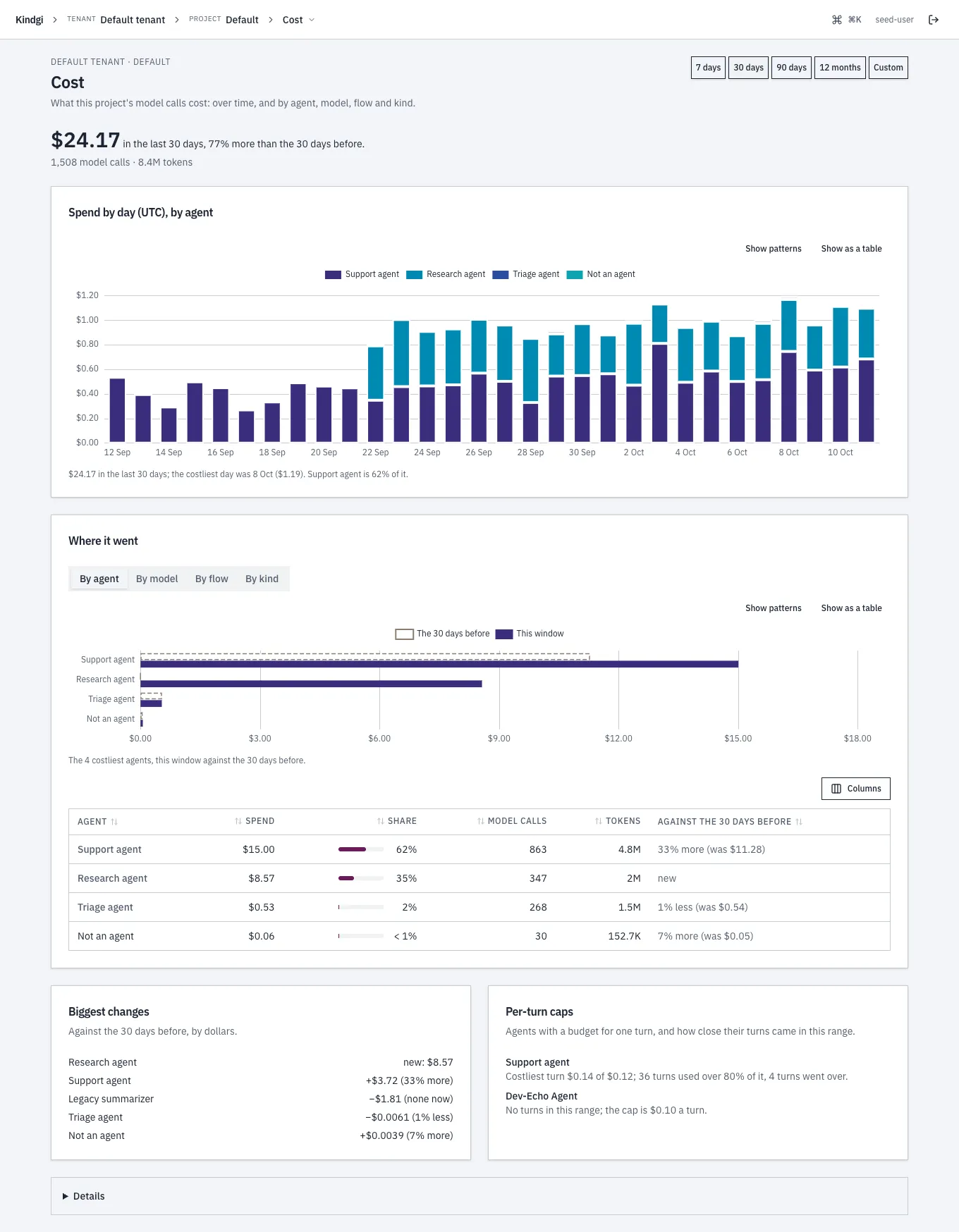
- The headline: "$24.17 in the last 30 days, 77% more than the 30 days before." and "1,508 model calls · 8.4M tokens".
- Spend by day (UTC), by agent: a stacked chart, with a sentence under it ("the costliest day was 8 Oct ($1.19). Support agent is 62% of it."). Show as a table gives the numbers. Over 12 months it's by month.
- Where it went: By agent, By model, By flow or By kind, the costliest against the range before ("33% more (was $11.28)", "new"). An agent's or a model's row filters the page to it. The table sorts by a column's header, and Columns chooses which columns it shows.
- Biggest changes: against the range before, by dollars ("Research agent new: $8.57", "Legacy summarizer −$1.81 (none now)").
- Per-turn caps: each agent with a budget for one turn, and how close its turns came ("Costliest turn $0.14 of $0.12; 36 turns used over 80% of it, 4 turns went over.").
- Details: the token split, and the exact
GET /v1/cost/aggregatequeries the page made.
The range and the breakdown are in the page's address, so a link opens the same view.
A run's cost
Section titled “A run's cost”Every run's page has a Cost tab: the run's calls, as
cost.usage.query returns them.
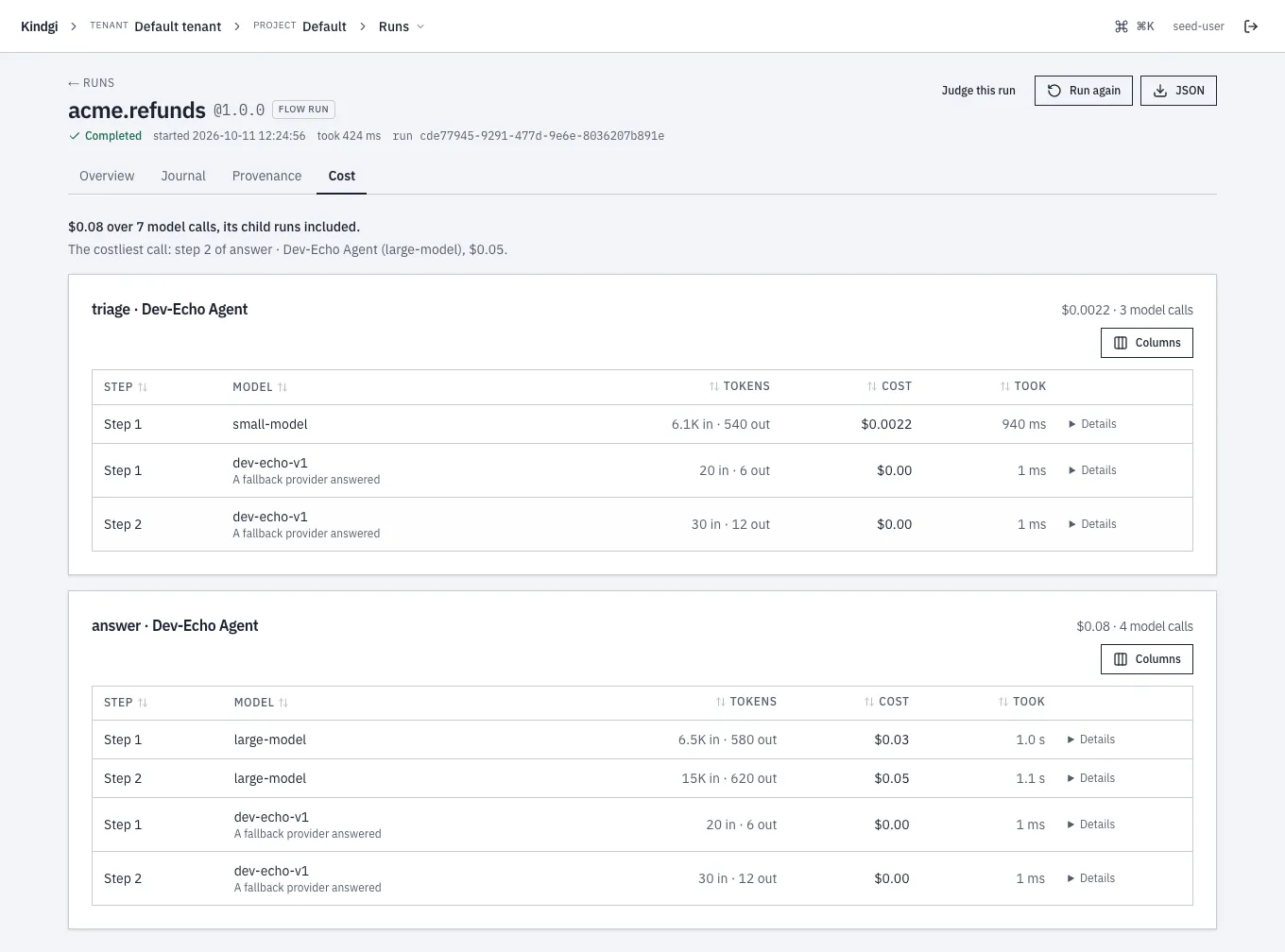
- The total, with a flow's child runs included: "$0.08 over 7 model calls, its child runs included."
- The costliest call: "The costliest call: step 2 of answer · Dev-Echo Agent (large-model), $0.05."
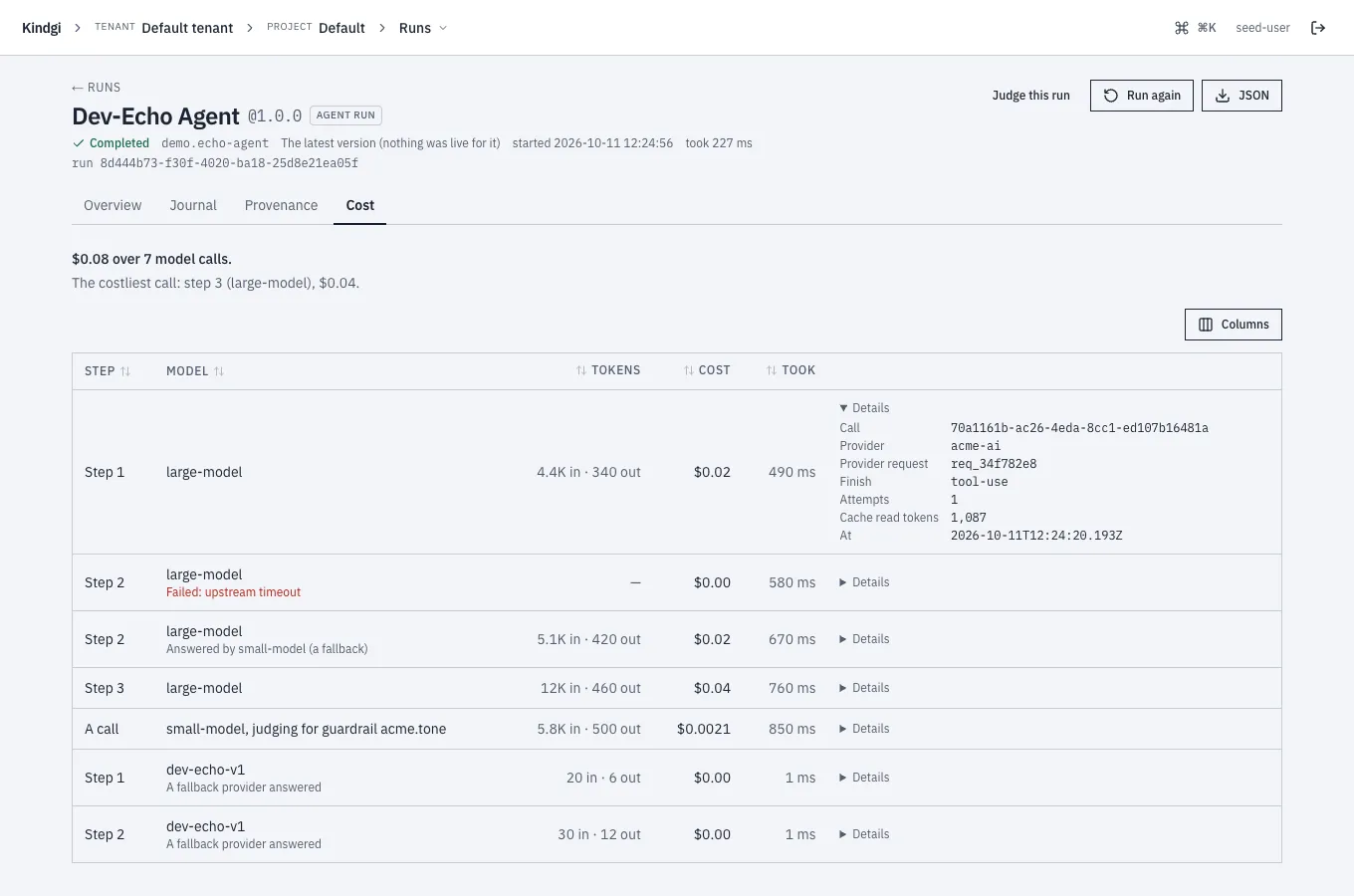
- Each model call, grouped by the run that made it: its step, model, tokens in and out, cost and how long it took. A failed call says why ("Failed: upstream timeout") and costs $0.00. When a fallback answered, the call says so ("A fallback provider answered").
- Details, for one call: the call's id, the provider and its request id, how it finished, its attempts, cache-read tokens and when it was made.
A flow run's Overview tab gives the same total: "Cost: $0.08 over 7 model calls, its child runs included. Each call →".
The tenant's costs
Section titled “The tenant's costs”Tenant admins see Tenant costs: every project's spend, laid out like a project's Cost page.
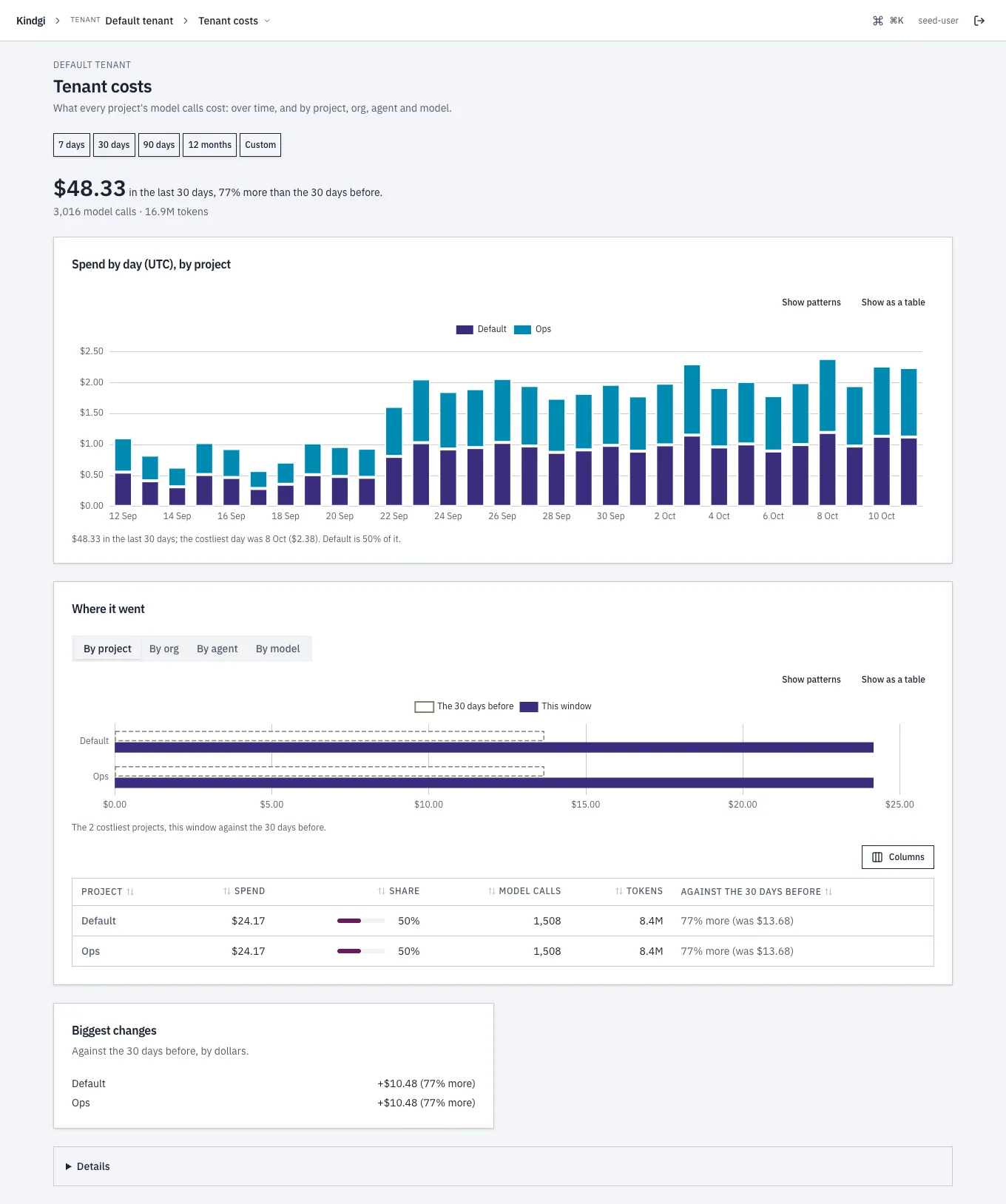
- The headline, and Spend by day (UTC), by project.
- Where it went: By project, By org, By agent or By model. A project's row opens that project's Cost page at the same range, and an agent's or a model's row filters this page.
- Biggest changes and Details, as on a project's page.
Anyone else who opens it is pointed to each project's Cost page instead. As with the API in One customer's month, a person's numbers count only the projects they may read.