

List runs
This guide lists runs: the newest page by page, only the ones your app started, the runs inside one run, or one agent's turns.
Before you start
Section titled “Before you start”- Runs to list, on a runtime such as
kindgi dev, with Kindgi 0.1's CLI. - For the app's half: Node 22.12 or later, Python 3.11 or later, or
Java 17 or later, with Kindgi 0.1's client, and
KINDGI_API_URLandKINDGI_API_TOKENset.
From the CLI
Section titled “From the CLI”The newest runs come first. List two:
pnpm exec kindgi runs list --limit=2uv run kindgi runs list --limit=2./kindgiw runs list --limit=2./kindgiw runs list --limit=2--limit=2 is the most runs on a page. It prints the page:
{ "data": [ { "id": "657512f8-97b5-41bb-a0cc-396bffe158f6", … "flowId": "acme.reserve-order", "flowVersion": "0.1.0", "status": "cancelled", … }, { "id": "365d7fd0-7801-43e5-a3c5-66f9479cf02d", … } ], "hasMore": true, "nextCursor": "eyJjcmVhdGVkQXQiOiIyMDI2LTEwLTAzVDIwOjE0OjE2Ljc0NFoiLCJpZCI6IjM2NWQ3ZmQwLTc4MDEtNDNlNS1hM2M1LTY2Zjk0NzljZjAyZCJ9"}--limitis 25 by default, and at most 100.--cursor=<nextCursor>gets the next page, where<nextCursor>is the page'snextCursor.- The list leaves out each run's
output.kindgi runs get <run-id>has it.
The CLI lists every run, including the agent turns inside flows. Each of
those is a run of agent.turn, with a parentRunId. --agent=<agent-id>
lists one agent's turns, as One agent's turns shows.
The clients also filter by status, creation time, flow and version, and
scope.
From your app
Section titled “From your app”Your app lists runs with runs.list. Ask your coding agent: "I want my app
to list the runs it started, newest first, a page at a time." For reference,
this code lists the newest runs your app started, then gets the next page:
import { createClient } from '@kindgi/sdk/client';
const kindgi = createClient(); // KINDGI_API_URL, KINDGI_API_TOKEN
// The newest runs your app started, without the agent turns inside themconst page = await kindgi.runs.list({ topLevel: true, limit: 3 });for (const run of page.data) console.log(run.id, run.flowId, run.status);
// The next pageif (page.nextCursor !== undefined) {  const next = await kindgi.runs.list({ topLevel: true, limit: 3, cursor: page.nextCursor });  console.log(next.data.length, next.hasMore);}
f703bffb-367c-4abb-a699-006575b7c21a acme.reserve-order cancelled54e3258d-3cd3-444a-8175-c965ef6cf682 acme.reserve-order completed42b7c0c8-3c47-4962-9b08-3319ff887ada acme.review-order completed3 truefrom kindgi.client import Kindgi, paginate
kindgi = Kindgi() # KINDGI_API_URL, KINDGI_API_TOKEN
# The newest runs your app started, without the agent turns inside thempage = kindgi.runs.list(top_level=True, limit=3)for run in page.data: print(run.id, run.flow_id, run.status)
# Every one of them, page after pageprint(sum(1 for _ in paginate(kindgi.runs.list, top_level=True)))969888a4-a1a8-43fc-8e83-63529ad580c2 acme.reserve-order cancelled197046c4-e220-4b6d-abcb-1703d6c6efd5 acme.reserve-order completededaf7625-0585-40c3-805c-0c098f6846b8 acme.review-order failed81package com.acme.app;
import com.kindgi.client.Kindgi;import com.kindgi.client.models.RunCollectionPage;import com.kindgi.client.resources.RunsListParams;
public final class ListRuns { public static void main(String[] args) { Kindgi kindgi = Kindgi.create(); // KINDGI_API_URL, KINDGI_API_TOKEN
// The newest runs your app started, without the agent turns inside them RunsListParams params = RunsListParams.builder().topLevel(true).limit(3L).build(); RunCollectionPage page = kindgi.runs().list(params); for (RunCollectionPage.DataItem run : page.data()) { System.out.println(run.id() + " " + run.flowId() + " " + run.status()); }
// The next page if (page.nextCursor() != null) { RunCollectionPage next = kindgi.runs().list(params.toBuilder().cursor(page.nextCursor()).build()); System.out.println(next.data().size() + " " + next.hasMore()); } }}b6a0ff1e-a891-49c4-857a-aca3ba8dd75e acme.reserve-order cancelled51a59895-3fad-4e49-8fef-f2e2be8881a9 acme.review-order completede3cf4013-a78d-48f8-b7f1-e729000fc994 acme.review-order completed3 trueThe params are a record with a builder; toBuilder() makes the next
page's from them.
package acme.app
import com.kindgi.client.Kindgiimport com.kindgi.client.resources.RunsListParamsimport scala.jdk.CollectionConverters._
object ListRuns {  def main(args: Array[String]): Unit = {    val kindgi = Kindgi.create() // KINDGI_API_URL, KINDGI_API_TOKEN
    // The newest runs your app started, without the agent turns inside them    val params = RunsListParams.builder().topLevel(true).limit(3L).build()    val page = kindgi.runs().list(params)    for (run <- page.data.asScala) println(s"${run.id} ${run.flowId} ${run.status}")
    // The next page    Option(page.nextCursor).foreach { cursor =>      val next = kindgi.runs().list(params.toBuilder.cursor(cursor).build())      println(s"${next.data.size} ${next.hasMore}")    }  }}
b6a0ff1e-a891-49c4-857a-aca3ba8dd75e acme.reserve-order cancelled51a59895-3fad-4e49-8fef-f2e2be8881a9 acme.review-order completede3cf4013-a78d-48f8-b7f1-e729000fc994 acme.review-order completed3 trueThe params are a Java record with a builder; toBuilder makes the next
page's from them.
The page holds the runs, and its nextCursor leads to the next one.
list takes these filters, with their Python names in brackets:
topLevel: true(top_level=True) leaves out runs started inside other runs, such as agent turns: the runs your app and the CLI started.includeOutput: true(include="output") adds each run'soutput.scope(scope_kind/scope_id) lists one project's runs, or the runs of every project in an org:{ kind: 'project', projectId }(scope_kind="project", scope_id=…), or{ kind: 'org', orgId }.agentId(agent_id) lists one agent's turns, as One agent's turns shows.statuslists the runs in one status, or in any of several:['failed', 'cancelled'](a list in Python too).createdAfter/createdBefore(created_after/created_before) list the runs created strictly after, or before, a time.flowId(flow_id) lists one flow's runs, andflowVersion(flow_version) one version's. An agent's turns run theagent.turnflow: useagentIdfor an agent's.- In Python,
paginatefollowsnext_cursorfor you.
A status that doesn't exist, a time that isn't one, an empty value, or a
version without its id is refused with 400 bad-input, naming it:
{ "error": { "code": "bad-input", "message": "`agentVersion` needs `agentId`", … } }The filters combine. Ask your coding agent, for example: "I want my app to list the runs from the last day that failed or were cancelled." For reference, this code lists them, leaving out the runs inside them:
import { createClient } from '@kindgi/sdk/client';
const kindgi = createClient(); // KINDGI_API_URL, KINDGI_API_TOKEN
const since = new Date(Date.now() - 24 * 3_600_000).toISOString();const ended = await kindgi.runs.list({  status: ['failed', 'cancelled'],  createdAfter: since,  topLevel: true,});for (const run of ended.data) console.log(run.id, run.status, run.agent?.version);
c231451d-c304-4466-bb37-3b72145470ed cancelled 2.1.0from datetime import datetime, timedelta, timezone
from kindgi.client import Kindgi
kindgi = Kindgi() # KINDGI_API_URL, KINDGI_API_TOKEN
since = (datetime.now(timezone.utc) - timedelta(days=1)).isoformat()ended = kindgi.runs.list(status=["failed", "cancelled"], created_after=since, top_level=True)for run in ended.data: print(run.id, run.status, run.agent.version if run.agent else None)c231451d-c304-4466-bb37-3b72145470ed cancelled 2.1.0package com.acme.app;
import com.kindgi.client.Kindgi;import com.kindgi.client.models.RunCollectionPage;import com.kindgi.client.models.RunStatus;import com.kindgi.client.resources.RunsListParams;import java.time.OffsetDateTime;import java.util.List;
public final class ListEnded { public static void main(String[] args) { Kindgi kindgi = Kindgi.create(); // KINDGI_API_URL, KINDGI_API_TOKEN
RunCollectionPage ended = kindgi.runs().list(RunsListParams.builder() .status(List.of(RunStatus.FAILED, RunStatus.CANCELLED)) .createdAfter(OffsetDateTime.now().minusHours(24)) .topLevel(true) .build()); for (RunCollectionPage.DataItem run : ended.data()) { System.out.println(run.id() + " " + run.status() + " " + (run.agent() == null ? null : run.agent().version())); } }}b627328a-d5ac-4230-b305-4bac6b307213 cancelled null4ff78455-4ff5-45e9-8d5b-7d3116a76e84 cancelled nulle7532a22-7401-4b8d-a7ac-f3dd20e628e2 cancelled nullb0896582-86d7-4e7d-8387-931550da93a3 failed null667c2bc8-6930-457e-bc7d-2756b6f26ff8 failed nullpackage acme.app
import com.kindgi.client.Kindgiimport com.kindgi.client.models.RunStatusimport com.kindgi.client.resources.RunsListParamsimport java.time.OffsetDateTimeimport scala.jdk.CollectionConverters._
object ListEnded { def main(args: Array[String]): Unit = { val kindgi = Kindgi.create() // KINDGI_API_URL, KINDGI_API_TOKEN
val ended = kindgi.runs().list(RunsListParams.builder() .status(List(RunStatus.FAILED, RunStatus.CANCELLED).asJava) .createdAfter(OffsetDateTime.now().minusHours(24)) .topLevel(true) .build()) for (run <- ended.data.asScala) println(s"${run.id} ${run.status} ${Option(run.agent).map(_.version).orNull}") }}b627328a-d5ac-4230-b305-4bac6b307213 cancelled null4ff78455-4ff5-45e9-8d5b-7d3116a76e84 cancelled nulle7532a22-7401-4b8d-a7ac-f3dd20e628e2 cancelled nullb0896582-86d7-4e7d-8387-931550da93a3 failed null667c2bc8-6930-457e-bc7d-2756b6f26ff8 failed nullThe runs inside a run
Section titled “The runs inside a run”A flow's run starts a run for each agent step. parentRunId
(parent_run_id) lists the runs a run started, each with the step it belongs
to. Ask your coding agent: "I want my app to list the agent turns inside a
flow's run." For reference, this code starts a flow's run, then lists the
runs inside it:
import { createClient } from '@kindgi/sdk/client';
const kindgi = createClient(); // KINDGI_API_URL, KINDGI_API_TOKEN
const run = await kindgi.runs.start({ flow: 'acme.process-order', input: { orderId: 'A-100' } });const children = await kindgi.runs.list({ parentRunId: run.id });for (const child of children.data) console.log(child.id, child.flowId, child.parentNodeId);
eb59636f-aaae-4cd2-84ec-66cbcbf55f83 agent.turn notefrom kindgi.client import Kindgi
kindgi = Kindgi() # KINDGI_API_URL, KINDGI_API_TOKEN
run = kindgi.runs.start(flow="acme.process-order", input={"orderId": "A-100"})children = kindgi.runs.list(parent_run_id=run.id)for child in children.data: print(child.id, child.flow_id, child.parent_node_id)13237b2f-6cdd-4592-a94d-f5e751258790 agent.turn notepackage com.acme.app;
import com.kindgi.client.Kindgi;import com.kindgi.client.models.Run;import com.kindgi.client.models.RunCollectionPage;import com.kindgi.client.models.StartRunBody;import com.kindgi.client.resources.RunsListParams;import java.util.Map;
public final class ListChildren { public static void main(String[] args) { Kindgi kindgi = Kindgi.create(); // KINDGI_API_URL, KINDGI_API_TOKEN
Run run = kindgi.runs().start(StartRunBody.WithFlow.builder() .flow("acme.process-order") .input(Map.of("orderId", "A-100")) .build()); RunCollectionPage children = kindgi.runs().list(RunsListParams.builder().parentRunId(run.id()).build()); for (RunCollectionPage.DataItem child : children.data()) { System.out.println(child.id() + " " + child.flowId() + " " + child.parentNodeId()); } }}84b4622d-b44d-40c7-b6f3-d4014539ab15 agent.turn notepackage acme.app
import com.kindgi.client.Kindgiimport com.kindgi.client.models.StartRunBodyimport com.kindgi.client.resources.RunsListParamsimport scala.jdk.CollectionConverters._
object ListChildren { def main(args: Array[String]): Unit = { val kindgi = Kindgi.create() // KINDGI_API_URL, KINDGI_API_TOKEN
val run = kindgi.runs().start(StartRunBody.WithFlow.builder() .flow("acme.process-order") .input(Map("orderId" -> "A-100").asJava) .build()) val children = kindgi.runs().list(RunsListParams.builder().parentRunId(run.id).build()) for (child <- children.data.asScala) println(s"${child.id} ${child.flowId} ${child.parentNodeId}") }}b3539355-2683-419f-bd84-26a718ccb66f agent.turn noteOne agent's turns
Section titled “One agent's turns”An agent's turn names its agent: agent carries the agent's id, the
version that ran and the conversation. That goes for an agent run and for
the turn a flow's agent step starts. List one agent's turns, at every
version:
pnpm exec kindgi runs list --agent=acme.chat-desk --tableuv run kindgi runs list --agent=acme.chat-desk --table./kindgiw runs list --agent=acme.chat-desk --table./kindgiw runs list --agent=acme.chat-desk --table--agent is the agent's id, and --table prints a table instead of JSON:
ID STATUS FLOW / AGENT CREATED──────────────────────────────────── ───────── ──────────────────── ────────────────────────45d986f1-8a8d-4341-a786-5ddcf239bb93 completed acme.chat-desk@0.1.0 2026-10-11T07:55:48.520Z95674147-b935-4a63-a74c-cbffc0fb103a completed acme.chat-desk@0.1.0 2026-10-11T07:55:39.011ZIn the clients, it's agentId, or agent_id in Python. Ask your coding
agent: "I want my app to list one agent's turns." For reference, the code
looks like this:
import { createClient } from '@kindgi/sdk/client';
const kindgi = createClient(); // KINDGI_API_URL, KINDGI_API_TOKEN
const turns = await kindgi.runs.list({ agentId: 'acme.desk-agent' });for (const run of turns.data) {  console.log(run.id, run.agent?.version, run.agent?.conversationId, run.parentRunId ?? '-');}
51f736ba-bdde-4558-bf5f-32270622b822 1.1.0 d8d51075-ee70-44bd-b93d-f15e450798b7 259f5e11-6ebe-4347-a590-e3db5c71cf7ff9745c06-9935-4641-bf41-77d11a7f1ffb 1.1.0 b3e40910-9a84-4fc5-a4f8-d2cced5dbb53 -d0f3817d-1166-462d-a666-7a193bc48f08 1.0.0 60c9d486-ff3b-4ef9-8fbe-be19ab1d7313 -from kindgi.client import Kindgi
kindgi = Kindgi() # KINDGI_API_URL, KINDGI_API_TOKEN
turns = kindgi.runs.list(agent_id="acme.desk-agent")for run in turns.data: if run.agent is not None: print(run.id, run.agent.version, run.agent.conversation_id, run.parent_run_id or "-")51f736ba-bdde-4558-bf5f-32270622b822 1.1.0 d8d51075-ee70-44bd-b93d-f15e450798b7 259f5e11-6ebe-4347-a590-e3db5c71cf7ff9745c06-9935-4641-bf41-77d11a7f1ffb 1.1.0 b3e40910-9a84-4fc5-a4f8-d2cced5dbb53 -d0f3817d-1166-462d-a666-7a193bc48f08 1.0.0 60c9d486-ff3b-4ef9-8fbe-be19ab1d7313 -package com.acme.app;
import com.kindgi.client.Kindgi;import com.kindgi.client.models.RunCollectionPage;import com.kindgi.client.resources.RunsListParams;import java.util.Objects;
public final class ListTurns { public static void main(String[] args) { Kindgi kindgi = Kindgi.create(); // KINDGI_API_URL, KINDGI_API_TOKEN
RunCollectionPage turns = kindgi.runs().list(RunsListParams.builder().agentId("acme.desk-agent").build()); for (RunCollectionPage.DataItem run : turns.data()) { System.out.println(run.id() + " " + run.agent().version() + " " + run.agent().conversationId() + " " + Objects.toString(run.parentRunId(), "-")); } }}1e6dcd0a-7a2c-4240-a55c-517415f38d2a 1.1.0 8cd0734d-e281-4325-b724-594eda004e54 -a9dc9e8c-733c-4b4f-a520-3dfb760979ce 1.1.0 3e923800-371e-40c3-8e1d-1af2f1295eca -package acme.app
import com.kindgi.client.Kindgiimport com.kindgi.client.resources.RunsListParamsimport scala.jdk.CollectionConverters._
object ListTurns { def main(args: Array[String]): Unit = { val kindgi = Kindgi.create() // KINDGI_API_URL, KINDGI_API_TOKEN
val turns = kindgi.runs().list(RunsListParams.builder().agentId("acme.desk-agent").build()) for (run <- turns.data.asScala) { println(s"${run.id} ${run.agent.version} ${run.agent.conversationId} ${Option(run.parentRunId).getOrElse("-")}") } }}1e6dcd0a-7a2c-4240-a55c-517415f38d2a 1.1.0 8cd0734d-e281-4325-b724-594eda004e54 -a9dc9e8c-733c-4b4f-a520-3dfb760979ce 1.1.0 3e923800-371e-40c3-8e1d-1af2f1295eca -The first turn is a flow's agent step: it has a parentRunId. Add
topLevel: true to leave those out. It combines with scope too. A turn
stored by an older runtime may not name its agent. It then has no agent,
and agentId doesn't list it.
Add agentVersion (agent_version) for one version's turns, such as to see
how a new version is doing. It needs agentId.
To see what a turn did, read its journal.
In the console
Section titled “In the console”A project's Runs page lists each agent run or flow run started in the project, newest first, with a flow's agent turns under it. It refreshes every 5 seconds. A flow run's row opens, by its arrow, to its agent turns, each with the step it belongs to. Their cost is in the flow run's. The list has a search box and sorts by a column's header. Columns chooses which columns it shows.
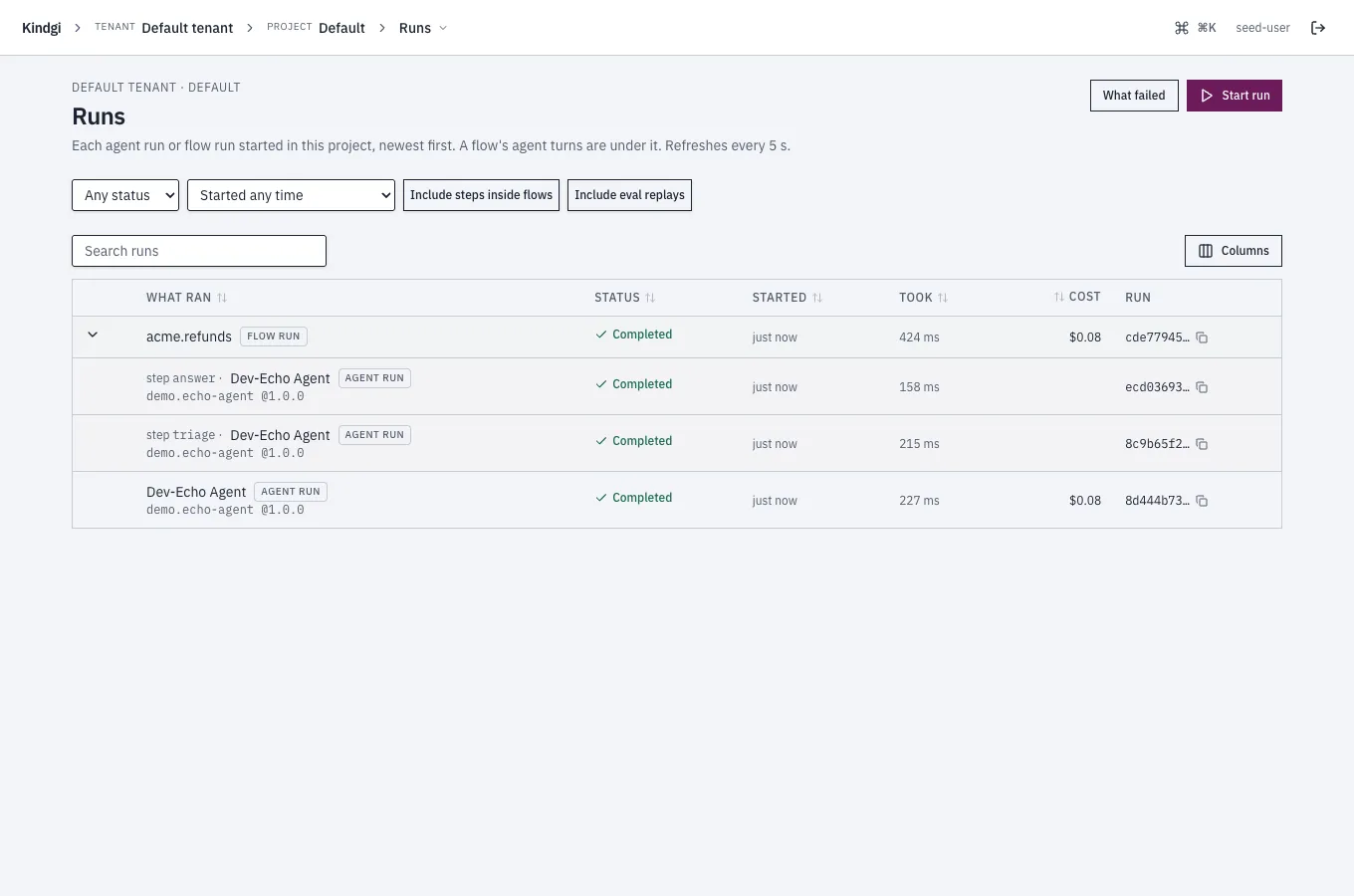
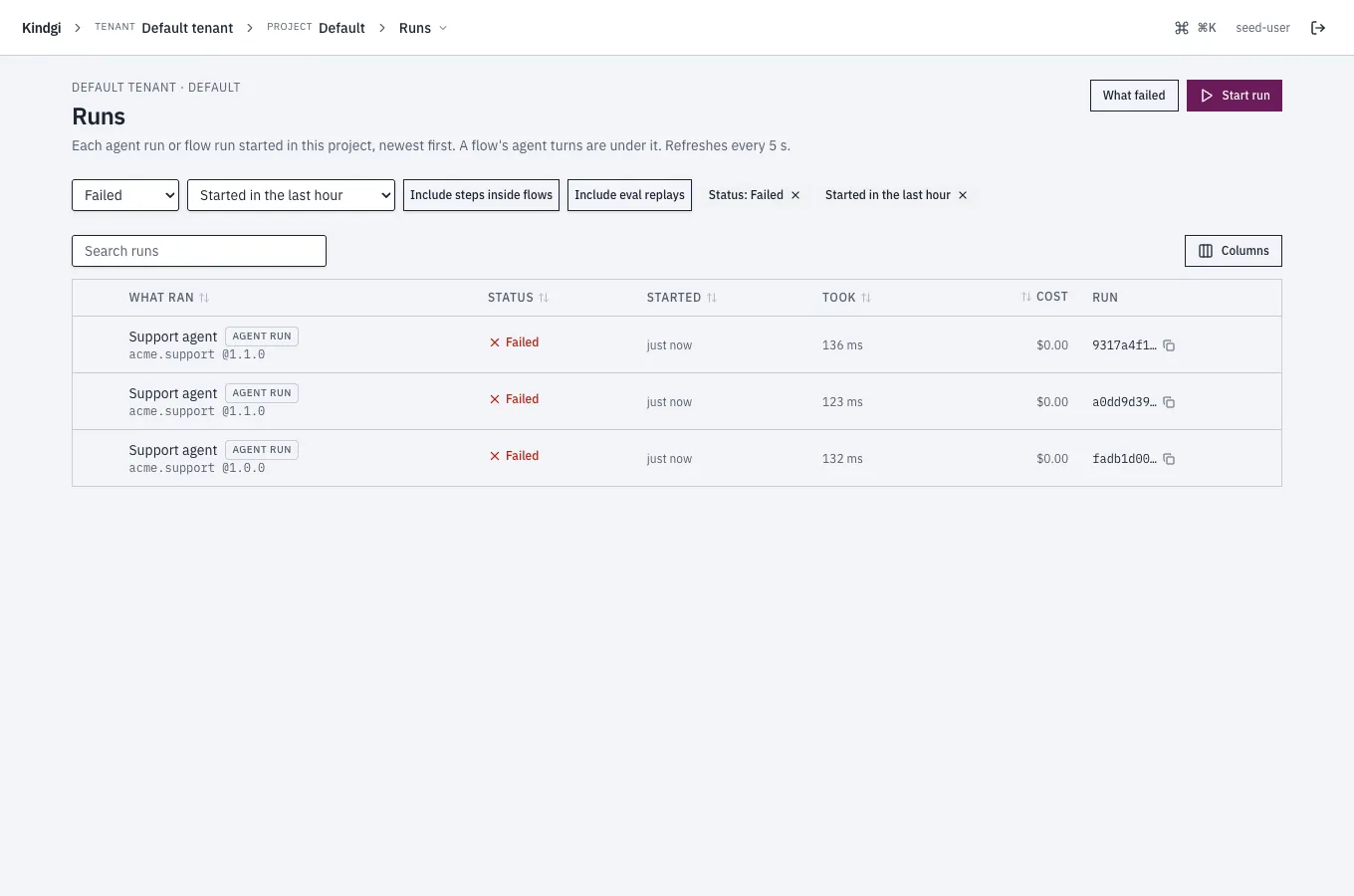
Its filters:
- Status: Pending, Running, Waiting, Completed, Failed or Cancelled. A waiting run waits on something, such as an approval.
- Started: in the last hour, 24 hours, 7 days or 30 days.
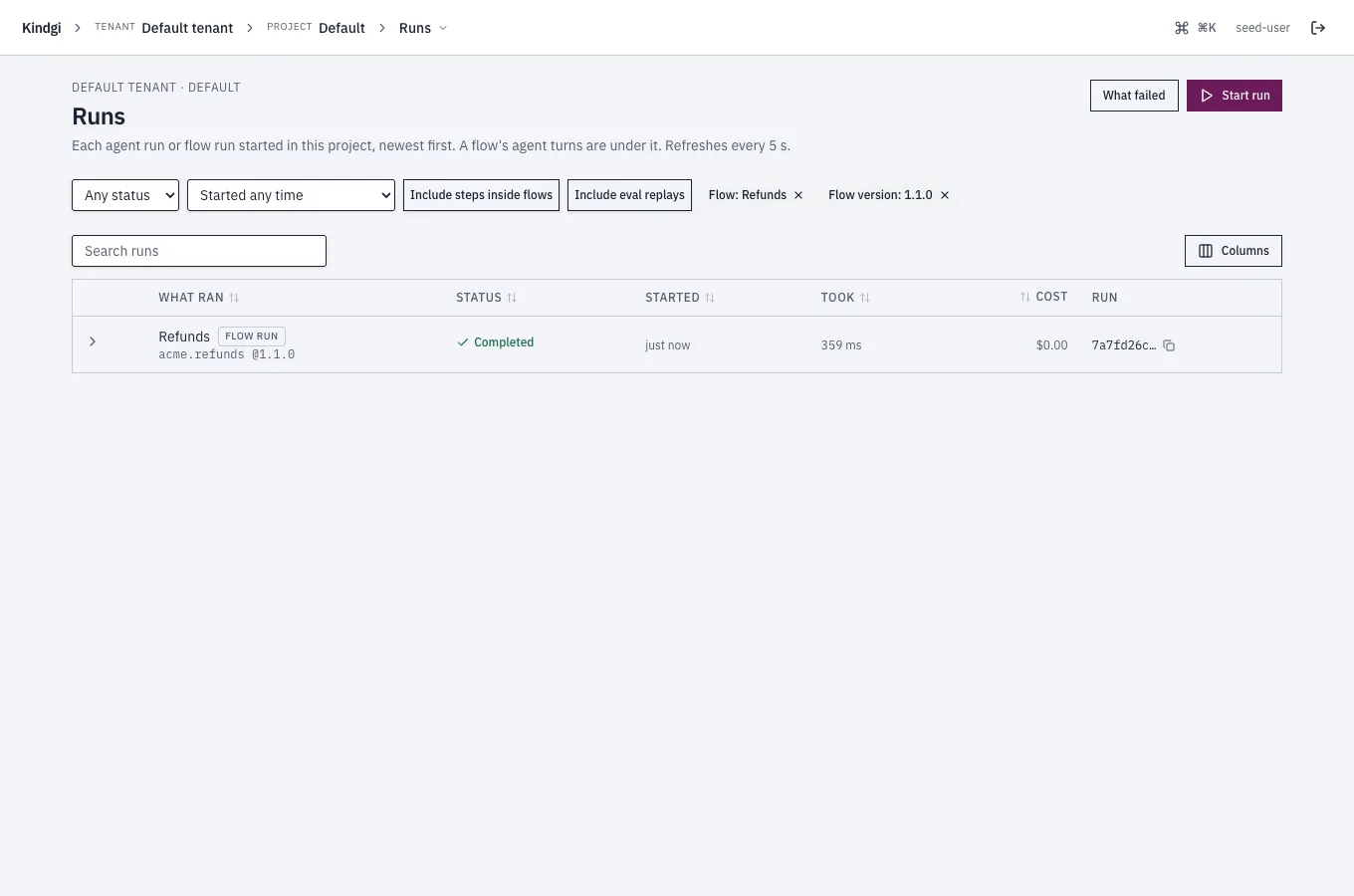
- An agent or a flow, and its version, from a link that names them. A flow's page links Its runs →, and Runs of 1.1.0 → for the version it shows. A schedule's page links Its runs →. Its failed runs on What failed names the agent or flow and its version. With an agent chosen, a Version choice appears: Every version, or one.
- Include steps inside flows and Include eval replays.
Each filter shows as a chip ("Status: Failed", "Started in the last hour", "Flow: Refunds"). Removing an agent's or a flow's chip removes its version too. The page's address keeps the filters, the sort and the search, so a link opens the same list.
What failed
Section titled “What failed”What failed, from the Runs page, groups the project's failed runs by cause and by version, so a bad deploy shows. Approvals people decided are counted apart: they aren't errors.
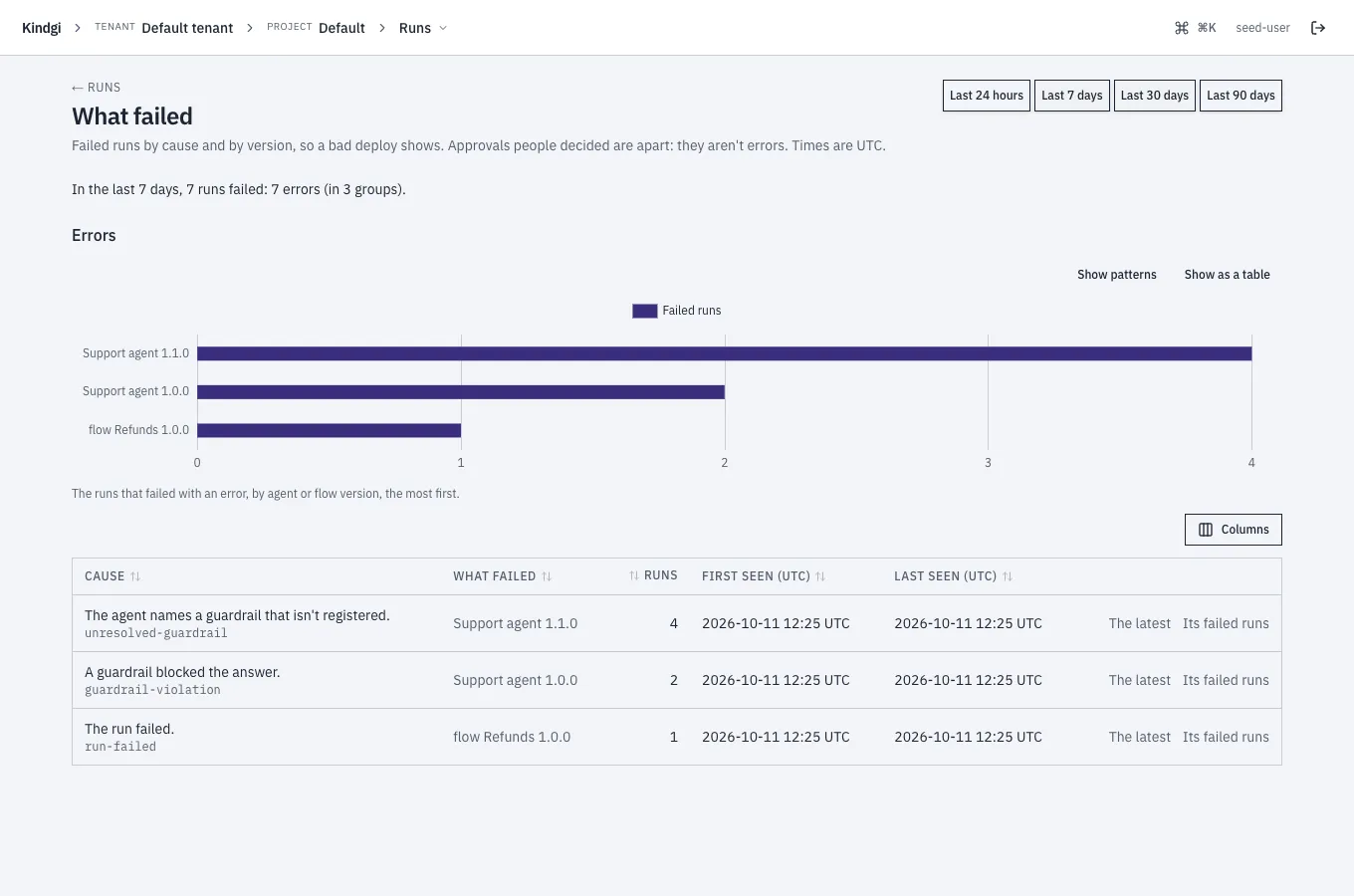
- The window: the last 24 hours, 7, 30 or 90 days.
- The headline: "In the last 7 days, 7 runs failed: 7 errors (in 3 groups)."
- The errors by version: bars of the runs that failed with an error, by agent or flow version, the most first. Show as a table shows the numbers.
- One row per cause and version: the cause in a run page's words, with
its code ("A guardrail blocked the answer."
guardrail-violation), what failed at which version, how many runs, when it was first and last seen, The latest run, and Its failed runs on the Runs page.