

Organize work by org and project
This guide gives each customer an org with its projects, runs and reads their work by project or org, and deletes an org.
A project holds runs, conversations, approvals and what they cost. An
org groups projects: one org per customer, for example, with a project
for each part of their work. Every tenant has a Default project. A run that
names no project runs in its agent's or flow's own project: the one it was
published in. For what kindgi deploy registers, that's the project the
deploy named (--project), else Default. A turn in a conversation stays in
the conversation's project.
An agent, flow, tool or test set belongs to the project its first version
was published into, and never moves. Publishing a version of it into another
project is refused with a 409, and nothing is written. Its code names the
kind, such as agent-project-mismatch, flow-…, tool-… or
eval-suite-project-mismatch.
The refusal doesn't name the project it belongs to, since you may not be
able to read that project. A deploy that includes one is refused whole and
deploys nothing, even when that agent or flow is unchanged. Publish new
versions in its own project.
Reading an agent, flow, tool, test set or guardrail says which project
it's in: its projectId, with the runtime 0.1.6 or later. A pack
kindgi dev serves from disk has none.
Before you start
Section titled “Before you start”- A runtime, such as
kindgi dev, with Kindgi 0.1's client and CLI. - Node 22.12 or later, Python 3.11 or later, or Java 17 or later, for the client.
KINDGI_API_URLandKINDGI_API_TOKENset, or a runningkindgi dev, which the client finds.- An agent, to run in the customer's project. This guide uses
acme-ops.echo-agent.
Give a customer an org and a project
Section titled “Give a customer an org and a project”Create the customer's org and a project in it once, then run the customer's work there. Ask your coding agent: "I want each of my customers to have an org with a project, and their work to run there." For reference, the script looks like this. It prints the run's status and the org's runs:
import { createClient } from '@kindgi/sdk/client';
const kindgi = createClient(); // KINDGI_API_URL, KINDGI_API_TOKEN, or the running kindgi dev
// Once per customer: an org, and a project in it.const org = await kindgi.orgs.create({ slug: 'acme-customer-one', name: 'Customer one' });const project = await kindgi.projects.create({ orgId: org.id, slug: 'support', name: 'Support' });
// The customer's work runs in its project.const run = await kindgi.runs.start({  agent: 'acme-ops.echo-agent',  input: { userMessage: 'Echo hello.' },  projectId: project.id,});
// Everything in the customer's org, across its projects.const runs = await kindgi.runs.list({ scope: { kind: 'org', orgId: org.id } });console.log(run.status, runs.data.map((r) => r.id));from kindgi.client import Kindgi
kindgi = Kindgi() # KINDGI_API_URL, KINDGI_API_TOKEN, or the running kindgi dev
# Once per customer: an org, and a project in it.org = kindgi.orgs.create(slug="acme-customer-one", name="Customer one")project = kindgi.projects.create(org_id=str(org.id), slug="support", name="Support")
# The customer's work runs in its project.run = kindgi.runs.start( agent="acme-ops.echo-agent", input={"userMessage": "Echo hello."}, project_id=project.id,)
# Everything in the customer's org, across its projects.runs = kindgi.runs.list(scope_kind="org", scope_id=str(org.id))print(run.status, [str(r.id) for r in runs.data])package com.acme.app;
import com.kindgi.client.Kindgi;import com.kindgi.client.models.CreateResourceResult;import com.kindgi.client.models.OrgSpec;import com.kindgi.client.models.ProjectSpec;import com.kindgi.client.models.Run;import com.kindgi.client.models.RunCollectionPage;import com.kindgi.client.models.ScopeKind;import com.kindgi.client.models.StartRunBody;import com.kindgi.client.resources.RunsListParams;import java.util.Map;import java.util.UUID;
public final class CustomerOrg { public static void main(String[] args) { Kindgi kindgi = Kindgi.create(); // KINDGI_API_URL, KINDGI_API_TOKEN, or the running kindgi dev
// Once per customer: an org, and a project in it. CreateResourceResult org = kindgi.orgs().create( OrgSpec.builder().slug("acme-customer-one").name("Customer one").build()); CreateResourceResult project = kindgi.projects().create( ProjectSpec.builder().orgId(org.id()).slug("support").name("Support").build());
// The customer's work runs in its project. Run run = kindgi.runs().start(StartRunBody.WithAgent.builder() .agent("acme-ops.echo-agent") .input(Map.of("userMessage", "Echo hello.")) .projectId(UUID.fromString(project.id())) .build());
// Everything in the customer's org, across its projects. RunCollectionPage runs = kindgi.runs().list( RunsListParams.builder().scopeKind(ScopeKind.ORG).scopeId(org.id()).build()); System.out.println(run.status() + " " + runs.data().stream().map(RunCollectionPage.DataItem::id).toList()); }}create answers the new org's or project's id. A run's projectId is a
UUID.
package acme.app
import com.kindgi.client.Kindgiimport com.kindgi.client.models.{OrgSpec, ProjectSpec, ScopeKind, StartRunBody}import com.kindgi.client.resources.RunsListParamsimport java.util.UUIDimport scala.jdk.CollectionConverters._
object CustomerOrg {  def main(args: Array[String]): Unit = {    val kindgi = Kindgi.create() // KINDGI_API_URL, KINDGI_API_TOKEN, or the running kindgi dev
    // Once per customer: an org, and a project in it.    val org = kindgi.orgs().create(OrgSpec.builder().slug("acme-customer-one").name("Customer one").build())    val project = kindgi.projects().create(      ProjectSpec.builder().orgId(org.id).slug("support").name("Support").build())
    // The customer's work runs in its project.    val run = kindgi.runs().start(StartRunBody.WithAgent.builder()      .agent("acme-ops.echo-agent")      .input(Map("userMessage" -> "Echo hello.").asJava)      .projectId(UUID.fromString(project.id))      .build())
    // Everything in the customer's org, across its projects.    val runs = kindgi.runs().list(RunsListParams.builder().scopeKind(ScopeKind.ORG).scopeId(org.id).build())    println(s"${run.status} ${runs.data.asScala.map(_.id).toList}")  }}
create answers the new org's or project's id. A run's projectId is a
UUID.
completed [ '68ebe748-4259-4f46-ae21-cf0da3b978c6' ]Keep the org's and the project's ids on the customer's row in your app. From the CLI:
kindgi projects create --name=Support --org=<org-id>makes a project and prints it with its id. Its slug is the name as a slug (support) unless--sluggives one.kindgi projects rename <project-id> --name=<name>renames one, and--slugchanges its slug.kindgi projects listlists the projects with their ids.kindgi runs start … --project=<project-id>runs in a customer's project.
In the console, a tenant admin makes one with New project on the tenant
dashboard's Projects card: a name, a slug made from the name until you
edit it, an org if the tenant has any, and what it's for. The new project then
opens. A project's admins (an admin of its org, or a tenant admin, is one)
rename it with Rename in its Dashboard's header. Its id stays; a new
slug changes what kindgi deploy --project takes.
Slugs. An org's slug is unique in the tenant. A project's slug is unique
in its org, so every customer can have a support project. A project with
no org has a slug unique among the projects with none. A taken slug is
refused with 409 slug-conflict:
Another org in the tenant has the slug "acme-customer-one"Another project in its org has the slug "support" (for a project without an org: another project without one)A tenant has one Default project. Asking for a second one answers
409 project-default-already-exists, "The tenant already has a Default
project".
Deploy a client's pack into its project
Section titled “Deploy a client's pack into its project”Give each client its own project and its own pack. kindgi init makes a
pack whose ids all start with its pack id, so two clients' packs never share
an id:
npx --yes @kindgi/cli@0.1 projects create --name="Acme shop" --org=<org-id>npx --yes @kindgi/cli@0.1 init acme-shop --template=woocommercecd acme-shoppnpm installpnpm exec kindgi deploy --project acme-shop--project takes the project's id or its slug. A slug is unique within an
org, so if two orgs each have a project with that slug, the CLI refuses it
and names both ids: pass the id instead. Without --project, a deploy is
tenant-wide and registers into the Default project, as before.
What a deploy into a project does, with the runtime 0.1.8 or later:
- Its agents, flows, tools and guardrails are registered in that
project, and the deployment records it (
projectIdonGET /v1/deployments/{deploymentId}). kindgi deploy --sync-secretswrites the secrets into that project, so one client's credentials stay in its own project. A tenant-wide deploy writes them tenant-wide. A secret a tool names that's set nowhere yet when it's deployed is read where the sync writes it (runtime 0.1.9 or later). So after a deploy into a project, set it later in that project (kindgi secrets set <name> --env=<env> --scope=project:<project-id>), not tenant-wide.- It needs admin on that project (a tenant-wide deploy needs admin on
the tenant). An API key limited to another project is refused with
403 key-project-mismatch. - A project of another tenant, or none, is
404 project-not-found. - A suspended project takes no deploy, where the runtime suspends
projects:
409 project-suspended, before anything is written. No run starts in it either:POST /v1/runsanswers the same, as do an eval run started in it and an improvement pass for one of its agents. An eval run or a pass already going stops at its next case and endscancelled, withproject-suspendedin itscancelReason. A delivery to one of its webhook triggers is answered202and skipped, with nothing recorded on the trigger's fires.
Deploying the same pack into a second project is refused, because its ids
already belong to the first project: 409 tool-project-mismatch (or
agent-…, flow-…, guardrail-…), and nothing is deployed. The message
names the fix: make a copy of the pack for the new client with kindgi init,
which gives every id the new pack's id.
What a project's runs can use
Section titled “What a project's runs can use”A run uses its own project's tools, agents, flows, guardrails, data blocks
and test sets, and the tools of an MCP server registered for its project,
its org or the tenant. Anything else is refused with
reference-out-of-scope: a publish, a deploy or a run start that names it
answers 400 before anything is written, and a tool call from the run
isn't run.
What a project's runs can use
has the rule and its messages.
To give several clients' projects one tool, run it as an MCP server and register it for their org or the tenant (Give some projects its tools).
Read a customer's work
Section titled “Read a customer's work”The lists take a scope: one project's, or every project's in an org.
In TypeScript, it's { kind: 'project', projectId } or
{ kind: 'org', orgId }. In Python, it's
scope_kind="project", scope_id=….
- Runs: List runs.
- Approvals: Decide an approval.
- Conversations: Conversations.
- Where answers came from: Trace an answer.
- What it cost, by month and model: Cost per run and per customer.
A record with no project shows only in a list without a scope.
A tool sees the run's project and org, as ctx.projectId and ctx.orgId.
So it can check that a record belongs to the customer the run is for, as
Check the run's org shows.
Put a project in production
Section titled “Put a project in production”A project is in production when the customer's real work runs in it:
serving their customers, or processing their live business data. A run in a
project in production is a production run, and a run anywhere else is
staging. A runtime that counts usage (KINDGI_USAGE_METERING=on) labels
each run with its class for usage counting, so test work is counted apart
from real work. A run's own read doesn't show it.
To switch it from your app, ask your coding agent: "Put a customer's project in production when they go live." For reference, the commands and the code look like this:
pnpm exec kindgi projects production <project-id> onpnpm exec kindgi projects production <project-id> statuspnpm exec kindgi projects production <project-id> offIn a Python project that's uv run kindgi …, and in Java or Scala ./kindgiw ….
Each prints one line: whether the project is in production and, if it is, since when. --json prints { projectId, productionSince }. A refusal names its code and exits 1.
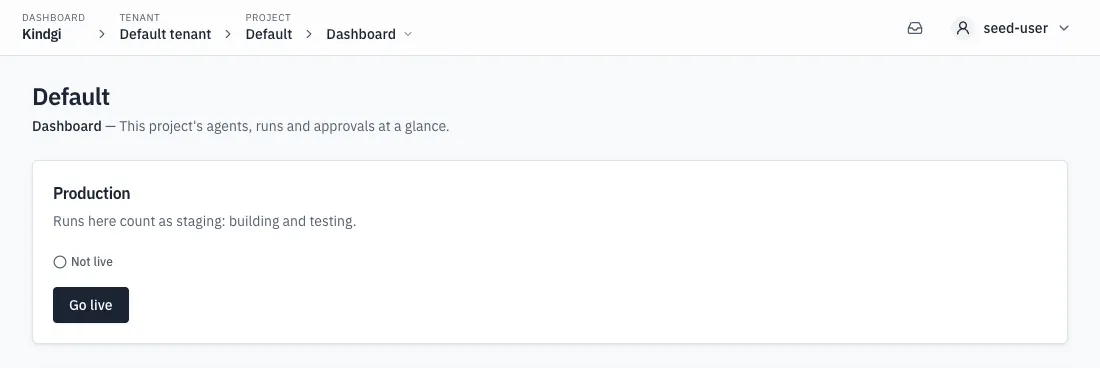
const { productionSince } = await kindgi.projects.setProduction(project.id, true);// …and out again: productionSince is null.await kindgi.projects.setProduction(project.id, false);done = kindgi.projects.production.set(str(project.id), production=True)print(done.production_since)kindgi.projects.production.set(str(project.id), production=False)// in src/main/java/com/acme/app/CustomerOrg.javaProjectProduction done = kindgi.projects().production() .set(project.id(), ProjectProductionBody.builder().production(true).build());System.out.println(done.productionSince());// …and out again: productionSince is null.kindgi.projects().production() .set(project.id(), ProjectProductionBody.builder().production(false).build());// in src/main/scala/acme/app/CustomerOrg.scalaval done = kindgi.projects().production() .set(project.id, ProjectProductionBody.builder().production(true).build())println(done.productionSince)// …and out again: productionSince is null.kindgi.projects().production() .set(project.id, ProjectProductionBody.builder().production(false).build())In the console, a project's Dashboard has a Production card. It shows Live, and since when, or Not live. A tenant admin puts the project in production with Go live, and takes it out with Take out of production, after the console asks ("Go live?", "Take this project out of production?"). While the tenant may not put projects in production, the card says so, and gives a tenant admin See how to go live when the runtime names where to go. A refused switch shows the runtime's own message.
-
Tenant admins only, both ways: anyone else gets
403 permission-denied. -
Setting what's already set changes nothing, and keeps the first
productionSince. Reading the project shows it while it's in production. -
The production gate: a runtime may require the tenant to be allowed to put projects in production, for example once it has paid (
KINDGI_PRODUCTION_GATE=on). Until then, putting one in production is refused with403 production-not-allowed, and the error'sdetails.nextsays where to go when the runtime names it (KINDGI_PRODUCTION_NEXT_URL). A project already in production stays so, and staging keeps working.GET /v1/tenantsays where the tenant stands:productionAllowed, andproductionNextwhile it isn't allowed.{"error": {"code": "production-not-allowed","message": "This tenant can't put projects in production yet. To be allowed: https://platform.example.com/account/billing. Projects not in production keep working as staging.","details": {"projectId": "b3bc8d28-8487-4d90-be57-4e522488f10c","next": "https://platform.example.com/account/billing"},"requestId": "req-04d7cdca-a8ca-4ff6-87ad-9939387223a0"}} -
A limit on projects in production: whoever runs the server can set the tenant's
projectsInProductionlimit (PUT /v1/system/tenants/{tenantId}/limits). With that many of its projects in production, putting another one in is refused with403 production-limit-reached. Itsdetailsgive the limit (projectsInProduction), the count (inProduction), andnextwhen the runtime names it. A project already in production answers its repeat unchanged, and taking one out is never refused. Lowering the limit takes no project out of production: the next one waits until the count is under it.GET /v1/tenantshows the limit inlimits.{"error": {"code": "production-limit-reached","message": "This tenant's limit is 3 projects in production, and it has 3. To put another in production: https://platform.example.com/account/billing, or take one out of production first.","details": {"projectId": "22792d5f-b8cb-4d57-a785-b1f00a57b38e","limit": "projects-in-production","projectsInProduction": 3,"inProduction": 3,"next": "https://platform.example.com/account/billing"},"requestId": "req-b455a4ea-669e-431f-9350-3142a35c991d"}} -
A runtime whose projects can't be put in production answers
501 production-unsupported.
Delete an org
Section titled “Delete an org”Delete an org when its customer leaves. Ask your coding agent: "When a
customer leaves, delete their org." For reference, the code looks like this,
with kindgi and org from the script:
await kindgi.orgs.delete(org.id);kindgi.orgs.delete(str(org.id))// in src/main/java/com/acme/app/CustomerOrg.java, when the customer leaveskindgi.orgs().delete(org.id());// in src/main/scala/acme/app/CustomerOrg.scala, when the customer leaveskindgi.orgs().delete(org.id)- The org is gone: lists leave it out, and fetching it answers
404 org-not-found. Its slug is free at once. Deleting it again changes nothing. - Its projects and teams stay, with no org, and so does their work.
- Its own secrets and their mappings are deleted for good. Its own environments and MCP endpoints are unregistered.
- Writes to it are refused: setting a secret in it, registering an MCP
endpoint in it, and creating or moving a project or a team into it. Creating
or moving a project or a team there answers
404 org-not-found, as for an org that never existed:No org with id "0404cbc2-9612-461d-9997-0cbf1d12341a".
Kindgi keeps the deleted org's record until a
retention policy on org purges it. That
comes after its environments' and MCP endpoints' own records are purged.