

Run on a schedule
This guide runs an agent or a flow at set times, and shows each time it ran, or why it didn't.
A schedule starts a run of an agent or a flow at the times a cron expression gives. Its runs act as whoever made the schedule, checked again at every run. They land in the schedule's project, and each names the schedule that started it.
To start a run when something happens outside instead, such as an order in
your WooCommerce store, use a webhook trigger.
For each new mail in a mailbox, use a mail trigger.
Or have the other system start a run with POST /v1/runs.
Before you start
Section titled “Before you start”- An agent or a flow to run, registered on your runtime, such as
kindgi dev. This guide runs the agentacme.order-desk. - Kindgi 0.2's CLI, in your pack's directory.
writeon the schedule's project andexecuteon the agent or flow, when authorization is on: its runs act as you, unless you make it shared (Run as a service account).
Create one
Section titled “Create one”The schedule says what to run, with what input, and when:
pnpm exec kindgi schedules create --agent=acme.order-desk --cron="0 7 * * 1-5" --timezone=America/Toronto \ --input='{"userMessage":"List the orders still open from yesterday."}' --label="weekday digest"- What it runs:
--agentruns the agent's pinned version, or else its project's Latest.--agent-versionpins one.--flowruns a flow, and needs--flow-version. - Its input: an agent's is
{"userMessage": "…"}, the message each run sends. A schedule for an agent without one is refused when you create it. A flow takes its own input,{}if you give none.--input=@digest.jsonreads a file. - When:
--crontakes a cron expression or a shorthand such as@daily.0 7 * * 1-5is 07:00 on weekdays. The times are in--timezone, an IANA name, UTC by default. The shortest interval is a minute, except underkindgi dev. - Where:
--project=<project-id>is its project. Without it, it's the workspace's default project. --labelnames it, for lists and the console.--allow-unattended=<tool-id>names a tool whose calls in its runs needn't wait for a person's yes, though no person started them, once for each tool. It takesadminon the project (Tools allowed unattended).
It prints the schedule, with its id. To see the next three times it runs,
where <schedule-id> is that id:
pnpm exec kindgi schedules get <schedule-id> --upcoming=3From your app, the clients have the same calls on schedules: register,
list, get, update, pause, resume, runNow, fires,
takeOwnership and unregister (run_now and take_ownership in
Python).
Run as a service account
Section titled “Run as a service account”A schedule's runs act as its owner. A schedule you create is personal: it runs as you, with your connections, and only you or a project admin can change it (Shared or personal). To make it shared instead, so its runs act as a service account, with the account's grants rather than yours, and keep running after you leave, run it as the project:
pnpm exec kindgi schedules create --agent=acme.order-desk --cron="0 7 * * 1-5" --timezone=America/Toronto \ --input='{"userMessage":"List the orders still open from yesterday."}' --project=<project-id> --run-as=project--run-as=projecttakesadminon the project (runtime 0.2.0 or later), as well as what creating the schedule needs. Anyone else withwriteon the project is answered403 permission-denied, "Running a trigger as the project takes a project admin." Its runs act as the project's own service account, made when a trigger is first set to run as the project, with theeditorrole on the project, so they may do what the project's editors may (A project's own account). With an authorization store, an agent or flow the project's editors can't run is refused,409 trigger-owner-cannot-run-target: "The project's own account runs only what the project's editors can: run the trigger as a service account that can, or own it yourself."
For an account of your own instead, one used across projects, with other
grants, or with keys for an app, create a service account, give it the
schedule's project, and name it with --run-as:
pnpm exec kindgi service-accounts create acme-scheduler --description="Runs the morning schedules" --project=<project-id>:editor--project=<project-id>:editor gives the account a role on the schedule's
project that runs agents and flows there. create prints its
serviceAccountId, the <service-account-id> below. To give an account
you already have the project, use kindgi service-accounts grant <service-account-id> --project=<project-id> --role=editor
(Service accounts).
pnpm exec kindgi schedules create --agent=acme.order-desk --cron="0 7 * * 1-5" --timezone=America/Toronto \ --input='{"userMessage":"List the orders still open from yesterday."}' --project=<project-id> --run-as=<service-account-id>- Naming an account needs
act_ason it, which tenant admins hold, as well as what creating the schedule needs. Anyone else is answered403 permission-denied, "You can't name that service account as the trigger's owner.", whether or not the account exists. A tenant admin is told when no service account in the workspace has that id (404 service-account-not-found), it was unregistered (409 service-account-unregistered), or it's a project's own account (409 service-account-project-owned, "That's a project's own account: run a trigger as it withrunAsProject."). - The account must be able to run it, as any owner must. With an
authorization store, that's checked when you name it: an account that
can't run what the schedule runs is refused (
409 trigger-owner-cannot-run-target). Give it the editor role on the target's project, or name another account. Without a store, grants limit nothing, so there's nothing to check. - A new target is checked against the owner too: a change keeps the
schedule's owner, so with a store, a new agent or flow must be one the
owner can run, an account or a person (
409 trigger-owner-cannot-run-target). It isn't checked when you're the owner, nor for an owner that was unregistered or removed. A tenant admin can give an account the role (not the project's own account, whose role is fixed), or a project admin can take the schedule over first. - A fire it may no longer run is
refused: after a grant is taken away, and every fire after the account is unregistered (runtime 0.1.9 or later). Take the schedule over, or delete it. - A schedule made with a token the runtime made at startup is personal
to that start's user. Without
KINDGI_API_TOKENorKINDGI_SEED_USER_ID, each start makes a new token, with a new user, so the schedule stays with a user later starts no longer use. Make such schedules shared with--run-as=project, or setKINDGI_API_TOKENorKINDGI_SEED_USER_ID, so the token's user stays the same across restarts (Point the runtime at it). - To make an existing schedule shared:
kindgi schedules take-ownership <schedule-id> --run-as=project, or--run-as=<service-account-id>for an account of your own. It needs what taking it over yourself needs,adminon the project andexecuteon the agent or flow, andact_ason an account named by id. Its next fire acts as the account. The schedule keeps its tools allowed unattended. - From your app:
runAsProject: trueorrunAsServiceAccountIdonschedules.registerandschedules.takeOwnership(run_as_projectandrun_as_service_account_idin Python). Send one, not both: both is a400. - Each change of owner is recorded as evidence,
trigger-owner-set: a schedule created to run as an account, and every take-over. It saysprojectAccount: truewhen the account is the project's own.
Shared or personal
Section titled “Shared or personal”A schedule a person owns is personal: its runs act as them, with their
connections. One a service account owns is shared: its runs act as the
account, with the company's connections only. Its owner is whoever created
it, or the account named with --run-as, and no change moves it (runtime
0.2.0 or later):
- A personal schedule is its owner's. Only they or a project admin can
change it, pause or resume it, run it now or unregister it. Anyone else
with
writeon the project is answered403 permission-denied, with its owner's name, such as "This schedule is personal: only Sam Lee or a project admin can change it." The owner still needswriteon the project, and its tools allowed unattended always take a project admin. - What a shared schedule runs takes a project admin: its agent or flow
and version, its input, and its tools allowed unattended. Anyone else
with
writeon the project is answered403 permission-denied, "Changing what a shared schedule runs takes a project admin." So a deploy job's key that moves a shared schedule to a new version needsadminon the project too. Its label, its cron line and timezone, its catch-up, overlap and deadline policies, and pausing, resuming, running it now or unregistering it takewriteon the project, as before. - A project admin's change to a personal schedule keeps its owner, so
its runs still act as them, with their connections. Each change, pause,
resume, run-now or unregister by anyone but the owner is recorded as
evidence,
trigger-changed-for-owner. It names who did it and what: the fields changed, and what the schedule ran before and after, never an input's values. A change to its tools allowed unattended keeps its own record,trigger-tools-allowed-unattended-set. The owner isn't told yet: a later runtime emails them. An app built on@kindgi/apican tell them itself, withcreateApp'striggerOwnerNotices: itstellis called after each such change, and after a take-over from them, with aTriggerOwnerNoticethat names the fields changed, never their values. - Only a take-over moves the owner.
kindgi schedules take-ownershipneedsadminon the project. Anyone else is answered403 permission-denied, "Taking a schedule over takes a project admin." A project admin's own take-over makes the schedule personal to them, and one with--run-as(project, or a service account's id) makes it shared (Run as a service account). - Without an authorization store, a project admin here is a tenant admin (Without authorization).
Each time it fires
Section titled “Each time it fires”Once it's created, the schedule fires at its times. Each time the schedule
comes due is a fire. A fire starts one run with
the schedule's input, and the run's trigger names the schedule, the fire
and the time it was for. With several runtime instances on one database,
each time still fires once.
- The previous run is still going, working or waiting for an approval.
With
--overlap=skip, the default, the fire isskipped-overlap.--overlap=allowstarts another run. - The runtime was down when one or more times came due. With
--catch-up=latest, the default, it fires once when it's back, for the latest of them. It says how many it stood in for, asmissedCount.--catch-up=skipfires none of them. A time is missed when the fire would start more than--starting-deadlineseconds late, 600 by default. - Its owner may no longer run it, such as when they lost their role on
the project, or were removed from the workspace, or it's a service account
that was unregistered (runtime 0.1.9 or later).
The fire is
refused, with why. Whoever holdsadminon the project can make themselves its owner:kindgi schedules take-ownership <schedule-id>, or hand it to a service account (Run as a service account). - The person a run would act for is being erased: the fire is
skipped-erasure, and no run starts for them until the erasure completes.
After 5 fires in a row that were refused or failed, the schedule pauses
itself, with the reason in its statusReason. Skipped fires don't count.
Nor does a fire refused for a limit, its note starting rate-limited:,
or one the database was too busy to start (runtime 0.1.9 or later), its
note starting database-busy:. Neither starts the count over.
kindgi schedules resume <schedule-id> clears the pause.
See what it did
Section titled “See what it did”The schedule's history says what each fire did:
pnpm exec kindgi schedules fires <schedule-id> --table--table prints a table. Without it, the same fires come as JSON. The
history is newest first, kept for 30 days. Each row has:
FIRED: when the fire happened.FOR: the time it was for, orrun-nowfor one you started by hand.OUTCOME:started,skipped-overlap,skipped-erasure,skipped,refused,failed, orpendingwhile a fire is starting. A fire isskippedwhen an Improve schedule has too few new corrections since its last Improve run or its month's cap is reached, when its project is suspended, or when its workspace is suspended or starts closing before its run or Improve run has started.NOTEsays which.STARTED: a run's id, orImprove run <id>for an Improve schedule.NOTE: why it was skipped, refused or failed, or how many missed times it stood in for.
Improve on a schedule shows a history.
kindgi runs list --trigger=<schedule-id> lists the runs it started. Each
fire also logs one [schedules] record, with its outcome and run, as
Logs describes.
Find your schedules
Section titled “Find your schedules”pnpm exec kindgi schedules list --status=activepnpm exec kindgi schedules list --project=<project-id>--status=activelists the active ones.--project=<project-id>,?projectId=in the API, lists one project's schedules.
Each schedule's owner has the owner's name now, displayName: the
person's, or the service account's. When it can't be read, only its id is
there. The CLI's RUNS AS column shows that name, else the id, and whether
the schedule is personal or shared, such as "Sam Lee (personal)". A schedule
that runs as its project's own account has isProjectAccount: true in its
owner, and its RUNS AS says "this project (shared)".
With authorization on, the list holds the
schedules in projects you may read, or all of them for a tenant admin. A
page can then hold fewer than --limit and still have more after it. Keep
going with --cursor, set to the previous page's nextCursor, until there's
none.
Run it now, pause it, change it
Section titled “Run it now, pause it, change it”kindgi schedules run-now <schedule-id>runs it once now, outside its schedule. Its next time doesn't move, and a run still going doesn't stop it.kindgi schedules pause <schedule-id>stops it.resumestarts it again from its next time, without running the ones it missed while paused.kindgi schedules update <schedule-id>changes when it runs, what it runs, its input or its policies, with the same flags ascreate. Its owner stays as it is (Shared or personal).--allow-unattendedreplaces its tools allowed unattended, and a new--agentor--flowmust name them again, ornone. A new--improvemust namenone, and comes with its--project.--clear-labeltakes the label off.kindgi schedules unregister <schedule-id>removes it.
Its versions
Section titled “Its versions”Each change to a schedule makes a version of it, which never changes
after (runtime 0.3.0 or later). Creating the schedule makes version 1. An
update that changes something makes the next, and so does a take-over to
another owner. An update that changes nothing makes none, nor do pausing,
resuming, running it now or removing it. A schedule from before versions
has none until its next change or its first fire.
A run uses the newest version when it starts, and keeps it whatever later
changes make: the run's trigger.version names it. So a change or a
take-over reaches the next run that starts, never a run already going.
From your app, newest first:
GET /v1/schedules/{triggerId}/versionspages them (schedules.versionsin TypeScript,list_versionsin Python);GET /v1/schedules/{triggerId}/versions/{version}reads one (getVersion,get_version). A version the schedule doesn't have is404 trigger-version-not-found.
From the CLI:
pnpm exec kindgi schedules versions <schedule-id> --tablepnpm exec kindgi schedules get <schedule-id> <version>versionspages them, with--limitand--cursor. Its table shows each one's number, when it was made, by whom, and why.Kindgistands in theBYcolumn for a version the runtime made itself.get <schedule-id> <version>reads one. Without a version,getis the schedule as it is now, and itsversionis the newest. TheVERSIONcolumn oflist --tableshows it, empty for a schedule that has none yet.
In the console, a schedule's page lists them under Versions (In the console).
Whoever can read the schedule can read its versions. Each one says when it
was made (createdAt), by whom (createdBy), and why (cause:
register, edit or owner for a take-over to another owner). Two causes
name no one, since the runtime made the version itself: first-fire, at
the first fire of a schedule from before versions, and unversioned-edit,
at its next fire or just before an edit or take-over, after a release from
before versions changed the schedule during an upgrade. Its definition is what it ran, with which input, as whom,
when, and with which policies, label and tools allowed unattended: never
its status.
The evidence of a change names the version it made (version), on
trigger-changed-for-owner, trigger-owner-set and
trigger-tools-allowed-unattended-set, and that version has what the
entry leaves out, such as an input's value.
The versions keep every input the schedule has had, so a secret pasted into its input stays in an earlier version after you edit it out: rotate it.
In the console
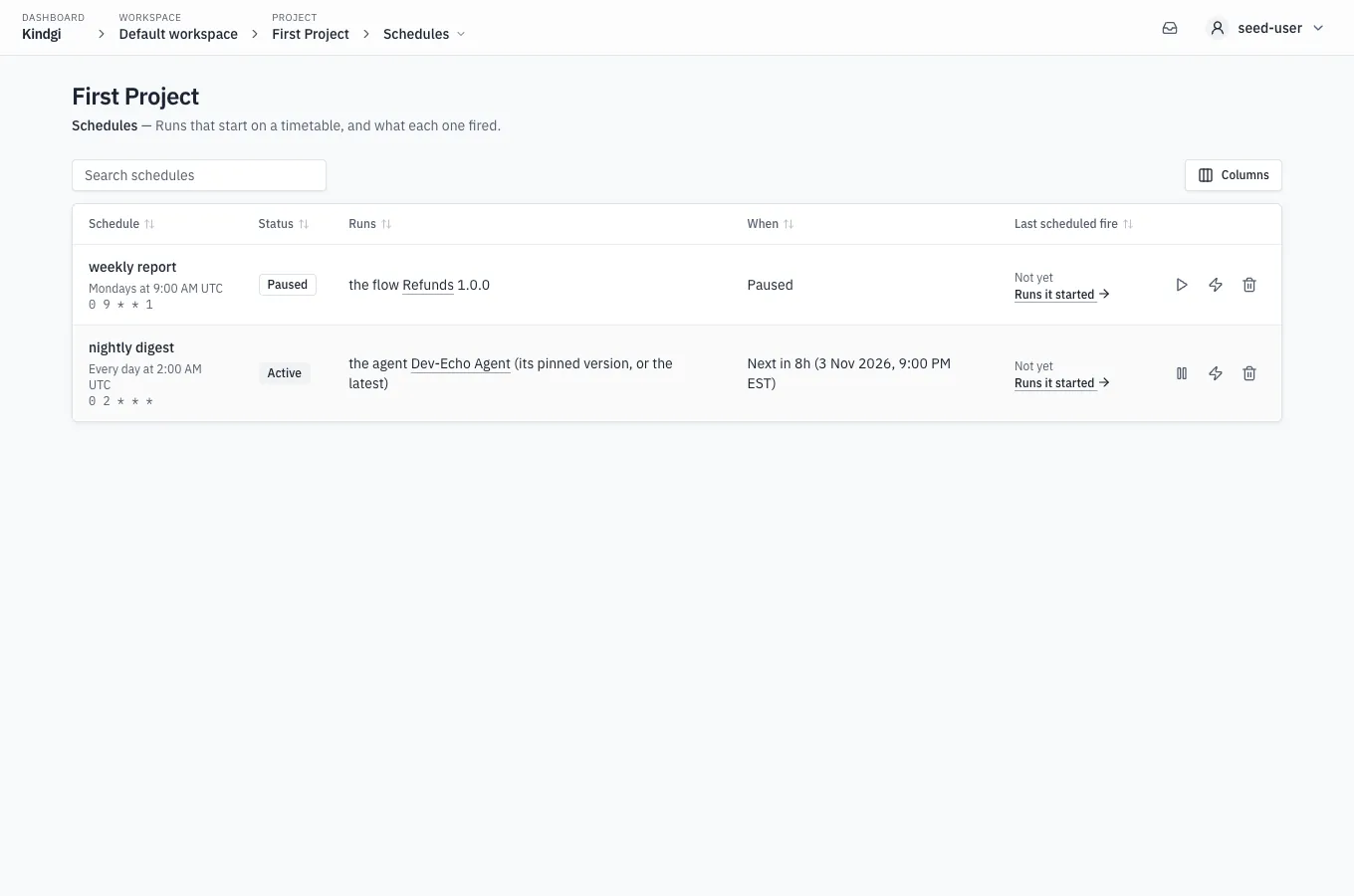
Section titled “In the console”A project's Schedules page lists its schedules. Each row says:
- its label, its cron in words, such as "Every day at 2:00 AM UTC", and the cron;
- whether it's Active or Paused;
- what it runs, such as "the agent Dev-Echo Agent (its pinned version, or the latest)", "the flow Refunds 1.0.0" or, for a schedule that starts Improve runs, the agent it improves;
- when it next fires, such as "Next in 23h (25 Oct 2026, 10:00 PM EDT)", or that it's paused;
- its last scheduled fire, and Runs it started →. A Run now fire is on the schedule's own page, not here.
Each row has Pause or Resume, Run now and Remove. Remove can't be undone: the runs it started stay, and you create it again to start over. Times are on your own clock to start with: Times, in the menu under your name, has Local with your city, such as Local (Toronto), and UTC (The menu under your name). A cron's words keep the schedule's own zone. The list has a search box and sorts by a column's header. Columns chooses which columns it shows. A schedule that starts Improve runs is listed too, and links its agent's Suggested changes page, where Schedule… makes one (Schedule Improve in the console).
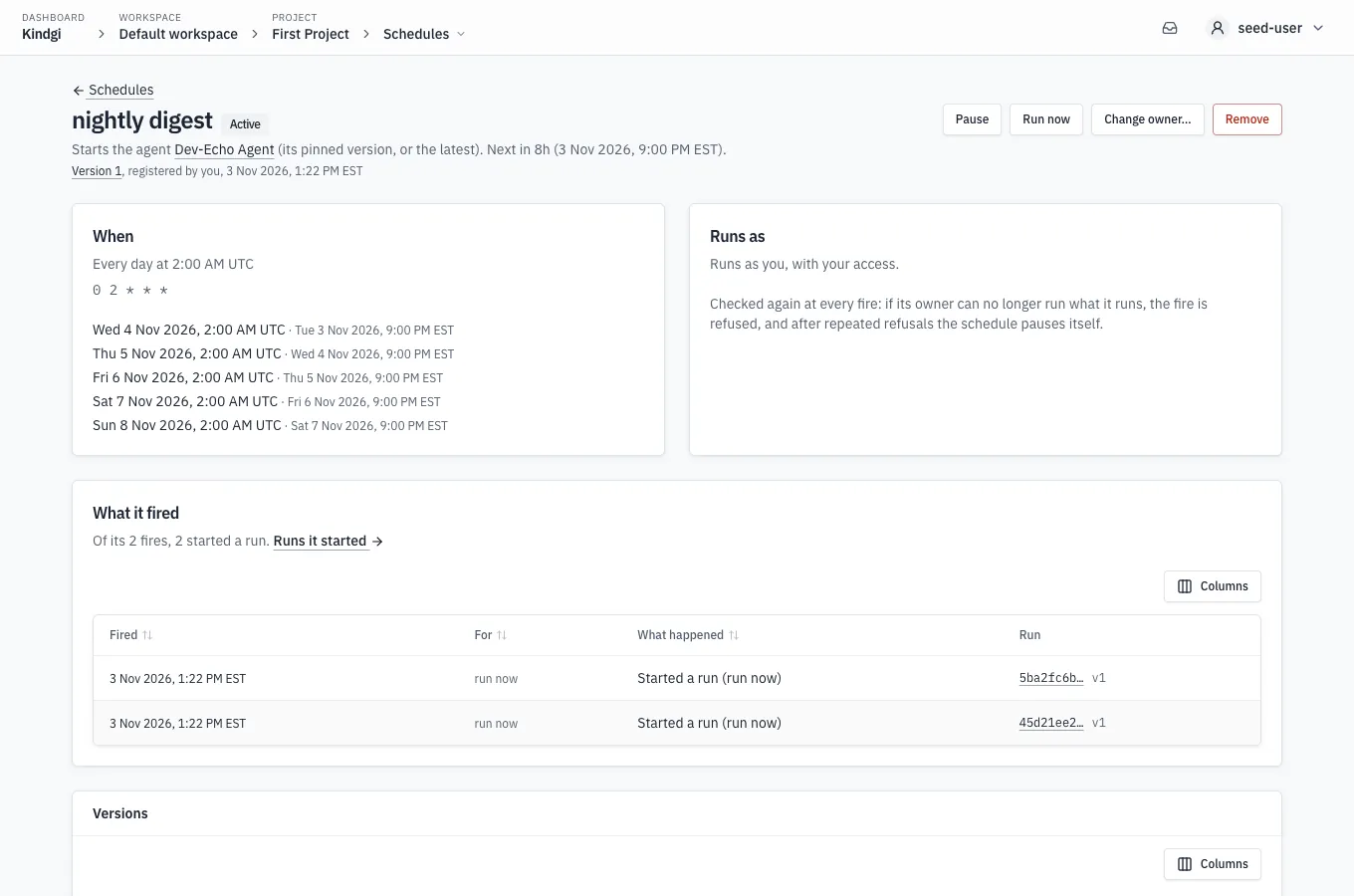
Under a schedule's title, its page says what it starts and when it next fires, or that it's paused, and then its newest version, who made it and when, such as "Version 2, taken over by you, 3 Nov 2026, 1:23 PM EST" (runtime 0.3.0 or later). The version's number opens it under Versions. The page has:
- When: its cron in words and the cron, in the schedule's own zone, and its next five times, each in that zone (named when it isn't UTC) and also on your clock when that reads differently. A paused one says "It doesn’t fire while paused." instead.
- Runs as: whose access its runs have, checked again at every fire, such as "Runs as you, with your access."
- What it fired: a summary, such as "Of its 2 fires, 2 started a run.", and a table of its fires, newest first. Each fire has when it fired, the time it was for, what happened or why the fire was refused, and the run it started, with the version of the schedule it ran, such as "v1" (runtime 0.3.0 or later). A fire started by hand is for "run now", and what happened reads "Started a run (run now)". The table sorts by a column's header, and Columns chooses which columns it shows.
- Versions (runtime 0.3.0 or later): its versions, newest first (Its versions). Each one has its number, when it was made, who made it and how, such as "Registered by acme-scheduler (service account)" or "Taken over by you", or why Kindgi made it itself, and what changed from the version before, such as "Runs as", or "Its first version". A version's number opens it above the table: who made it and when, what changed field by field, and what it ran. The table sorts by Version or When, and Columns chooses which columns it shows.
- Details, folded at the foot of the page: its trigger and schedule ids, its owner, and Tools allowed unattended, the tools its runs call without waiting for a person's yes, or "None" (Tools allowed unattended).
Project editors and up have, on the list and on the page:
- Pause and Resume;
- Run now: "It starts a run now, as its owner, with its usual input. Its next scheduled fire doesn't change.";
- Remove: "Remove this schedule? It stops firing. The runs it started stay, with their record of what started them. It can't be brought back: create it again to start over."
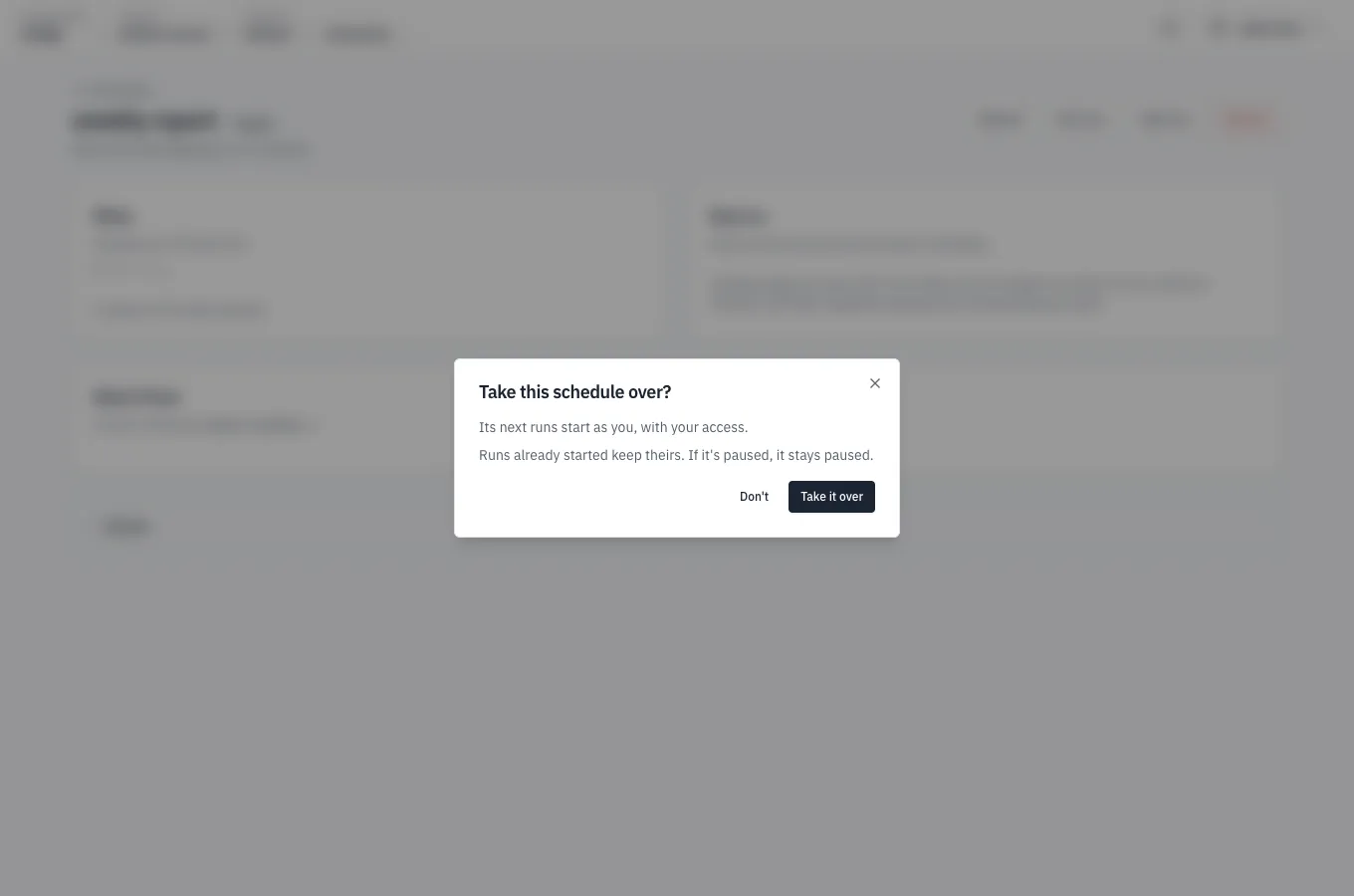
On a schedule that runs as someone else, project admins also get Take over: "Its next runs start as you, with your access. Runs already started keep theirs. If it's paused, it stays paused." On a schedule with tools allowed unattended, the dialog adds that its runs still call them, with the new owner's access.
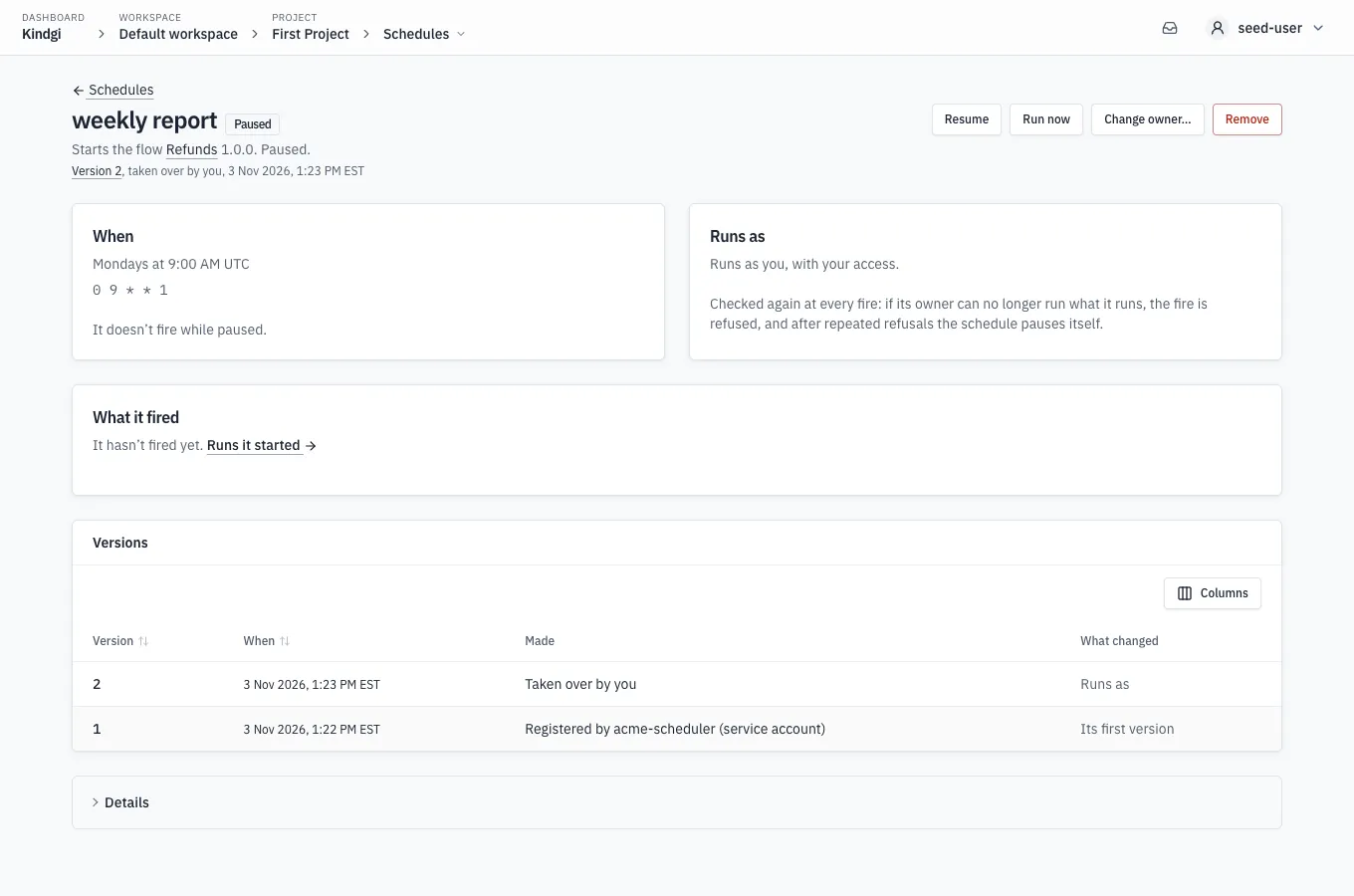
After it, the page says "Runs as you, with your access.", and a paused schedule stays paused:
A tenant admin gets Change owner… instead (runtime 0.1.9 or later),
whenever the workspace has a registered service account the schedule doesn't
already run as. Its Runs
as list has "You — with your access", the take-over above, and each
registered service account, such as "nightly-bot — a service account, with
its own access". The account it runs as now isn't listed, and on a schedule
that runs as you the list starts at "Pick a service account". Under the
list, the dialog says what changes before anything does, such as "Its next
runs act as nightly-bot, with its access, not yours: it needs its own access
to what this schedule starts." After Change owner, the page reads:
"Runs as the service account nightly-bot." Naming an account needs what
--run-as needs, and a refusal shows in the
runtime's words.
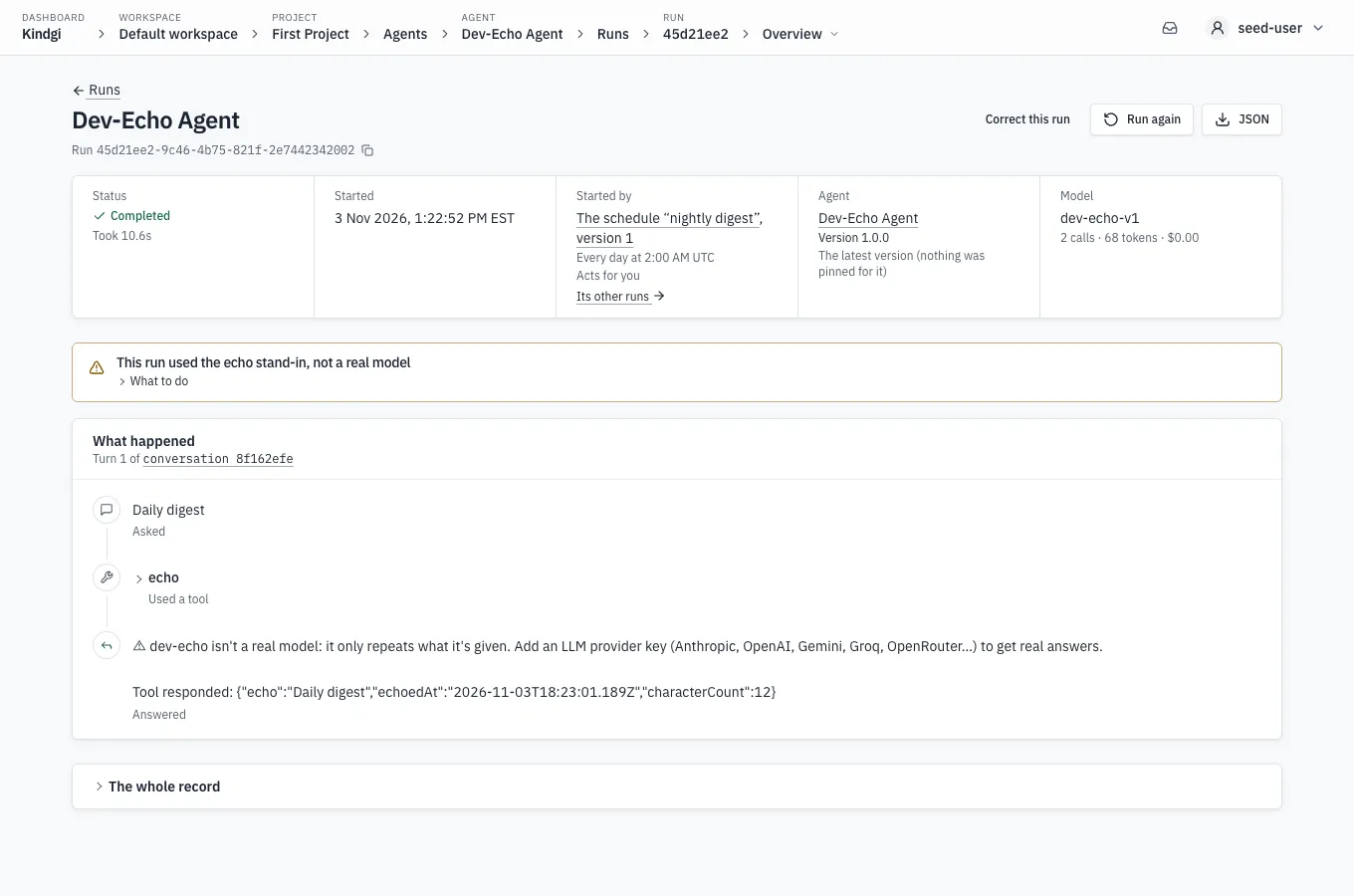
A run a schedule started says so on its page, under Started by: "The schedule “nightly digest”", when it fires, such as "Every day at 2:00 AM UTC", and for a scheduled fire the time it was for. Then whom the run acts for, such as "Acts for you", and Its other runs →, the runs list filtered to that schedule.
Improve on a schedule
Section titled “Improve on a schedule”A schedule can start Improve runs on an agent in a project, instead of agent or flow runs, when there are enough new corrections since the schedule's last Improve run:
pnpm exec kindgi schedules create --cron="0 3 * * *" --improve=acme.rank.scorer --project=<project-id> \ --input='{"corrections": 10, "monthCapUsd": 50}' --label="acme improve"--improve=acme.rank.scoreris the agent to improve.--projectis the project its Improve runs work in, the schedule's own. An Improve schedule needs it.
It prints the schedule, with the defaults applied to its input:
{ "scheduleId": "fa6356f8-3f9f-4ab3-b713-636424a43120", "triggerId": "fa6356f8-3f9f-4ab3-b713-636424a43120", "improve": { "agentId": "acme.rank.scorer", "projectId": "eea49512-700f-4c59-9f66-05ca3b820a3b" }, … "input": { "corrections": 10, "from": "experts", "runCapUsd": 5, "monthCapUsd": 50 }, …}At each fire, it counts the project's open corrections sorted to Improve,
from from, made or sorted since its last Improve run started. With
corrections of them, and room left under the month's cap, it starts an
Improve run that takes every open one, as one you start does. Otherwise the
fire is skipped, and its note says which was short.
Its input, --input, takes:
corrections: how many new corrections since the schedule's last Improve run start one, 5 by default (1 to 1000).from: whose corrections count,experts(corrections from expert groups, the default) oreveryone. With no expert group, no correction counts as an expert's, and every fire isskipped: useeveryone. Witheveryone, your users' corrections, made with aparticipantId, count only while the project sorts them like the others (sortEndUserCorrections). An unsorted one never counts. Once the setting is off, none counts, not even one sorted while it was on, by the project or by a person.runCapUsd: the most one Improve run's search may cost, in US dollars, 5 by default and at most 100. It's never more than what's left of the month's cap.monthCapUsd: the cap on what the agent and project's Improve runs cost in a calendar month (UTC), by hand or by the schedule, in US dollars: 20 by default and at most 1000. It holds their searches, not their proofs, so a proof can take the month past it, as the month's cap below says.tiersandmodel: what each Improve run tries, and the model that drafts new wording, as--tier,--providerand--modeldo for a start. Left out, every tier that's ready, and the provider and model the version's model-settings block names; with neither, the prompt tier isn't ready.
A schedule's Improve runs rank candidates that pass as many cases by
passRate, the default for one you start.
It's kept with the defaults applied. An option it doesn't have is refused, naming it.
Its first fire, started with run-now, started an Improve run, and the next
came while that Improve run was still running. Its history, newest first:
pnpm exec kindgi schedules fires <schedule-id> --tableFIRED FOR OUTCOME STARTED NOTE──────────────────────── ─────── ─────────────── ──────────────────────────────────────────────── ──────────────────────────────────────────────────────────────────────────────────────────────2026-10-09T13:25:40.917Z run-now skipped-overlap Improve run 3599f4ab-8788-433f-af66-7990ddfa9f47 on the agent in the project is still running.2026-10-09T13:25:40.341Z run-now started Improve run 3599f4ab-8788-433f-af66-7990ddfa9f47- One per agent and project. A second Improve schedule for the same agent
and project is refused with
409 schedule-exists, naming the first (details.scheduleId): change that one instead. - One Improve run at a time: while the agent's previous Improve run in the
project is still going, a fire is
skipped-overlap. - The month's cap: once the agent and project's Improve runs this month
have cost
monthCapUsd, the schedule waits for the next month. It staysactive, its read says until when (pausedUntil, the 1st of next month, UTC, withpausedReasonmonth-cap), and its fires until then areskipped, with a note that startsmonth-cap:and says when it runs again. Only the schedule stops at the cap: an Improve run you start still starts, and counts toward it. The cap holds each Improve run's search, not its proof: an Improve run checks its cost before each run of its search, and proves its best change after the search, uncapped. So a month's Improve runs can go over the cap, by a run on the test cases or by a proof. - Its owner keeps
publishon the agent. If the owner loses it, the schedule is paused at its next fire, withstatusReasonowner-lost-publish. Saving it with a new owner (take-ownership) resumes it. - At most once an hour.
- Who may change it: registering one takes
writeon the project, as any schedule does, andpublishon the agent, as starting an Improve run does. So does changing, pausing, resuming, firing or unregistering one. Anyone else's change to a personal one also takes a project admin, as changing what a shared one runs (its agent, input or tools) does. Saving one with an agent or a flow in place of the Improve target takes what registering that takes. - Who may stop it: an admin of its project may also pause or unregister
one without
publishon the agent, as its Improve runs count toward the project's month. Changing, resuming or firing one still takes both. - Who may read it: reading one, or its fires, takes
readon its project or on the agent, as reading an Improve run does. The list shows a schedule only to readers of its project: withreadon the agent alone, get it by its id.
list --table shows each one's agent and project under RUNS, such as
improve acme.rank.scorer (project <project-id>), and under STATUS a
schedule at its month's cap, such as
active, waits until 2026-11-01T00:00:00.000Z (month-cap), or one paused for
its owner, paused (owner-lost-publish). An Improve schedule made before
Improve schedules worked in a project shows (no project): its fires are
refused until you save its target with the project,
kindgi schedules update <schedule-id> --improve=<agent-id> --project=<project-id>.
--project is the schedule's own project: an update with another is refused.
A fire that started an Improve run names it, as improveRunId. The Improve run
names the schedule and the fire, as trigger. When the Improve run suggests
a change, it asks for the review at once, so the suggested change waits in
reviewers' approvals.
Schedule Improve in the console
Section titled “Schedule Improve in the console”Schedule…, on an agent's Suggested changes page, makes the same
schedule in the console, for that agent. It asks for what --input and
the flags take, with the same defaults: what to improve (settings values, or
the agent's instructions with the model that drafts them), how many new
corrections start an Improve run and whose, what one Improve run and the month
may spend, when (a cron, and a time zone, UTC to start with), and a label.
Under the cron it puts the cron in words, and it holds back one that fires
more than once an hour: "At most once an hour: name one minute (0 * * * * is
every hour). Each fire may start an Improve run, which costs money."
Create makes it, running as you, and opens its page. Under kindgi dev,
Schedule… is off, and the page says why: kindgi dev runs while you
work, not around the clock, so a schedule is for a deployed runtime. A
schedule's fire starts no Improve run there: start Improve by hand, as
Under kindgi dev shows.