

People, API keys and service accounts
When you finish this page, your deployment's people have their own sign-ins and API keys, and your pipelines have service accounts. With authorization on, each has a role, with only what they need. You can also remove someone in one step.
A workspace has people, each with their own sign-in and API keys. It also
has service accounts, which act for a pipeline or an app. A tenant
admin adds them. With authorization on, what each may do is kept in
OpenFGA, and the first tenant admin is the runtime's seed user:
KINDGI_SEED_USER_ID, or the API token's user. The runtime makes the seed
user a tenant admin at every start. On a runtime that serves one workspace,
KINDGI_ADMIN_EMAILS names more, who are tenant admins from their first
sign-in (Tenant admins by email). Without
authorization, roles aren't checked
(Without authorization).
Before you start
Section titled “Before you start”- For roles: authorization on for your runtime (Run with authorization). Without it, see Without authorization.
- You're a tenant admin, such as the seed user.
- The
kindgiCLI reaches your runtime as you, with the runtime's address exported asKINDGI_API_URLand your API key asKINDGI_API_TOKEN. Thecurlexamples read the same two variables. - For
kindgicommands: Kindgi 0.8's CLI, which runs from any folder asnpx --yes @kindgi/cli@0.8(Install). Inside a pack project,pnpm exec kindgiruns the project's pinned CLI instead.
Who can do what
Section titled “Who can do what”With authorization on:
- A tenant admin does everything in the workspace. They add and remove people, make keys for anyone, and change workspace-wide settings: providers, policies, signing keys, deployments and identity providers.
- A tenant member reads the workspace's settings, not its projects: its providers, policies, adapters and signing keys. Everyone you add is one. A deployment is read in the project it serves: a member lists and reads only those in projects they read. One deployed without a project is the default project's.
- A role on a project gives the work in it: its agents, runs and
conversations. The roles are
owner,admin,editor,runnerandviewer(Project memberships). Arunnercan run: start runs of the project's agents and flows, use their tools inside those runs, stop their own runs, and keep their own schedules. - A service account has only what it's granted. It isn't a tenant member unless you make it one.
- A capability is needed on top of the role to trust signing keys
(
signing-keys:write) and to write secrets, environment values and the workspace's config entries (secrets:write,env:writeand the like). A workspace's first admin, the person it was created with on a runtime serving many tenants, holds every one butsecrets:reveal, and no other person holds any unless the runtime's operator gives them the same (What only the runtime's token does). A key carries those it was made with (API keys).
Lists hold only what the caller may read.
Without authorization
Section titled “Without authorization”A runtime without an authorization store, with no KINDGI_OPENFGA_API_URL,
suits one workspace whose people trust each other: one operator, or a small
team. kindgi dev runs this way. Serving many tenants needs authorization:
with KINDGI_TENANCY=multi, the runtime doesn't start without a store.
- Everyone it lets in works in every project, by a sign-in or a key: its agents, runs, conversations and deployments. Writing secrets, environment values and the workspace's config entries still takes its capability: a key made with it carries it, and a sign-in carries none (API keys).
- Workspace settings are the tenant admin's. Anyone reads the workspace's
name, policies, model providers, adapters, identity providers and signing
keys, and only the tenant admin changes them. Webhook endpoints and
compliance evidence are the tenant admin's to read too, as are people, keys
for others and service accounts. Anyone else gets
403 permission-denied. - The tenant admin is whoever uses the runtime's API token, or an
adminkey made for the seed user, and a console signed in with either (Signing in with an API token). Someone signed in through an identity provider or an emailed link isn't one, the seed user included. - Roles aren't checked. A project role you record, and a service
account's grants, give nothing more here. Making a person a tenant admin
answers
501 person-grants-unsupported. - Neither tenant admins by email nor domain join works here. The
runtime refuses
KINDGI_ADMIN_EMAILSat start without a store, since a person who signs in can't be a tenant admin. Setting an identity provider'sjoin: domainanswers409 domain-join-needs-authorization, since a joiner would work in every project. Add people one by one, or run with authorization for either. - Schedules and webhook triggers keep to their owners (runtime 0.2.0 or later). Only a tenant admin changes, pauses, fires or unregisters someone else's personal one, changes what a shared one runs, sets one's tools allowed unattended, or takes one over (Shared or personal).
Run with authorization when people need different access, or more than one person needs to be a tenant admin.
Add a person
Section titled “Add a person”Adding a person gives them a place in the workspace, so they can sign in and get keys:
npx --yes @kindgi/cli@0.8 people add --name="Sam Rivera" --email=sam@acme.example--nameis their name, as people see it.--emailis the email they sign in with. It's unique among the workspace's people. A person added with one is invited.--no-invitedoesn't email them the invitation, for when you tell them yourself. They're still invited.
It prints the new person, and says on stderr what being added gives them. With sign-in off, nobody is invited:
{ "userId": "002ee784-0b05-47fb-918e-34d192be94c1", "displayName": "Sam Rivera", "email": "sam@acme.example"}Added to the workspace: they can read its settings. With authorization on, give them a project role to work on its agents and runs; without it, they can work in every project already. Then their first key: kindgi tokens create --for=user:002ee784-0b05-47fb-918e-34d192be94c1An email another of the workspace's people already has is refused with
409 identity-user-email-taken. Other workspaces' people don't count: one
email can be a person in several workspaces, added to each by one of its
admins. At sign-in, they
choose a workspace.
With authorization on, give them a role on a project next. A tenant admin, or an admin of that project, adds them by email or by id:
curl -X POST "$KINDGI_API_URL/v1/projects/<project-id>/memberships" \ -H @<(printf 'Authorization: Bearer %s\n' "$KINDGI_API_TOKEN") -H 'content-type: application/json' \ -d '{"email":"sam@acme.example","role":"editor"}'<project-id>is the project's id.emailnames the person.userIdnames them by id instead.roleis their role on the project:owner,admin,editor,runnerorviewer.
The email matches whatever its case, and the answer names the person. Here a
project admin added a viewer as GUS@acme.test:
{"projectId":"ea6e0f95-301e-4017-b2d4-82590cc6ec64","userId":"74e4beb8-6aa4-47ef-9f2a-e0245ee62343","role":"viewer"}Someone who isn't one of the workspace's people, or who was removed, isn't added:
{"error":{"code":"identity-user-not-found","message":"No one with email \"outsider@example.com\" is a member of this workspace","requestId":"req-304865e8-9499-48cd-afca-2f8c87e8f05d"}}In the TypeScript client, it's
projects.memberships.add(projectId, { email, role }). They can then
sign in to the console, or use a key you make them.
Their invitation
Section titled “Their invitation”Where people sign in to the console, a person added with an
email is invited: the runtime emails them an invitation, through the
sign-in email sender you set up. It
says who added them, to which workspace, and when it expires, and links to
the console's sign-in page with their email filled in. The link holds no
secret and signs no one in: they sign in on that page, a way the deployment
allows, with that email. From a runtime at http://localhost:18096, an
invitation read:
From: Kindgi <sign-in@acme-live.example>Subject: You're invited to Default workspace on Kindgi
seed-user added you to Default workspace on Kindgi.
Sign in with this email address here:
http://localhost:18096/console/login#email=ann%40acme.test
This invitation expires on 2026-10-24 15:06 UTC.If you weren't expecting it, ignore this email.
The invitation is open for 7 days from the add, or from the last time it
was sent. It's pending until their first sign-in, then it's gone: they've
joined. Once the 7 days pass with no sign-in it's expired, and every way
in refuses them, an identity provider too, until a tenant admin sends it
again. A key you made them still works. With sign-in off, nobody is
invited: people work with the keys you make them.
With sign-in on, kindgi people add prints the invitation, and says on
stderr whether it went out:
{ "userId": "f9054f5f-3a4b-40af-8aa9-317c32eead7c", "displayName": "Ann Lee", "email": "ann@acme.test", "invite": { "state": "pending", "expiresAt": "2026-10-24T15:06:45.522Z", "sentAt": "2026-10-17T15:06:45.552Z" }, "inviteEmail": { "sent": true }}Added to the workspace: they can read its settings. With authorization on, give them a project role to work on its agents and runs; without it, they can work in every project already. Then their first key: kindgi tokens create --for=user:f9054f5f-3a4b-40af-8aa9-317c32eead7cThe invitation went to ann@acme.test: they sign in with it before it expires (2026-10-24T15:06:45.522Z).The person's record keeps invite until their first sign-in, with a
state of pending or expired. sentAt is when it was last emailed;
it's absent when it never was. People added before the runtime invited,
the people the runtime adds itself (such as the seed user), and people with
no email aren't invited, so they have no invite.
When the invitation wasn't emailed, inviteEmail.reason says why, and so
does the line on stderr:
| Reason | Why it wasn't emailed |
|---|---|
not-requested |
--no-invite (sendInvite: false). |
not-configured |
The runtime has no sign-in email sender, so there's no emailed link: they sign in through Google, Microsoft, GitHub or the workspace's identity provider, with that email. |
send-failed |
The mail server refused it or didn't answer. |
capped |
The workspace, or the whole deployment, has sent as many invitation emails as it may in 24 hours (below). |
no-email |
They have no email, so they aren't invited. |
With --no-invite, the line reads:
Invited, not emailed (--no-invite): tell them to sign in with bo@acme.test before it expires (2026-10-24T15:06:46.142Z).Unless it's no-email, they're invited all the same: tell them to sign in
with their email, or send it again. To send it again, open for 7 days from
then:
npx --yes @kindgi/cli@0.8 people invite <user-id>Someone who has joined, or was never invited, is refused with
409 identity-user-not-invited. Sending one person's again within a
minute, more than 5 times in 24 hours, or past the invitation emails the
workspace, or the whole deployment, may send in 24 hours, is refused with
429 invite-capped and a Retry-After, and changes nothing.
In 24 hours a workspace sends at most 100 invitation emails, or 10 while it
isn't allowed production
(with KINDGI_PRODUCTION_GATE set to on). The whole deployment sends at
most 500 by default, all its tenants together
(KINDGI_AUTH_INVITE_EMAIL_DAILY_CAP).
The people invited who haven't signed in yet, with a STATE of pending or
expired:
npx --yes @kindgi/cli@0.8 people list --pending --tableHere Lee Park's invitation expired before they signed in:
ID NAME EMAIL STATE ADDED──────────────────────────────────── ──────── ───────────── ─────── ────────────────────────8e4e2291-7af5-42cd-8799-e4a7b5dc8c03 Lee Park lee@acme.test expired 2026-10-08T15:06:49.559Zf9054f5f-3a4b-40af-8aa9-317c32eead7c Ann Lee ann@acme.test pending 2026-10-17T15:06:45.522Zd94a41a9-939d-43a3-89ac-84406d0cffed Bo Chen bo@acme.test pending 2026-10-17T15:06:46.142Zbd6453a9-b1f5-4cba-89f2-a172675bdee6 Kim Ito kim@acme.test pending 2026-10-17T15:06:47.404ZTo take an invitation back, remove the person: in the console, Revoke the invitation on their page.
In the TypeScript client, users.create(spec) answers with the person
added; its inviteEmail says whether the invitation was emailed, and is
absent on a runtime that doesn't invite. users.resendInvite(userId)
sends it again, and users.list({ pending: true }) lists the invited.
Let people at your domain join
Section titled “Let people at your domain join”Rather than add each person, a tenant admin can let everyone at the company's email domain join the workspace (runtime 0.7.0 or later, with an authorization store). Someone who signs in with a mailbox at an allowed domain, by a way that proves it, and whom the workspace doesn't have yet, is offered the workspace and joins with a press:
- The ways that prove a mailbox are a Google Workspace account at that
domain, a Microsoft work account, and the emailed link. GitHub never
counts. A sign-in through the workspace's own identity provider follows
that provider's own
joinsetting instead (Or let your colleagues join). - A joiner gets the domain's role:
viewer(the default) orrunner(who also runs its agents and flows) on the default project, ornone, a member only. Never tenant admin. TheircreatedByisemail_domain:<domain>. - Someone removed stays out. Stopping allowing a domain stops new joins; the people who joined stay.
- Never a public mailbox domain, such as gmail.com or outlook.com
(
400 join-domain-public), and never a domain the operator verified for another workspace (409 join-domain-verified-elsewhere).
The domain's own mailbox is the proof. So allowing a domain, or giving its
joiners more, takes a tenant admin whose sign-in proved an email at
exactly that domain (no subdomain, no parent), by one of those ways. An API
key or a service account can't. Anyone else is refused with
403 join-domain-not-yours, and the refusal is recorded. Lowering the
role, or stopping allowing the domain, takes any tenant admin, a key too.
The deployment's operator can always do both.
| Route | What it does |
|---|---|
GET /v1/auth/join-domains |
The allowed domains, the first allowed first. Anyone in the workspace may read them |
POST /v1/auth/join-domains |
Allows one: {"domain": "acme.com", "role": "viewer"}. 409 join-domain-exists if it is already |
PATCH /v1/auth/join-domains/{domain} |
Changes what joiners get: {"role": "runner"}. The same role writes nothing |
POST /v1/auth/join-domains/{domain}/unregister |
Stops allowing it |
A domain is stored lower case, as its A-label: bücher.de is
xn--bcher-kva.de. In the TypeScript client, it's auth.joinDomains:
list(), allow({ domain, role }), update(domain, { role }) and
unregister(domain).
From the CLI:
pnpm exec kindgi sign-in join-domains list --tablepnpm exec kindgi sign-in join-domains allow acme.com --role=runnerpnpm exec kindgi sign-in join-domains remove acme.comThe CLI signs in with an API key, which proves no email, so allow takes
the operator's key. On a runtime serving one tenant, make one with the
deployment's own token,
kindgi tokens create --role=admin --capability=kindgi:system, and sign in
with it (kindgi auth login --token). A tenant admin allows their own
domain from the console's Sign-in page instead. Anyone's key in the
workspace can list, and any tenant admin's can remove.
Where the operator manages sign-in (KINDGI_AUTH_TENANT_PROVIDERS=off),
allowing a domain or giving joiners more takes the operator's credential,
and a tenant admin's is refused with 403 join-domains-operator-managed.
On a runtime serving many tenants, the operator manages each tenant's
domains on /v1/system/tenants/{tenantId}/join-domains, with a system key
holding system:join-domains
(The operator's keys).
Make someone a tenant admin
Section titled “Make someone a tenant admin”A tenant admin can do everything in the workspace. grant makes someone one,
and ungrant takes it away:
npx --yes @kindgi/cli@0.8 people grant <user-id> --tenant-adminnpx --yes @kindgi/cli@0.8 people ungrant <user-id> --tenant-admin<user-id> is the person's id, as kindgi people add printed it. The grant
holds from their next request.
kindgi people grants <user-id> --table lists what someone holds, as
granted directly: tenant admin, tenant member, project and team roles, a
reviewer role, and the capabilities they hold. What a team or an org gives
isn't expanded. Sam, newly added,
holds only the tenant membership:
WHERE ROLE────── ───────────────────────────tenant member (reads its settings)Everyone's grants come in one read: the people list takes include=grants.
In TypeScript, that's users.list({ includeGrants: true }), and in Python
identity.users.list(include="grants"). Each person then carries grants,
the same shape as their own grants read. A runtime without an authorization
store lists the people without them.
Taking tenant admin away is refused in three cases:
409 last-tenant-admin: they're the only one. Make someone else a tenant admin first.409 seed-user-admin: they're the seed user, whom the runtime makes a tenant admin again at every start. UnsetKINDGI_SEED_USER_IDand restart the runtime first.409 listed-admin: the server'sKINDGI_ADMIN_EMAILSnames them, and every start makes them a tenant admin again. Take their address off the list and restart the runtime first (Tenant admins by email).
If the first admin stops being a tenant admin, the capabilities they held are revoked, and the audit entry lists them. A key acts as the person or service account it's for, whoever made it. So their own keys keep their capabilities, but until the first admin is a tenant admin again, those keys can't trust signing keys, and can't change secrets or environment values where they aren't an admin. A key they made for another tenant admin, or for a service account that's one, keeps working.
Making the first admin a tenant admin again doesn't give their own
capabilities back. Another tenant admin who holds them can give them back
(Give a tenant admin capabilities).
A key that carries capabilities also makes new keys with them
(kindgi tokens create --capability=<cap>, in API keys):
their own keys, once they're an admin again, or one made for another
tenant admin or a service account that's one. Before you revoke the last
key that carries a capability, or let it expire, make its replacement with
it. If no tenant admin holds a capability and no key in the workspace
carries it, contact support. On a runtime you run yourself,
kindgi-runtime tenants give-capabilities
gives a tenant admin the first admin's capabilities again.
Make the key that carries these capabilities for a service account that's a tenant admin, not for the first admin. It keeps working if the first admin stops being a tenant admin or is removed, and as a tenant admin, whoever holds it can make new keys with its capabilities:
npx --yes @kindgi/cli@0.8 service-accounts create acme-admin --description="Trusts signing keys and sets secrets" --tenant-adminnpx --yes @kindgi/cli@0.8 tokens create --for=sa:<service-account-id> --role=admin --capability=signing-keys:write --capability=secrets:write --label=admin --expires=90dIt can trust signing keys, so keep it out of CI: trusting CI's signing key is a person's step, and CI's keys are each made for one job (The keys CI uses). On Kindgi Cloud, CI's deploy key is a tenant admin's key too, with no capability. It can still promote to prod, replace release gates, and make service accounts and keys, so main's own protection is what guards prod there (The deploy key).
Someone who signs in
Section titled “Someone who signs in”To make someone who signs in to the console a tenant admin, through your workspace's identity provider, Google, Microsoft, GitHub or an emailed link:
-
Run with an authorization store (Run with authorization), with
KINDGI_OPENFGA_API_URLset. Without one, nobody who signs in is a tenant admin: see below. -
Add them, with the email they sign in with:
Terminal window npx --yes @kindgi/cli@0.8 people add --name="Sam Rivera" --email=sam@acme.exampleSigning in never adds anyone. Someone who hasn't been added is refused with
not-invited(Who gets in). Where the runtime invites, they sign in within 7 days (Their invitation). -
Make them a tenant admin, as the seed user, with the runtime's API token, or as any tenant admin.
<user-id>is the idpeople addprinted:Terminal window npx --yes @kindgi/cli@0.8 people grant <user-id> --tenant-adminIn the console, that's Tenant admin: they administer the whole workspace in Add a person, or Make tenant admin under Tenant admin on their page.
-
They sign in. From their next request on, they administer the workspace: every project, its people, keys and service accounts, and its settings.
They hold no capability yet, so they can't trust signing keys, write secrets or change environment variables. To give them those, see Give a tenant admin capabilities and What only the runtime's token does.
Without an authorization store, it can't be done. people grant
answers 501 person-grants-unsupported, and their page in the console says
"This runtime runs without an authorization store, so it doesn't read
anyone's roles: every caller with the runtime's token is an admin."
Without authorization says who the tenant admin is then.
Don't set KINDGI_SEED_USER_ID to their id. Without a store, it gives
their own sign-in nothing. With one, it makes them a tenant admin, but:
- the runtime's token then acts as them, so the access audit records everything done with the token as theirs;
- whatever the earlier seed user was given, such as project roles and keys, stays with that user;
- taking tenant admin from them is refused with
409 seed-user-adminfor as long as the setting names them.
Use people grant instead.
On a runtime serving many tenants, the runtime's token acts in no
workspace, so it's no workspace's admin. A workspace's first admin is the
firstAdmin it was created with, or one that kindgi-runtime tenants make-admin makes (Create a tenant).
They make the others, as above. Those others hold no capability:
kindgi-runtime tenants give-capabilities, run with the workspace's id,
gives one what a workspace's first admin holds
(What only the runtime's token does),
and a tenant admin who holds a capability can give it
(Give a tenant admin capabilities).
What only the runtime's token does
Section titled “What only the runtime's token does”On a runtime serving one tenant, the runtime's API token acts as the seed user. It's a tenant admin, and it holds more than any person you make one:
- Every capability,
secrets:revealamong them. A person you make a tenant admin holds none until one is given them. So their sign-in can't trust signing keys, store, rotate or revoke secrets, or change environment variables, and the keys they make carry none either. Such a request is refused with403, naming the capability: "Bearer token is missing thesecrets:writecapability required for this route." - Reading secret values (
secrets:reveal). No person is ever given it, so only a key that carries it does that. - The system keys,
/v1/system/keys, such as the license renewal's (A key for the counts). Every other key and sign-in is refused there with403 system-principal-required. - The whole license, with its renewal, for the token, or a key made
with
kindgi:system. A tenant admin reads only its countdown, and only while the deployment serves just this tenant (What you may do,licenseOperatorOnly). - Identity providers, when you manage sign-in yourself
(
KINDGI_AUTH_TENANT_PROVIDERS=off). Only the token, or a key made withkindgi:system, adds, changes or removes them (Who manages a workspace's identity providers).
To give the capabilities to a person who's a tenant admin, choose one of three ways:
-
A tenant admin who holds them gives them, with the API (Give a tenant admin capabilities): any their own person holds, but
secrets:reveal. -
kindgi-runtime tenants give-capabilities(runtime 0.1.8 or later) gives them what a workspace's first admin holds: every capability butsecrets:reveal. Their sign-in then carries those capabilities, and the console offers them on the keys they make. It runs against the runtime's database and authorization store, with yourkindgi.env. The tenant id is in the runtime's startup output, on itsTenant:line. Run it with--dry-runfirst, which lists each capability they don't hold yet and changes nothing:Terminal window docker run --rm --network kindgi --env-file kindgi.env \registry.kindgi.com/kindgi/runtime:<version> \tenants give-capabilities <tenant id> --person <user-id> \--reason "Sam deploys and sets secrets" --dry-run<version>is the version your runtime runs. Another version refuses when the database's migrations aren't its own, and changes nothing. For someone who holds none yet, the dry run prints:tenants give-capabilities --dry-run: tenant <tenant id>, person <user-id>, a tenant admin. Nothing was changed.would give: env:writewould give: secrets:revokewould give: secrets:revoke:hardwould give: secrets:rotatewould give: secrets:writewould give: signing-keys:write- Someone who isn't a tenant admin is refused, and nothing changes. So make them a tenant admin first.
- What it gives is in the workspace's audit log, as
person-capabilities-grantedbysystem, with your--reason. - If they stop being a tenant admin, what they hold is taken away, as for the first admin (above).
-
A key from the token.
kindgi tokens create --for=user:<user-id> --role=admin --capability=<cap>, made with the runtime's token, carries whichever of its capabilities you name,secrets:revealtoo (API keys). It's for the API, the CLI and the SDKs. Their sign-in still carries none. Don't namekindgi:system. A key with it reads the whole license and manages the identity providers as the token does. On a runtime serving many tenants, every key loses it.
Give a tenant admin capabilities
Section titled “Give a tenant admin capabilities”A tenant admin gives another tenant admin capabilities their own person
holds now, such as env:write or signing-keys:write. What their key was
made with never counts, so a service account or a system key gives none.
Make the person a tenant admin first.
In TypeScript, that's users.giveCapabilities(userId, ['env:write']) and
users.takeBackCapability(userId, 'env:write'), and in Python
identity.users.give_capabilities and
identity.users.take_back_capability. Over HTTP, it's
POST /v1/identity/users/{userId}/capabilities with
{"capabilities": [...]}, 1 to 32 of them, and
DELETE /v1/identity/users/{userId}/capabilities/{capability}. Each answers
with the person's grants after, capabilities included.
A sign-in session holds what its person holds, read on each request, so a change reaches it at once. An API key keeps the capabilities it was made with: to take one away from a person's keys too, revoke those keys.
A tenant admin takes back only what their own person holds. A person may
drop their own capability with a full API key or session, but not with a
member one, nor with one limited to a project. The last holder's may go
too, so before you take back the last one, give it to someone else first.
One the person doesn't hold is left as it is.
Giving or taking back is refused in these cases, and nothing changes:
403 permission-denied: you aren't a tenant admin. Taking back your own needs no admin, but it does need a full API key or session: amemberone, or one limited to a project, is refused, and the message names which.403 capability-not-held: your own person doesn't hold one of them now. The message names the ones you lack. Taking back one you don't hold is refused the same way, unless it's your own.403 capability-not-givable:secrets:revealor a system capability (kindgi:system,system:*). No person gives these.403 caller-not-a-person: a service account's key or a system key asked.409 receiver-not-tenant-admin: the person isn't a tenant admin. Make them one first.501 person-capabilities-unsupported: the runtime doesn't give or take back capabilities.
Tenant admins by email
Section titled “Tenant admins by email”On a runtime that serves one workspace and has an authorization store, name its tenant admins by email. They're tenant admins from their first sign-in, with no step that needs the API token:
KINDGI_ADMIN_EMAILS=dana@acme.com,lee@acme.com- At every start, each listed address that isn't a tenant admin yet is
made one. If no one in the workspace has that email, the runtime adds
them first, with no invitation. They sign in by that address, through the
workspace's identity provider or the deployment's own ways in. They get
what a first admin holds, as
kindgi-runtime tenants make-admingives it, and each change is audited. - While an address is listed, the list holds. Taking tenant admin from
that person answers
409 listed-admin. Removing them answers409 identity-user-unregister-refused, withreasonlisted-admin, since the next start would add them back as someone new. Their grants readtenantAdminFromSetting: true. In the console, People's Access column says "tenant admin, from the server's setting", and on their page both actions are off, with the way to change it under each. - Take an address off the list and restart: someone the list made a tenant admin stops being one at that start. They lose what a first admin holds, as when tenant admin is taken from them, and stay a member.
- Unset or empty is an empty list. A start without
KINDGI_ADMIN_EMAILS, or with it empty, takes every address off: everyone the list made a tenant admin stops being one, and the start log says the list is unset or empty. A redeploy that drops the variable does the same, so keep the line in the runtime's environment for as long as they should be admins. Where the list made no one a tenant admin, unset changes nothing. - Tenant admins made any other way aren't touched. That's
people grant, the console ortenants make-admin. Listing them, or taking them off the list, changes nothing for them. - The start log names whom it made a tenant admin, and who stopped
being one. When no one who signs in would be left a tenant admin, it
still follows the list and says so. The seed user is still one, so the
way back is the API token, or
tenants make-admin. - It's refused at start when the runtime serves several workspaces,
where each one's first admin comes with it (
firstAdminonPOST /v1/system/tenants), and without an authorization store (Without authorization). A malformed address stops the runtime at start too.
What you may do
Section titled “What you may do”GET /v1/identity/me/permissions answers what you, the caller, may do, with
your API key's limits applied. Unlike grants, it counts every way you hold
a role.
tenant:{admin, member}.reviewer: when you're a reviewer, it has:- your role;
- your reviewer
id, which an approval assigned to you names inassignedTo, and which is absent without a roster row; - the approvals' roles you may decide: your rank and those under it;
- whether you can decide at all.
key: when you call with an API key, its role, the project it's limited to, andreadOnly: whether it only reads (A key that only reads).tokenCapabilities: what your token itself carries for secret, env, config-entry and signing-key writes. A sign-in session carries the ones you hold as a person. A workspace's first admin, the person it was created with, holds every one butsecrets:reveal; no one else holds any unless the runtime's operator gives them the same (What only the runtime's token does). An API key carries those it was minted with, none by default, and only ones its minter holds.projects: each project you may read, with your highest role in it and every way you hold one (via):direct, or through ateam, withsincewhen the runtime keeps it;org-admin, as an admin of the org it sits in;tenant-admin;everyone, where the project also lets everyone in the workspace run it.
everyoneCanRunProjects: each project you hold no role on, and may run because it lets everyone in the workspace run it, by name. It's absent when there are none, and from an older runtime.orgsandteams: your own, with your role in each.capabilities: what each project role allows on the project and on each kind of object in it, read from the runtime's authorization model. Your project role's entry is what you may do there. Arunner'sprojectentry holdsrun: stopping their own runs and keeping their own schedules.runneris absent from a runtime that has no such role.everyoneCapabilities: what everyone in the workspace may do on a project that lets everyone run it, by kind of object: for each project ineveryoneCanRunProjects, and each inprojectswhosevialistseveryone, on top of the role you hold there. It's absent from an older runtime.licenseOperatorOnly:truewhenGET /v1/licenserefuses you whatever your role, because the license is the deployment operator's, as on a runtime serving many tenants; the console doesn't ask it then.falsewhen your role decides: the deployment's own token reads it, and where the deployment is set up to serve one tenant (withoutKINDGI_TENANCY=multi) and its database holds only yours, its admins (tenant.admin) read the license's countdown and its other people are still refused. It's absent when the deployment has no license to read, or couldn't read its tenants just then, and on an older runtime: askGET /v1/licenseas before.readOnlyNotice: the line the console shows someone who may only view a project, when one is set. It's in the workspace's config,kind: 'config', keyconsole.readOnlyNotice, plain text on one line, at most 280 characters. Setting it takesenv:write, as every config entry does (Who can do what).
A key limited to a project sees that project alone (in memory, it also reads
its person's own facts that name no other project:
Who sees what). A
member key is never a tenant admin. You see only what you may read: no
project you can't read, and no one else's role.
The console hides actions by it (The console, by role). The server still checks every call.
On a runtime without an authorization store, it answers
501 permissions-unsupported. In the TypeScript and Python clients, it's
client.identity.me.permissions().
API keys
Section titled “API keys”Everyone can make their own keys, for the API, the CLI and the SDKs:
npx --yes @kindgi/cli@0.8 tokens create --label=laptop --expires=30d--labelis a name for the key, to tell your keys apart.--expiresis when it stops working:30d,12h,90mor a date. A key without it doesn't expire.
The secret is printed once, there. Store it, because nothing shows it again.
A key can't outlive the key that makes it. Made with a key, it stops when
that key is revoked, and so does every key made with it in turn, whoever
they act for. A runtime that records which key made a key shows it as the
key's mintedWith. An older runtime records none, so a key it made stands
alone: revoking the key that made it, or removing its maker, leaves it
working, and kindgi tokens revoke names no keys with it. Made with a key
that expires, the new key's --expires must be no later than that key's. A
later one, or none, is refused with 403 token-expiry-exceeds-minter,
naming the latest date allowed. The same holds in a console signed in with a
key. These aren't limited by an expiry:
- the deployment's token;
- a key without an expiry, though a key it makes still stops when it's revoked;
- a console signed in through SSO, a social sign-in or an emailed link.
Make longer-lived keys with one of those, such as the 90-day key in Service accounts. A key that stands alone, which no other key's revoke stops, is made with the deployment's token or from a console signed in through SSO, a social sign-in or an emailed link.
-
For someone else, as a tenant admin only:
--for=user:<user-id>or--for=sa:<service-account-id>. -
--role=member, the default, takes no admin action on the workspace, even for a tenant admin. A project admin's member key still manages that project's members.--role=adminis made only by a tenant admin, and only for a tenant admin. For anyone else, it's refused with403 role-exceeds-principal. -
--project=<project-id>limits the key to one project. A request that names another project is refused with403 key-project-mismatch. The key reads the default project (GET /v1/projects/default) only when it's that project; otherwise it's refused the same way, namingdefault. A promotion reads one project and writes another, so a key limited to a project is refused the same way on every promotion (A promote key for each later environment). A body names a project withprojectId,scope.projectId,improve.projectId, orscopeKind: 'project'withscopeId, and a query withscopeKindandscopeId. Setting or clearing the workspace's or an org's environment order names other projects, so it's refused the same way (runtime 0.6.0 or later). On a runtime without an authorization store, a write above the key's project, to the workspace (such as its settings, a new project, or a secret, env value or MCP endpoint for the whole workspace or an org), to an org or to a team, is refused with403 key-project-mismatchtoo (runtime 0.6.0 or later); with one, the authorization model refuses it withpermission-denied, as before. Without a store, a write to an existing item by its id is judged as before, except a memory fact's, which goes by the fact's scope, as writing one does. A key limited to a project can't carrykindgi:system: that mint is refused,403 capability-not-mintable.Such a key reads its project's work and what that work needs: the workspace's release gates and the org its project is in, but no team. The workspace's settings answer it
403: providers, policies, adapters, capabilities, signing keys and sign-in providers. A row with no project, such as an approval or a cost record with none, is the whole workspace's: a list leaves it out, and asked for alone it answers as another project's row does. A cost total it asks for counts only its project's records, and one for another org's scope answers403. -
--capability=<cap>, repeatable, puts a capability on the key, such assigning-keys:writeorsecrets:write(Who can do what). You can give only those you hold, astokenCapabilitieslists them: another is refused with403, naming it. The key uses them only as far as its role goes: trusting signing keys takes--role=admin.
A key limited to a project, and a session limited to one, act only inside that project, even for their own person:
- They don't list or revoke their person's sessions, and a session doesn't
read, set up or take off its person's second factor. Those reach every
project, so they're refused with
403 permission-denied. GET /v1/identity/users/<user-id>/grantsshows their person's role in that project only.- They see only the connections their runs in that project may use, and connect, change and disconnect none (Who can see and change a connection).
- They write memory only in that project (Who sees what).
A tenant admin made Sam's first key:
npx --yes @kindgi/cli@0.8 tokens create --for=user:<user-id> --label=laptop --expires=30d{ "meta": { "id": "16979e65-a65d-46aa-a348-1b64d1c7d41f", "principal": { "kind": "user", "id": "002ee784-0b05-47fb-918e-34d192be94c1" }, "role": "member", "capabilities": [], "label": "laptop", "createdBy": "user:11111111-3333-4333-8444-000000000402", "createdAt": "2026-10-09T12:20:34.217Z", "expiresAt": "2026-11-08T12:20:34.178Z" }, "secret": "kgi_ak_…"}⚠ The secret of key 16979e65-a65d-46aa-a348-1b64d1c7d41f is shown once, above: store it now.npx --yes @kindgi/cli@0.8 tokens list --tableID FOR ROLE PROJECT LABEL CREATED EXPIRES REVOKED LAST USED──────────────────────────────────── ───────────────────────────────────────── ────── ─────── ────── ──────────────────────── ──────────────────────── ─────── ─────────16979e65-a65d-46aa-a348-1b64d1c7d41f user:002ee784-0b05-47fb-918e-34d192be94c1 member laptop 2026-10-09T12:20:34.217Z 2026-11-08T12:20:34.178Zkindgi tokens list lists your keys, and --table prints them as a table.
A tenant admin sees everyone's, and --for=user:<id> narrows it to one
person's. Someone else's key reads as 404. kindgi tokens revoke <token-id> refuses the key from its next request on, with 401, and every
key made with it, and with those in turn, whoever they act for. Their
sessions end too. It says how many went:
{ "tokenId": "16979e65-a65d-46aa-a348-1b64d1c7d41f", "revoked": true, "alsoRevoked": [ "5b0f4b8e-7d0a-4c43-9d1e-2f6a8c3e1b77", "c3a1e9d2-4b6f-4e8a-a0d7-9f2b5c8e4a61" ]}Also revoked 2 keys minted with it.GET /v1/tokens?mintedWith=<token-id> lists the keys made with it, to any
depth, revoked ones too, among those you see: revoking it takes the live ones
among them. The console's Revoke says how many before you press it.
A key or session with limits, one limited to a project or with the
member role, lists, reads and revokes only those of your keys within its
limits: the keys limited to the same project and, for member, the
member keys (runtime 0.6.0 or later). Those are the keys no wider than
itself, and every key it can make is among them. Reading or revoking one
of your keys beyond its limits answers 403, naming its own limit
(key-project-mismatch, or permission-denied for an admin key), and
says nothing about that key. A key or session without limits sees what it
did before: a tenant admin's, every key; anyone else's, all of their own.
A key that only reads
Section titled “A key that only reads”A key minted with readOnly: true reads and changes nothing: for a tool
that should look at a workspace and never act in it. The CLI's
tokens create has no flag for it. Mint it with POST /v1/tokens and
{"readOnly": true}, or with the TypeScript client's
tokens.create({ readOnly: true }). Its other limits apply as for any key:
its role, its project and its capabilities.
- Every request it makes but a
GETor aHEADis refused with403 read-only-key, before any route runs. The one exception is an agent's pin check,POST /v1/agents/{agentId}/pinned/check, which writes nothing. - It mints and revokes no keys, its own included, and it doesn't open a
console session: a sign-in with it is refused with
403 read-only-key, as any other post is. - Its record carries
readOnly: true. Called with it,GET /v1/identity/whoamianswersreadOnly: true, and What you may do haskey.readOnlyand shows each of its projects' roles asviewer, and its org and teamadminroles asmember. - A server whose key store can't keep the limit makes no such key: the mint
answers
501 read-only-unsupported, with no secret.
Service accounts
Section titled “Service accounts”A service account is for a pipeline or an app. It has no sign-in, only keys, and only the grants you give it.
Your own key acts as you: a run it starts counts as one you started. For automation, use a service account's key: its runs count as unattended, so a tool that needs a person's yes when no one is watching waits for one (When no person started the run).
- A workspace's first admin key is a service account's. It's the key
POST /v1/system/tenantsanswers with when it names nofirstAdmin, so the runs it starts count as unattended. For the work you start yourself, add yourself as a person (Add a person) and use a key of your own (API keys). - On a runtime serving one tenant, the runtime's API token acts as the seed user, a person, so the runs it starts count as a person's.
Make one. A deploy into a project takes admin on it, so this one, which
deploys from CI, is an admin of one project:
npx --yes @kindgi/cli@0.8 service-accounts create acme-ci --description="Deploys from CI" --project=<project-id>:adminacme-ciis the account's name.--descriptionsays what it's for.--project=<project-id>:<role>gives it a role on a project. Repeat it for more projects.
{ "serviceAccountId": "04da5350-4207-4563-a4f9-c3c3463f33cf", "name": "acme-ci", "description": "Deploys from CI", "grants": [ { "kind": "project", "projectId": "211244ea-cdac-45e5-be8c-30a3e0bc42f7", "role": "admin" } ], "createdBy": "user:11111111-3333-4333-8444-000000000402", "createdAt": "2026-10-09T12:20:35.334Z"}Then make it a key, limited to that same project:
npx --yes @kindgi/cli@0.8 tokens create --for=sa:<service-account-id> --project=<project-id> --label=ci --expires=90d<service-account-id> is the serviceAccountId that create printed, and
--project=<project-id> limits the key to that one project. The key is made
with yours, so it stops when yours is revoked, or when you're removed. If it
must outlive yours, make it from a console signed in through SSO, a social
sign-in or an emailed link, or with the deployment's token.
Its grants are written before create answers, so its first key works at
once. You can grant --tenant-admin, --tenant-member and
--project=<id>:<role>, now or later with kindgi service-accounts grant
and ungrant.
CI's deploys name that project, with kindgi deploy --project <id or slug>.
A deploy that names no project is workspace-wide, which needs admin on the
workspace, so this key is refused.
On Kindgi Cloud, CI needs a tenant admin's key instead, because Kindgi
Cloud builds a pack only with one: an account made with --tenant-admin,
and a key made with --role=admin and no --project. The key needs no
capability: add --capability=secrets:write only when CI runs
kindgi deploy --sync-secrets. That key reaches the whole workspace, so keep
it in CI's deploy step only.
Give --tenant-member only to an account whose job reads the workspace's
settings. Without it, such a read is refused, and the refusal says how to
grant it.
kindgi service-accounts unregister <service-account-id> takes its grants
away, and its keys stop working. If it stops part way, its keys have
already stopped: run it again to take away the grants it left (runtime
0.3.0 or later).
A project's own account
Section titled “A project's own account”A project can have one service account of its own (runtime 0.2.0 or
later). It runs only the triggers set to run as the project: shared
schedules, webhook triggers and mail triggers on a company mailbox. A
shared trigger that names a service account runs as that one instead.
The project's account is made the first time a trigger is set to run as
the project, when one is created or taken over
with --run-as=project (runAsProject: true in the API), which takes
admin on the project
(Run as a service account).
A project that never does that has none. A runtime that can't make one
answers --run-as=project with 501 trigger-operation-unsupported: "This
runtime can't make a project's own account."
- Its grant is fixed:
editoron its project, and nothing else, so its runs may do what the project's editors may.grantandungranton it are refused,409 service-account-project-owned. So, with an authorization store, a trigger runs as the project only if the project's editors can run its agent or flow. Setting it to run as the project, or giving it another agent or flow, is otherwise refused,409 trigger-owner-cannot-run-target: "The project's own account runs only what the project's editors can." Run the trigger as a service account that can, or own it yourself; to change one the project's account owns, a project admin can take it over first. - It has no keys. A key for it is refused the same way: "A project's own account has no keys: give an app a service account of its own."
- It's named only as the project.
--run-as=<service-account-id>with its id is refused: a tenant admin is answered409 service-account-project-owned, and anyone else gets the usual403. - Its name is
project-<project-id>.kindgi service-accounts list --tableshows it withproject's own: <project-id>in its grants.listandgetwithout it, and the API, show itsprojectId. A trigger that runs as it hasisProjectAccount: truein itsowner. If a tenant admin already made an account of that name,--run-as=projectis answered409 service-account-name-taken: "An account namedproject-<project-id>is already registered. A tenant admin can unregister it." - A tenant admin may unregister it. The project's triggers that run as
it then stop, until a project admin takes each over. A take-over with
--run-as=projectmakes the project a new account. - Deleting the project keeps it. It reaches nothing while the project is deleted, and a restore brings it back with the project.
- Without an authorization store, running a trigger as the project takes a tenant-admin key, and its grant is kept as a record only: each fire or delivery checks only that the account is registered.
For an account used across projects, with other grants, or with keys for an app, make one of your own, as above.
Who sees the workspace's people
Section titled “Who sees the workspace's people”Only a tenant admin lists them. Anyone else gets:
{"error":{"code":"permission-denied","message":"Only a tenant admin lists the workspace's people","requestId":"req-6f9ecda9-4a1d-4ef4-83a8-c91d5c78e47f"}}A person's record and sessions are for a tenant admin, or that person.
Remove a person
Section titled “Remove a person”Removing a person ends all their access at once:
npx --yes @kindgi/cli@0.8 people remove <user-id>{ "user": { "userId": "e071f636-1e1e-4ee9-ac6e-ba1c1bd234ed", "tenantId": "d283f09b-debf-46f5-9c10-13595df0224d", "primaryEmail": "sam@acme.example", "displayName": "Sam Rivera", "createdAt": "2026-10-17T02:45:02.525Z", "unregisteredAt": "2026-10-17T02:45:03.717Z" }, "keysRevoked": 1, "sessionsRevoked": 0, "grantsRemoved": 5}Removed Sam Rivera: 1 key(s) and 0 session(s) revoked, 5 role(s) and membership(s) taken away.In one step, before it answers, their API keys are revoked, with every key
made with one of them and with those in turn, whoever they act for: a pipeline's
key they made from the command line stops too. The answer counts those
apart, as mintedKeysRevoked, and the CLI says Also revoked 2 key(s) minted with theirs, whoever they act for. Their sessions
end, and every grant, membership and capability is taken away, with what
their creates gave them: owner on each agent, flow, tool, guardrail and
test set they made, and admin on an org they made (runtime 0.1.9 or
later). Every connection they own to another app is removed too, with the
reason owner-removed, and withdrawn at the app where the app allows
(runtime 0.7.0 or later). What else they made stays. The workspace's admins
still manage all of it, and an org's admins what's in their org; no one
becomes its owner. The next request with Sam's key:
{"error":{"code":"auth-missing","message":"Bearer token is not recognized","requestId":"req-ea8f3a9a-f1df-4365-9f7c-7bab23beea86"}}That's a 401. Their record stays, so runs, approvals and the audit trail still
say who they were. Adding their email again makes a new person, with nothing
granted. A person a site signs in can be let back in instead, the same
person (runtime 0.1.10 or later):
kindgi sites restore-person.
Schedules and webhook triggers they own stop running as them (runtime
0.1.9 or later). Each fire is refused and counts toward pausing it:
after 5 in a row that were refused or failed, it
pauses itself.
The fire's detail, in kindgi schedules fires or kindgi webhooks fires,
says why:
The owner user:… was removed from the workspace, so flow acme.digest@1.0.0 no longer runs as them: take the schedule over, or delete it.To keep one running, take it over, before or after you remove them:
kindgi schedules take-ownership <schedule-id>
or
kindgi webhooks take-ownership <trigger-id>.
A run of theirs that's already going isn't stopped: it fails at its next
check of what they may do.
For a person removed on an earlier runtime, their creates' owner and
admin entries stayed, and their schedules and webhook triggers could go on
running as them. The connections they owned stayed too, unless the removal
ran on runtime 0.7.0 or later. To finish it: take over their schedules and
webhook triggers, upgrade the runtime, then remove them again.
kindgi people list --include-removed lists them, and kindgi people remove
on someone already removed takes what's left.
It's refused for yourself, for the seed user, and for someone the server's
KINDGI_ADMIN_EMAILS names, with identity-user-unregister-refused (its
reason says which), and for the only tenant admin, with
last-tenant-admin. Removed people are left out of lists.
kindgi people list --include-removed shows them too.
In the console
Section titled “In the console”-
API keys lists your keys, and a tenant admin's lists everyone's. Create a key makes one for you, with its role, project and expiry. A tenant admin can make one for a person or a service account too. The secret shows once, with a Copy button.
When you hold capabilities, What it can change offers them, none ticked: Trust signing keys, Store secrets, Rotate secrets, Revoke secrets, Revoke secrets for good, Read secret values and Change environment variables, each with its name, such as
signing-keys:write. A key that trusts signing keys is an Admin key, under How far it goes, with Trust signing keys ticked.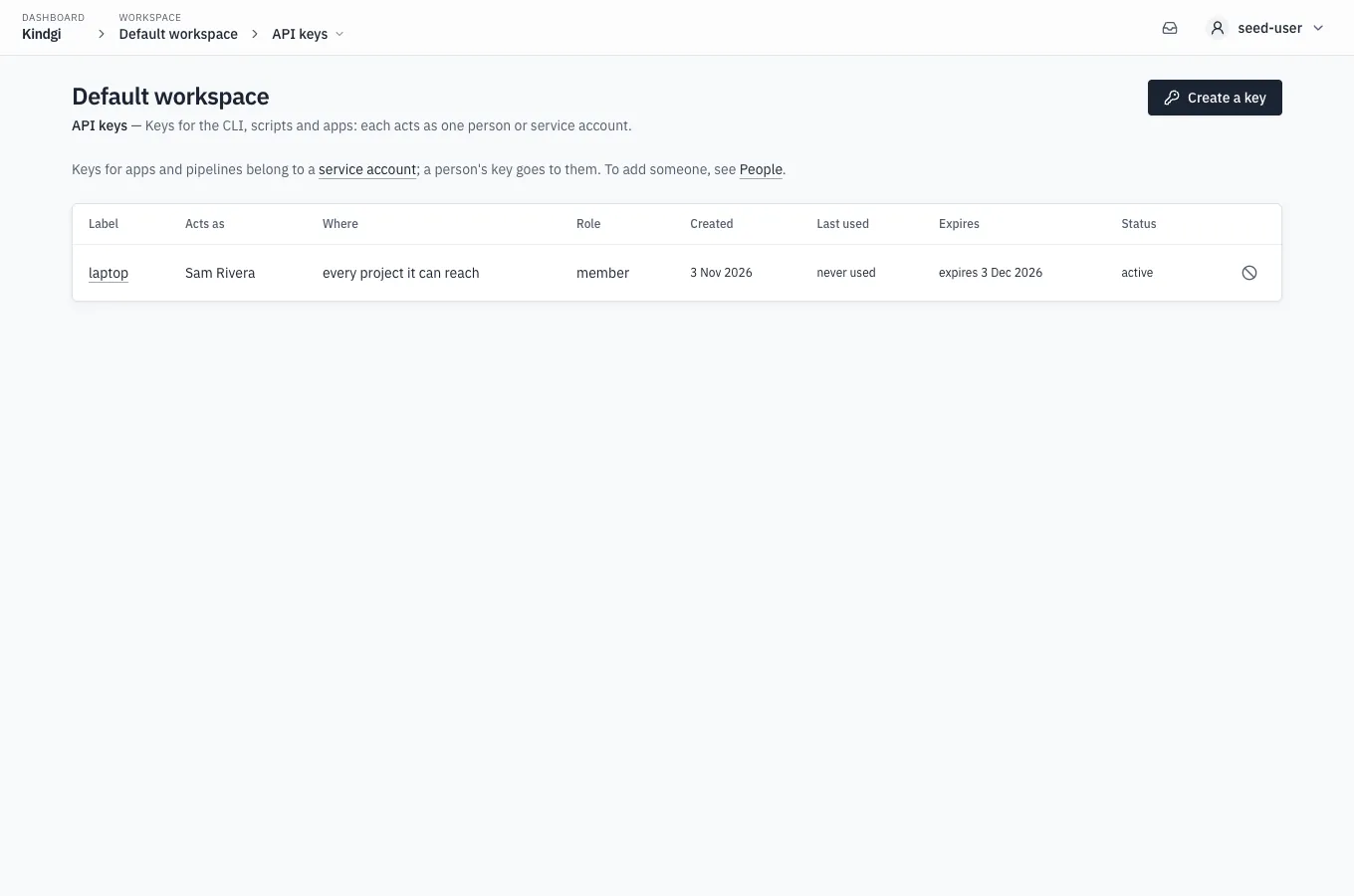
-
Service accounts, for tenant admins: create one with its grants, change them, make it a key, or unregister it.
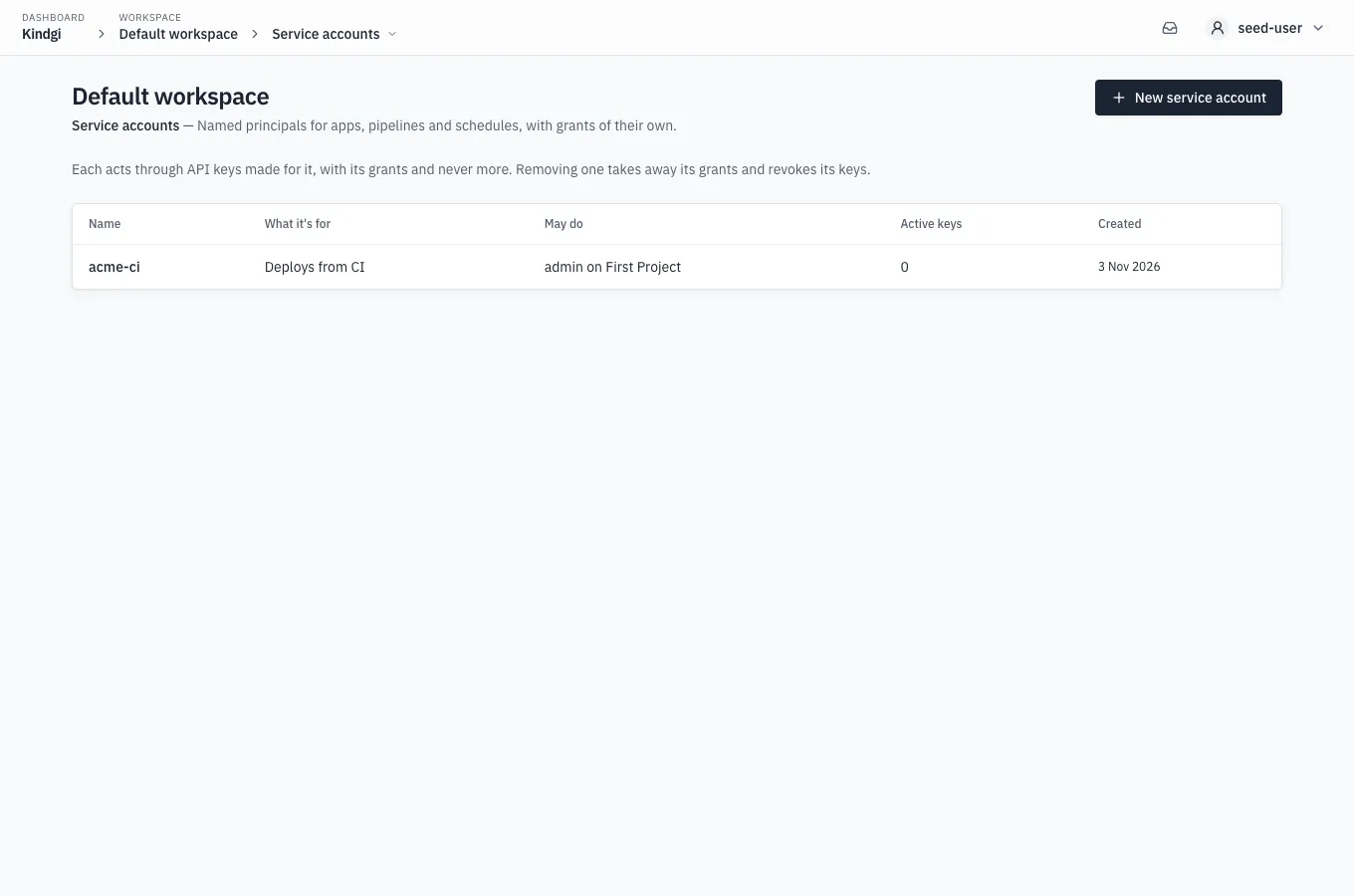
A project you have no role on shows No access, with the projects you can open.
People
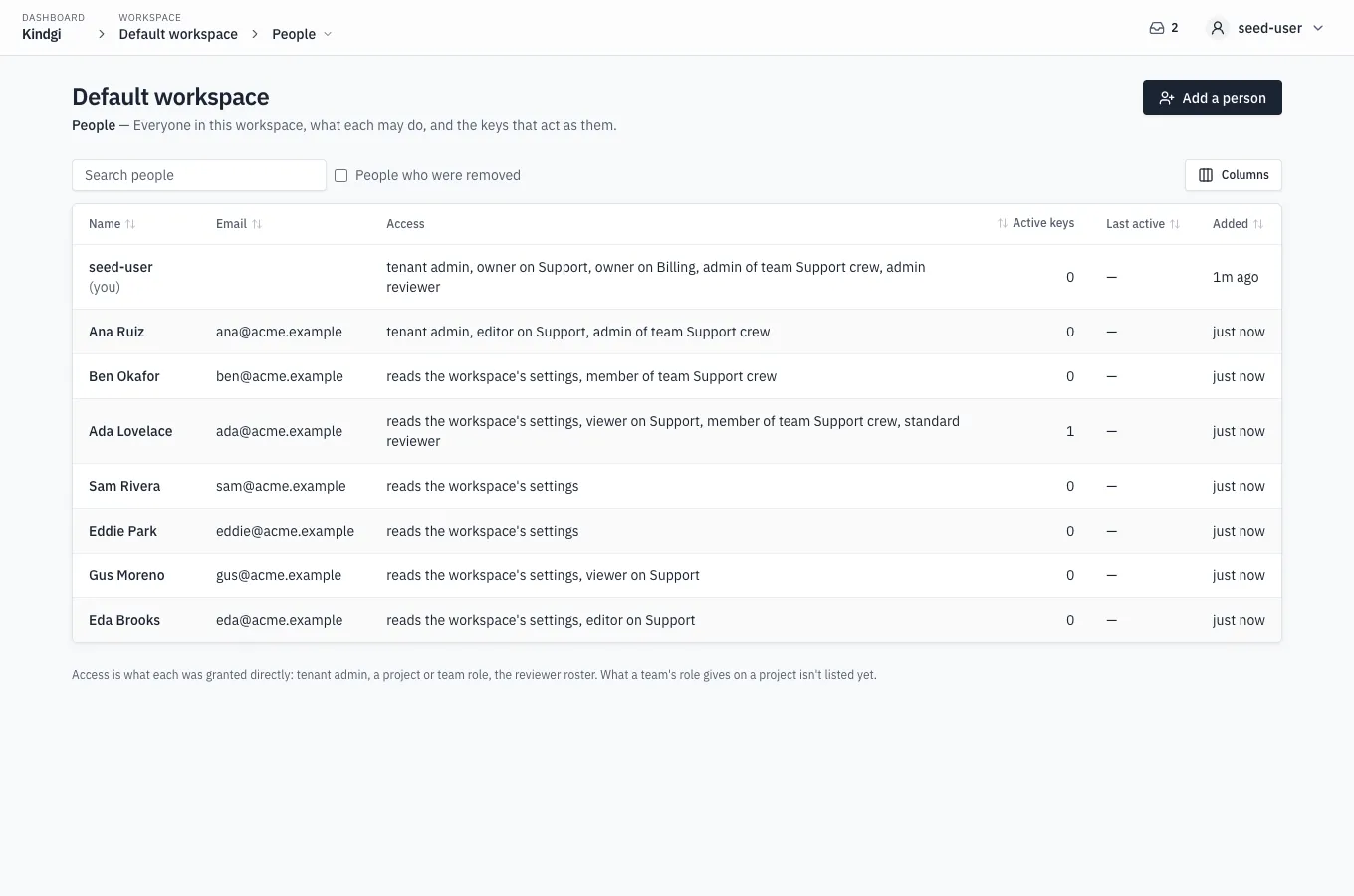
Section titled “People”People, for tenant admins, lists the workspace's people: each one's access in words, such as "reads the workspace's settings, viewer on Support, member of team Support crew, standard reviewer", their active keys, when they were last active, and when they were added. Access is what each was granted directly: what a team's role gives on a project isn't listed there. A search box, sorting, People who were removed and Columns narrow and order the list, and the page's address keeps them.
Someone invited who hasn't signed in yet is marked (invited), and (invitation expired) once its 7 days pass:
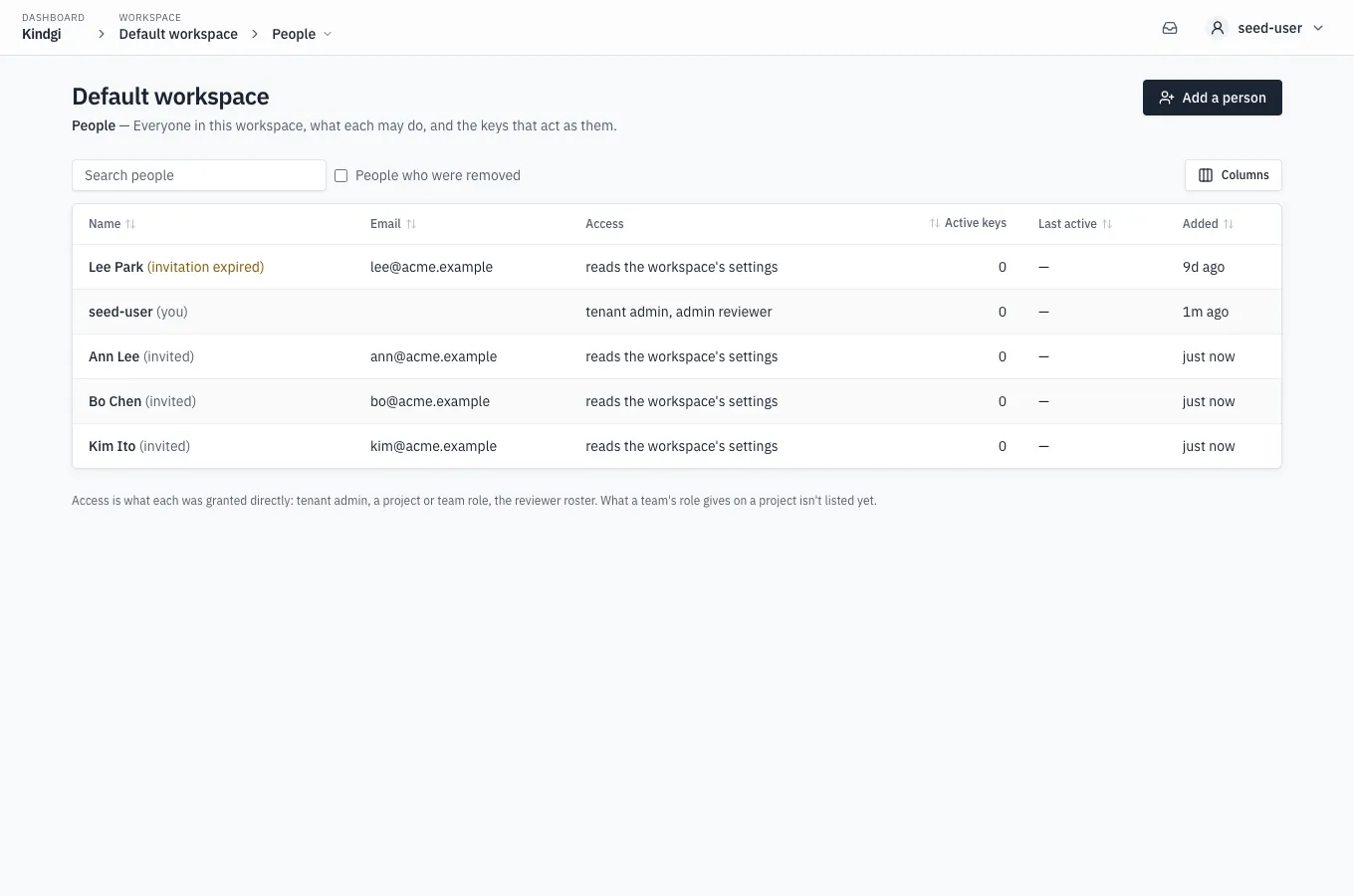
Add a person adds someone with their access in one step: "Give them their access now, in the same step." It takes a name, an optional email ("One person per email in this workspace."), project roles, teams, a reviewer tier, and Tenant admin: they administer the whole workspace.
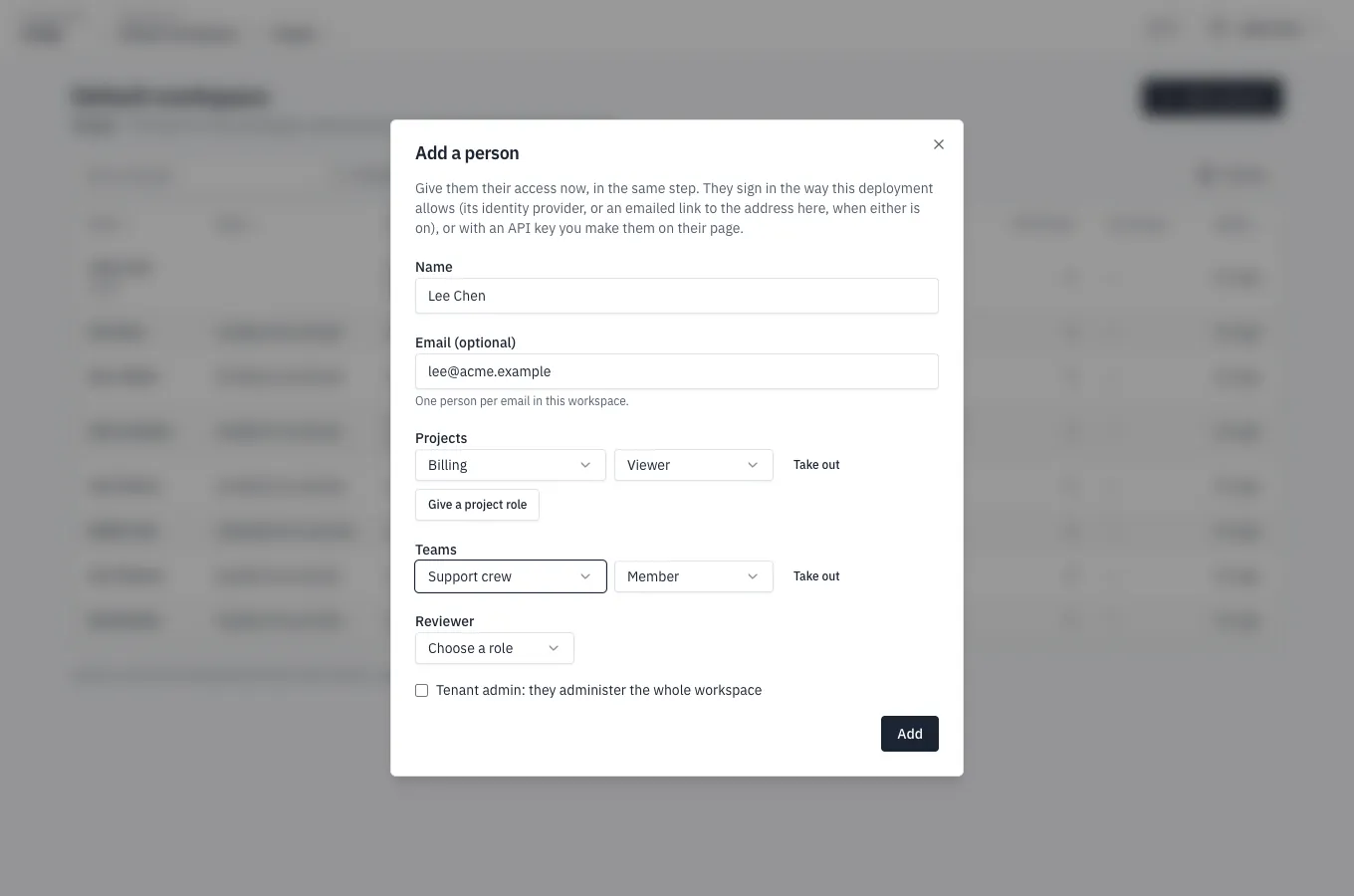
Each part is a step of its own. When they all work, the person's page opens. When one doesn't, the dialog says how each went:
- They weren't added, such as for an email someone has: "Sam Rivera wasn't added.", each step with why ("Someone in this workspace already has that email.") or "not tried: they weren't added", and Change and try again.
- They were added, but not everything was given: the steps that failed say why, with Try again what failed.
- It isn't known whether they were added, because the runtime didn't answer: it says so and offers Look in People, rather than adding them again.
Where the runtime invites, a dialog that stays open also says whether their invitation went out, and when it didn't, what to do, such as "Invited, but the invitation email didn't go out: send it again, or tell them to sign in." Here the project role's step got no answer:
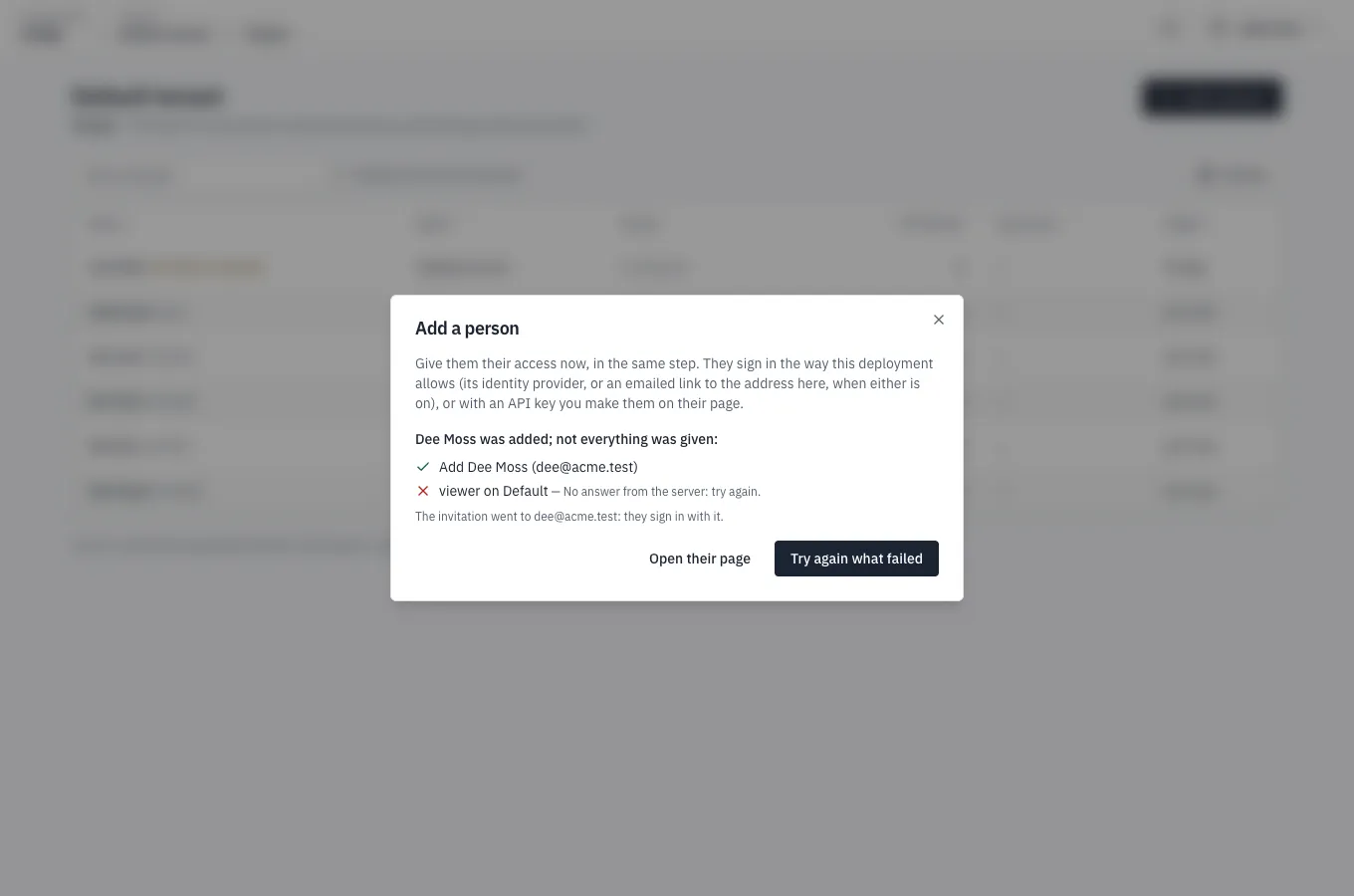
A person's page says what they may do and changes it in place, each part where you may:
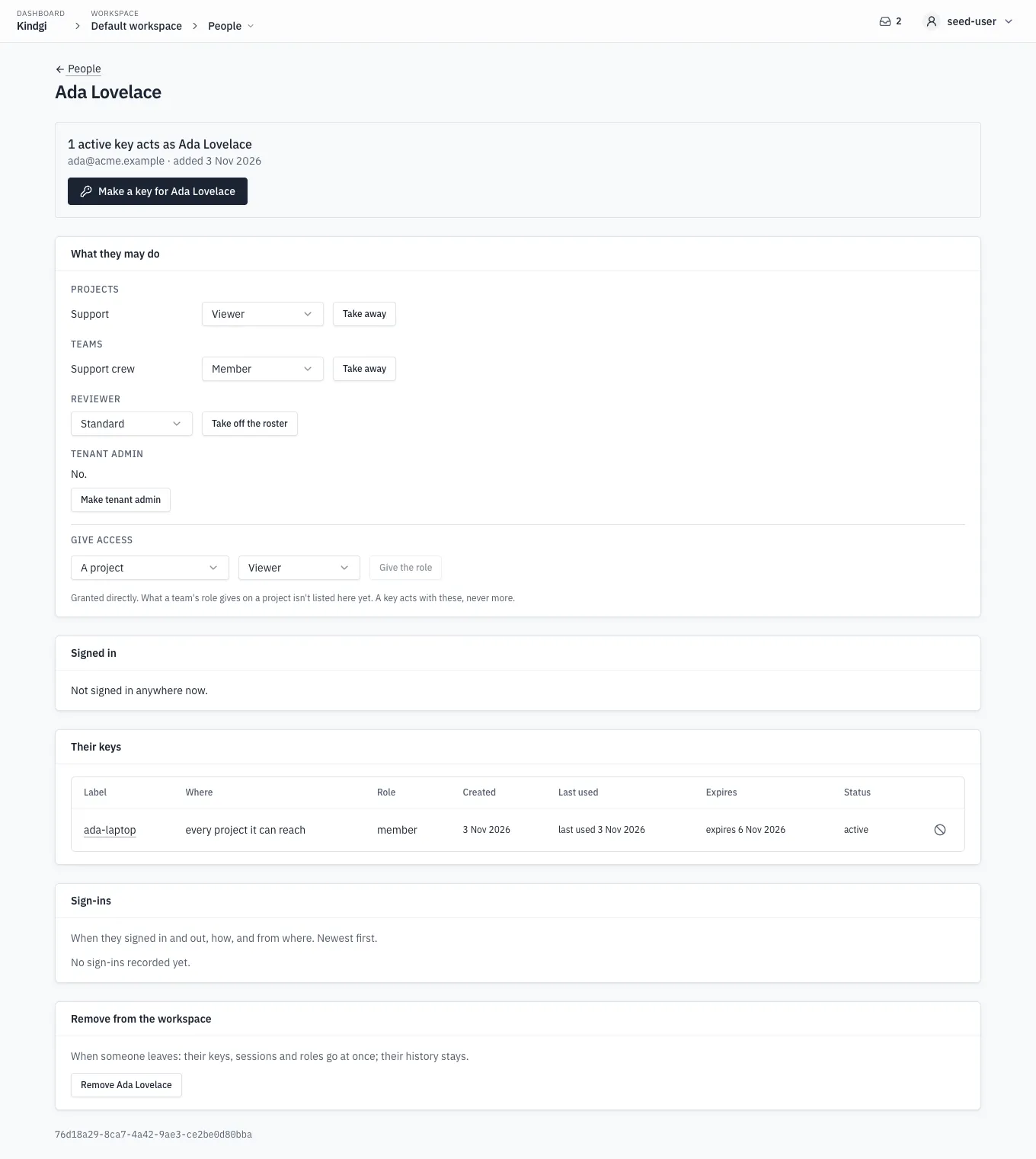
- Projects and teams: change a role, Take away one, or Give access to another project or team, with a role. Each project role says what it gives, such as "Also changes it: registers and runs agents, corrects answers, publishes." for an editor.
- Reviewer: their tier, or none; Take off the roster.
- Tenant admin: Make tenant admin, or Remove tenant admin for one who is: "From their next request on, they can administer the workspace: every project, its people, keys and service accounts, and its settings." "A workspace always keeps one admin: removing the only one is refused."
Taking something away asks first: "Take Ada Lovelace off Support? From their next request on, they can't work in Support. Their other access, and what they did there, stay." The page also lists their keys, with Make a key for them, where they're signed in, their sign-ins, and Remove from the workspace.
A removed person's page says what their removal took away, and keeps what they had, for the record. When their removal left roles or connections to other apps behind, because it stopped part-way or ran on a runtime older than 0.7.0, a tenant admin's page shows Finish removing: it removes them again, which takes what's left and changes nothing else.
Until they first sign in, their page has an Invitation section: when it's open until and when it was emailed, or when it expired ("they can't sign in until it's sent again"). Send it again opens it for 7 days from then ("Renewed: open for 7 days from now."), and says whether it went out; for an open one never emailed, it's Send the invitation. Remove from the workspace reads Revoke the invitation: "They haven't signed in: revoking removes them from the workspace, so the invitation no longer lets them in. Adding their email again invites them anew."
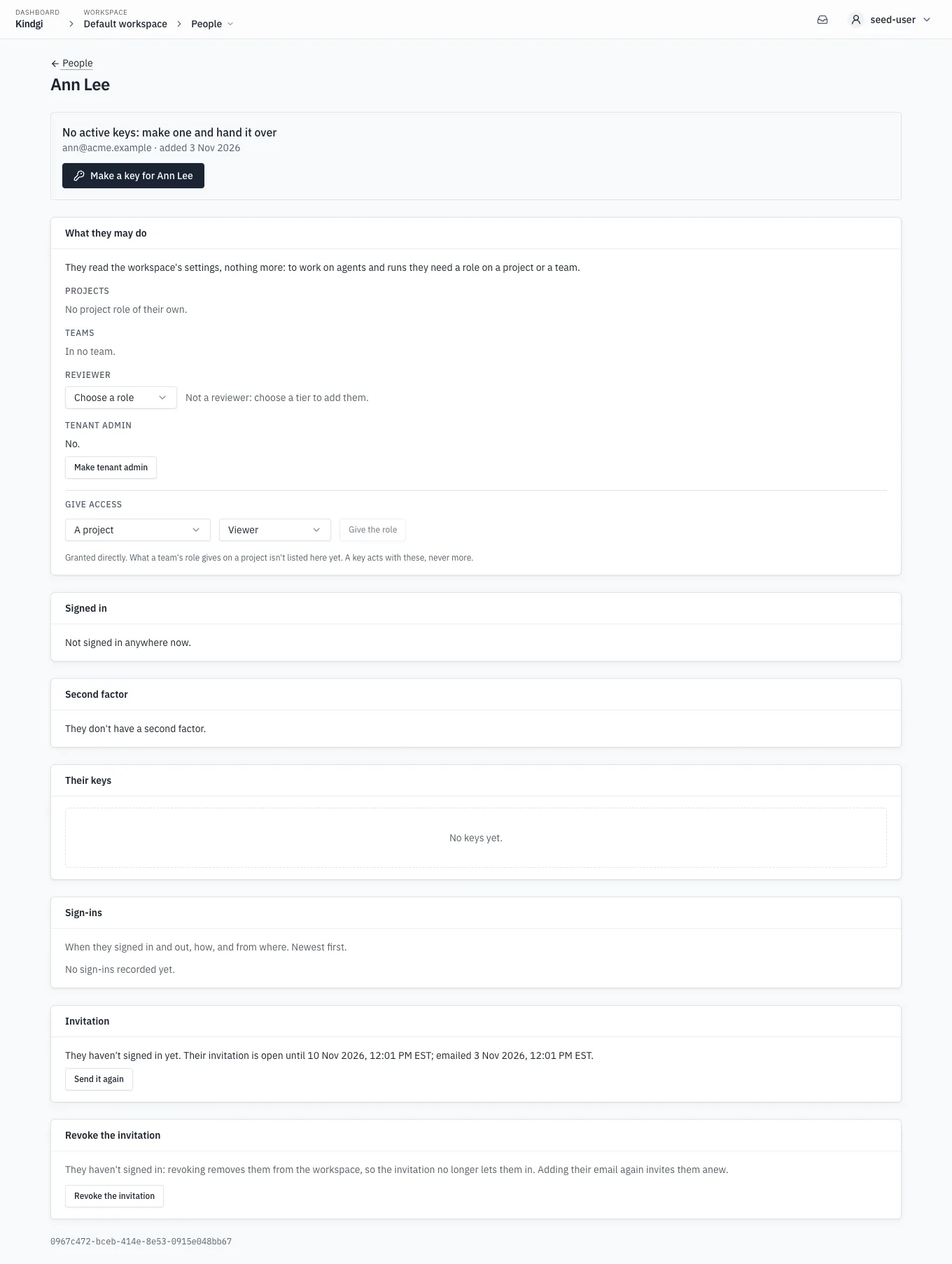
With the runtime 0.7.0 or later, a tenant admin also sees a person's
Chat apps on their page, where the runtime lets
chat apps sign in. It lists the chat apps they
connected, such as Claude: each by the address it sends people back to, with
"It calls itself …" when the app gave a name, what it can do, and when it
was connected. A link to it is their page's address with #chat-apps.
- Disconnect, then Disconnect it, stops one acting for them at once: its next request to Kindgi is refused, and it can't sign in again on its own. It isn't a block: they can connect it again from the chat app.
- They're emailed where the runtime sends mail and they have an address, with the subject "A chat app was disconnected from your access to Default workspace" (the workspace's name): which app, who disconnected it (your email address, or "A workspace admin" without one) and when. The disconnect stands even when the email doesn't go out.
- Your own page lists your own chat apps, as My access > Chat apps does, and disconnecting one there sends no email.
A removed person's page has no Chat apps: their removal already stopped every chat app of theirs.
What needs you
Section titled “What needs you”A tenant admin's home in the workspace starts with what needs a look, such as "8 people in 3 projects and 1 team. 3 people have no project of their own; 1 key expires this week.", or "Nothing needs you right now.":
- No project of their own: people who aren't a tenant admin and have no project role given them directly. A project they reach through a team or as an org admin isn't counted.
- Keys: those that expire this week, or have gone unused for 90 days, with All keys.
- Recently refused: requests the access audit recorded as denied, with All refused requests. "Someone refused may be missing access they need."
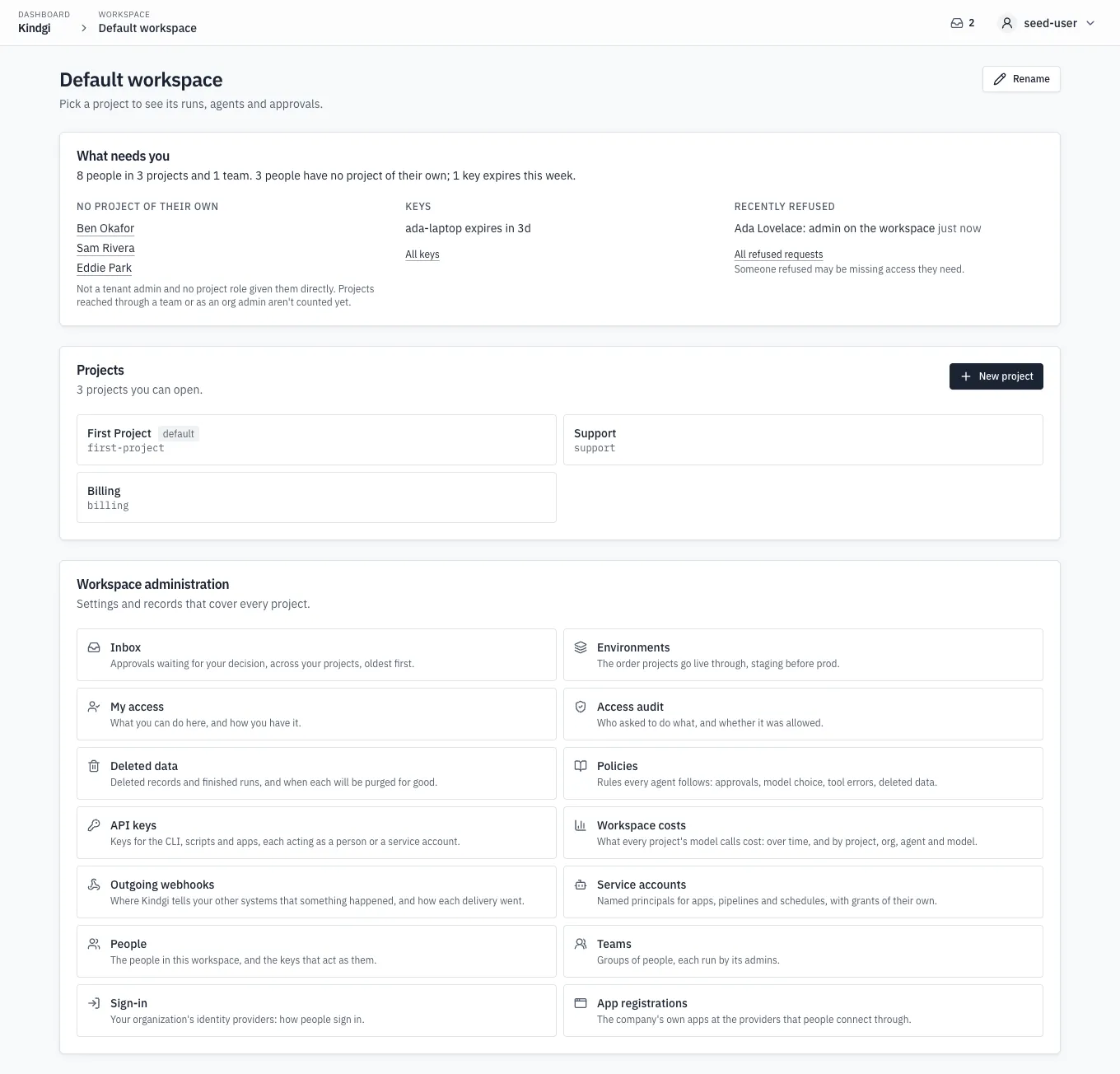
It counts everyone, and never says all is clear before it has read everything. While a read is still coming in, it says so, such as "Still reading everyone's access…". A read that failed is named: "… couldn't be read".
Recorded
Section titled “Recorded”Each change is kept as evidence: person-added, person-granted,
person-ungranted, person-unregistered, person-capabilities-granted,
person-capabilities-revoked, api-key-minted,
api-key-revoked, service-account-created, service-account-granted,
service-account-ungranted and service-account-unregistered. A key's
secret is never in one. A project's own account is made with one
service-account-created, which has its projectId and
projectAccount: true, and no separate service-account-granted.
Disconnecting a chat app is kept as chat-app-disconnected, with its
clientId and how many of its refresh tokens were revoked
(revokedCount). On My access > Chat apps, the person is its actor
and it has no userId. From a person's page in People
(runtime 0.7.0 or later), the tenant admin is its actor and the person is
its userId, so an admin's own page records their own id as both.
- Turn on sign-in: the ways your people sign in.
- Run with authorization: project memberships, teams and the access audit.
- Set up SSO: a workspace's own identity provider.