

Write a flow
This page builds acme.process-order: look an order up, have an agent write
a thank-you note, then confirm the order with that note. Two tools, one
agent, one flow.
The tools
Section titled “The tools”Ask your coding agent: "I want a tool that looks up an order, and one that
confirms an order with a note." Kindgi's skills in your pack tell it how
(How it knows Kindgi). For reference, the
tools look like this. acme.get-order only reads, so it says
mutating: false. acme.confirm-order changes something, so it doesn't:
import { defineTool } from '@kindgi/sdk/define';import type { ToolId } from '@kindgi/sdk/types';import { z } from 'zod';
const Order = z.object({  orderId: z.string(),  customer: z.string(),  total: z.number(),  items: z.array(z.object({ sku: z.string(), quantity: z.number().int() })),});
const ORDERS: Record<string, z.infer<typeof Order>> = {  'A-100': { orderId: 'A-100', customer: 'ada@example.com', total: 42.5, items: [{ sku: 'mug', quantity: 2 }] },  'A-200': {    orderId: 'A-200',    customer: 'grace@example.com',    total: 1250,    items: [      { sku: 'desk', quantity: 1 },      { sku: 'lamp', quantity: 2 },    ],  },};
const defined = defineTool({  id: 'acme.get-order' as ToolId,  description: 'Looks up an order by id.',  version: '0.1.0',  input: z.object({ orderId: z.string().min(1) }),  output: Order,  effects: [],  mutating: false, // only reads  handler: async ({ orderId }) => {    const order = ORDERS[orderId];    if (order === undefined) throw new Error(`No order ${orderId}`);    return order;  },});
if (defined.kind === 'err') throw new Error(defined.error.message);
export default defined.value;import { defineTool } from '@kindgi/sdk/define';import type { ToolId } from '@kindgi/sdk/types';import { z } from 'zod';
const defined = defineTool({ id: 'acme.confirm-order' as ToolId, description: 'Confirms an order and emails the customer.', version: '0.1.0', input: z.object({ orderId: z.string(), note: z.string().optional() }), output: z.object({ orderId: z.string(), status: z.literal('confirmed'), note: z.string().optional(), }), effects: [], // no `mutating: false`: it changes something handler: async ({ orderId, note }) => ({ orderId, status: 'confirmed' as const, note }),});
if (defined.kind === 'err') throw new Error(defined.error.message);
export default defined.value;from pydantic import BaseModel, Field
from kindgi import tool
class OrderQuery(BaseModel): order_id: str = Field(alias="orderId", min_length=1)
class Item(BaseModel): sku: str quantity: int
class Order(BaseModel): order_id: str = Field(alias="orderId") customer: str total: float items: list[Item]
ORDERS = { "A-100": {"customer": "ada@example.com", "total": 42.5, "items": [{"sku": "mug", "quantity": 2}]}, "A-200": { "customer": "grace@example.com", "total": 1250, "items": [{"sku": "desk", "quantity": 1}, {"sku": "lamp", "quantity": 2}], },}
@tool(id="acme.get-order", mutating=False) # only readsdef get_order(input: OrderQuery) -> Order: """Looks up an order by id.""" order = ORDERS.get(input.order_id) if order is None: raise ValueError(f"No order {input.order_id}") return Order(orderId=input.order_id, **order)from typing import Literal
from pydantic import BaseModel, Field
from kindgi import tool
class ConfirmInput(BaseModel): order_id: str = Field(alias="orderId") note: str | None = None
class Confirmed(BaseModel): order_id: str = Field(alias="orderId") status: Literal["confirmed"] = "confirmed" note: str | None = None
@tool(id="acme.confirm-order") # no mutating=False: it changes somethingdef confirm_order(input: ConfirmInput) -> Confirmed: """Confirms an order and emails the customer.""" return Confirmed(orderId=input.order_id, note=input.note)package acme.tools;
import com.kindgi.pack.Tool;import jakarta.validation.constraints.Size;import java.util.List;import java.util.Map;
public final class GetOrder { public record Input(@Size(min = 1) String orderId) {}
public record Item(String sku, int quantity) {}
public record Order(String orderId, String customer, double total, List<Item> items) {}
private static final Map<String, Order> ORDERS = Map.of( "A-100", new Order("A-100", "ada@example.com", 42.5, List.of(new Item("mug", 2))), "A-200", new Order("A-200", "grace@example.com", 1250, List.of(new Item("desk", 1), new Item("lamp", 2))));
public static final Tool<Input, Order> TOOL = Tool.define("acme.get-order") .description("Looks up an order by id.") .version("0.1.0") .input(Input.class) .output(Order.class) .mutating(false) // only reads .handler((input, ctx) -> { Order order = ORDERS.get(input.orderId()); if (order == null) throw new IllegalArgumentException("No order " + input.orderId()); return order; });
private GetOrder() {}}package acme.tools;
import com.fasterxml.jackson.annotation.JsonProperty;import com.kindgi.pack.Tool;import org.jspecify.annotations.Nullable;
public final class ConfirmOrder { public record Input(String orderId, @Nullable String note) {}
public enum Status { @JsonProperty("confirmed") CONFIRMED }
public record Confirmed(String orderId, Status status, @Nullable String note) {}
public static final Tool<Input, Confirmed> TOOL = Tool.define("acme.confirm-order") .description("Confirms an order and emails the customer.") .version("0.1.0") .input(Input.class) .output(Confirmed.class) // no mutating(false): it changes something .handler((input, ctx) -> new Confirmed(input.orderId(), Status.CONFIRMED, input.note()));
private ConfirmOrder() {}}package acme.tools
import com.kindgi.pack.scaladsl._import jakarta.validation.constraints.Size
object GetOrder { final case class Input(@Size(min = 1) orderId: String) final case class Item(sku: String, quantity: Int) final case class Order(orderId: String, customer: String, total: Double, items: Seq[Item])
private val orders = Map( "A-100" -> Order("A-100", "ada@example.com", 42.5, Seq(Item("mug", 2))), "A-200" -> Order("A-200", "grace@example.com", 1250, Seq(Item("desk", 1), Item("lamp", 2))))
val tool: Tool[Input, Order] = Tool[Input, Order]("acme.get-order") .description("Looks up an order by id.") .version("0.1.0") .readOnly // only reads .handler((in, _) => orders.getOrElse(in.orderId, throw new NoSuchElementException(s"No order ${in.orderId}")))}package acme.tools
import com.kindgi.pack.scaladsl._
object ConfirmOrder { final case class Input(orderId: String, note: Option[String])
enum Status { case confirmed }
final case class Confirmed(orderId: String, status: Status, note: Option[String])
val tool: Tool[Input, Confirmed] = Tool[Input, Confirmed]("acme.confirm-order") .description("Confirms an order and emails the customer.") .version("0.1.0") // no readOnly: it changes something .handler((in, _) => Confirmed(in.orderId, Status.confirmed, in.note))}The agent
Section titled “The agent”Ask your coding agent: "I want an agent that writes a one-sentence thank-you note for an order." For reference, the agent looks like this. It has no tools: it reads the order's customer and total from its input and answers with one sentence:
import { defineAgent } from '@kindgi/sdk/define';import type { AgentId, Semver } from '@kindgi/sdk/types';
const defined = defineAgent({  id: 'acme.note-writer' as AgentId,  version: '0.1.0' as Semver,  name: 'Note writer',  description: 'Writes a one-sentence thank-you note for an order.',  instructions:    'Write a one-sentence thank-you note to {{ input.customer }} for their order of {{ input.total }} USD. Answer with the note only.',  capabilities: [{ needs: [{ feature: 'tool-use' as const }] }],  tools: [],  retrieval: [],  guardrails: [],  parameters: [],  budget: { maxSteps: 2, maxCostUsd: 0.05, maxWallMs: 30_000 },});
if (defined.kind === 'err') throw new Error(defined.error.message);
export default defined.value;from kindgi import Agent
note_writer = Agent( id="acme.note-writer", version="0.1.0", name="Note writer", description="Writes a one-sentence thank-you note for an order.", instructions=( "Write a one-sentence thank-you note to {{ input.customer }} for their order of " "{{ input.total }} USD. Answer with the note only." ), capabilities=[{"needs": [{"feature": "tool-use"}]}], budget={"maxSteps": 2, "maxCostUsd": 0.05, "maxWallMs": 30_000},)package acme.agents;
import com.kindgi.pack.Agent;import java.util.List;import java.util.Map;
public final class NoteWriter { public static final Agent AGENT = Agent.define("acme.note-writer") .version("0.1.0") .name("Note writer") .description("Writes a one-sentence thank-you note for an order.") .instructions("Write a one-sentence thank-you note to {{ input.customer }} for their order of " + "{{ input.total }} USD. Answer with the note only.") .capability(Map.of("needs", List.of(Map.of("feature", "tool-use")))) .set("budget", Map.of("maxSteps", 2, "maxCostUsd", 0.05, "maxWallMs", 30_000)) .build();
private NoteWriter() {}}package acme.agents
import com.kindgi.pack.scaladsl._
object NoteWriter { val agent: Agent = Agent("acme.note-writer") .version("0.1.0") .name("Note writer") .description("Writes a one-sentence thank-you note for an order.") .instructions("Write a one-sentence thank-you note to {{ input.customer }} for their order of " + "{{ input.total }} USD. Answer with the note only.") .capability(Map("needs" -> Seq(Map("feature" -> "tool-use")))) .set("budget", Map("maxSteps" -> 2, "maxCostUsd" -> 0.05, "maxWallMs" -> 30000)) .build()}The flow
Section titled “The flow”Ask your coding agent: "I want a flow that looks up an order, has the agent write a thank-you note, then confirms the order with that note." For reference, the flow looks like this:
import { defineFlow } from '@kindgi/sdk/define';
const defined = defineFlow({  id: 'acme.process-order',  version: '0.1.0',  name: 'Process an order',  description: 'Looks up an order, writes a thank-you note, and confirms the order with it.',  nodes: [    {      id: 'order',      kind: 'tool',      ref: 'acme.get-order',      inputMapping: { orderId: { path: 'runInput.orderId' } },    },    {      id: 'note',      kind: 'agent',      ref: 'acme.note-writer',      inputMapping: {        customer: { path: 'nodeOutputs.order.customer' },        total: { path: 'nodeOutputs.order.total' },      },    },    {      id: 'confirm',      kind: 'tool',      ref: 'acme.confirm-order',      inputMapping: {        orderId: { path: 'runInput.orderId' },        note: { path: 'nodeOutputs.note.text' },      },    },  ],  edges: [    { id: 'e1', from: '$start', to: 'order' },    { id: 'e2', from: 'order', to: 'note' },    { id: 'e3', from: 'note', to: 'confirm' },    { id: 'e4', from: 'confirm', to: '$end' },  ],});
if (defined.kind === 'err') throw new Error(defined.error.message);
export default defined.value;from kindgi import Flow
process_order = Flow( id="acme.process-order", version="0.1.0", name="Process an order", description="Looks up an order, writes a thank-you note, and confirms the order with it.", nodes=[ { "id": "order", "kind": "tool", "ref": "acme.get-order", "inputMapping": {"orderId": {"path": "runInput.orderId"}}, }, { "id": "note", "kind": "agent", "ref": "acme.note-writer", "inputMapping": { "customer": {"path": "nodeOutputs.order.customer"}, "total": {"path": "nodeOutputs.order.total"}, }, }, { "id": "confirm", "kind": "tool", "ref": "acme.confirm-order", "inputMapping": { "orderId": {"path": "runInput.orderId"}, "note": {"path": "nodeOutputs.note.text"}, }, }, ], edges=[ {"id": "e1", "from": "$start", "to": "order"}, {"id": "e2", "from": "order", "to": "note"}, {"id": "e3", "from": "note", "to": "confirm"}, {"id": "e4", "from": "confirm", "to": "$end"}, ],)package acme.flows;
import acme.agents.NoteWriter;import acme.tools.ConfirmOrder;import acme.tools.GetOrder;import com.kindgi.pack.Flow;import java.util.Map;
public final class ProcessOrder { public static final Flow FLOW = Flow.define("acme.process-order") .version("0.1.0") .set("name", "Process an order") .set("description", "Looks up an order, writes a thank-you note, and confirms the order with it.") .node(Map.of( "id", "order", "kind", "tool", "ref", GetOrder.TOOL, "inputMapping", Map.of("orderId", Map.of("path", "runInput.orderId")))) .node(Map.of( "id", "note", "kind", "agent", "ref", NoteWriter.AGENT, "inputMapping", Map.of( "customer", Map.of("path", "nodeOutputs.order.customer"), "total", Map.of("path", "nodeOutputs.order.total")))) .node(Map.of( "id", "confirm", "kind", "tool", "ref", ConfirmOrder.TOOL, "inputMapping", Map.of( "orderId", Map.of("path", "runInput.orderId"), "note", Map.of("path", "nodeOutputs.note.text")))) .edge("e1", "$start", "order") .edge("e2", "order", "note") .edge("e3", "note", "confirm") .edge("e4", "confirm", "$end") .build();
private ProcessOrder() {}}A step with no inputMapping can be shorter: .toolNode("order", GetOrder.TOOL)
or .agentNode("note", NoteWriter.AGENT).
package acme.flows
import acme.agents.NoteWriterimport acme.tools.{ConfirmOrder, GetOrder}import com.kindgi.pack.scaladsl._
object ProcessOrder { val flow: Flow = Flow("acme.process-order") .version("0.1.0") .set("name", "Process an order") .set("description", "Looks up an order, writes a thank-you note, and confirms the order with it.") .node(Map( "id" -> "order", "kind" -> "tool", "ref" -> GetOrder.tool, "inputMapping" -> Map("orderId" -> Map("path" -> "runInput.orderId")))) .node(Map( "id" -> "note", "kind" -> "agent", "ref" -> NoteWriter.agent, "inputMapping" -> Map( "customer" -> Map("path" -> "nodeOutputs.order.customer"), "total" -> Map("path" -> "nodeOutputs.order.total")))) .node(Map( "id" -> "confirm", "kind" -> "tool", "ref" -> ConfirmOrder.tool, "inputMapping" -> Map( "orderId" -> Map("path" -> "runInput.orderId"), "note" -> Map("path" -> "nodeOutputs.note.text")))) .edge("e1", "$start", "order") .edge("e2", "order", "note") .edge("e3", "note", "confirm") .edge("e4", "confirm", "$end") .build()}nodesare the steps. Each has anid(unique in the flow), akindand aref: the id of the tool or agent it runs. In Python, Java and Scala,refcan also be the tool or agent itself.edgesconnect them.$startand$endare where the run enters and leaves; an edge without a condition fires when its source step completes.inputMappingbuilds each step's input from the run's input (runInput.…) and earlier steps' outputs (nodeOutputs.<step>.…). See Pass data between steps.
The shape is checked when the file loads: ids, edges between steps that
exist, $start and $end, no cycles. That the tools and the agent exist is
checked when a run starts: a run of a flow that names a tool your tenant
doesn't have is refused before anything runs.
Run it
Section titled “Run it”With kindgi dev running in the pack, start a run from a second terminal:
pnpm exec kindgi runs start --flow=acme.process-order --input='{"orderId":"A-100"}'uv run kindgi runs start --flow=acme.process-order --input='{"orderId":"A-100"}'./kindgiw runs start --flow=acme.process-order --input='{"orderId":"A-100"}'./kindgiw runs start --flow=acme.process-order --input='{"orderId":"A-100"}'{ "id": "f35d0699-00d8-4e85-944c-e0c9da3ce8e5", … "flowId": "acme.process-order", "flowVersion": "0.1.0", "status": "completed", "dryRun": false, … "output": { "note": "Thank you for your order of $42.50, ada@example.com!", "status": "confirmed", "orderId": "A-100" }, …}The command waits for the run to finish. The flow declares no output, so
the run returns the output of the step that reached $end: here,
acme.confirm-order's.
The agent step
Section titled “The agent step”An agent step runs one turn of the agent, as a run of its own (a child of the
flow's run). The agent gets the step's input twice: as structured input, which
{{ input.customer }} in its instructions reads, and as its user message (the
input as JSON). Give an agent its input
has the details.
The step's output has the answer as text, and as output when the agent
declares a typed answer, plus the turn's runId. Without a model provider,
dev-echo answers, and the note is the agent's input echoed back.
Change it
Section titled “Change it”Save a file and kindgi dev loads the new version; the next run uses it, with
no restart. A run already in flight keeps the version it started on. Change
version when what callers send or get back changes, not on every save.
In the console
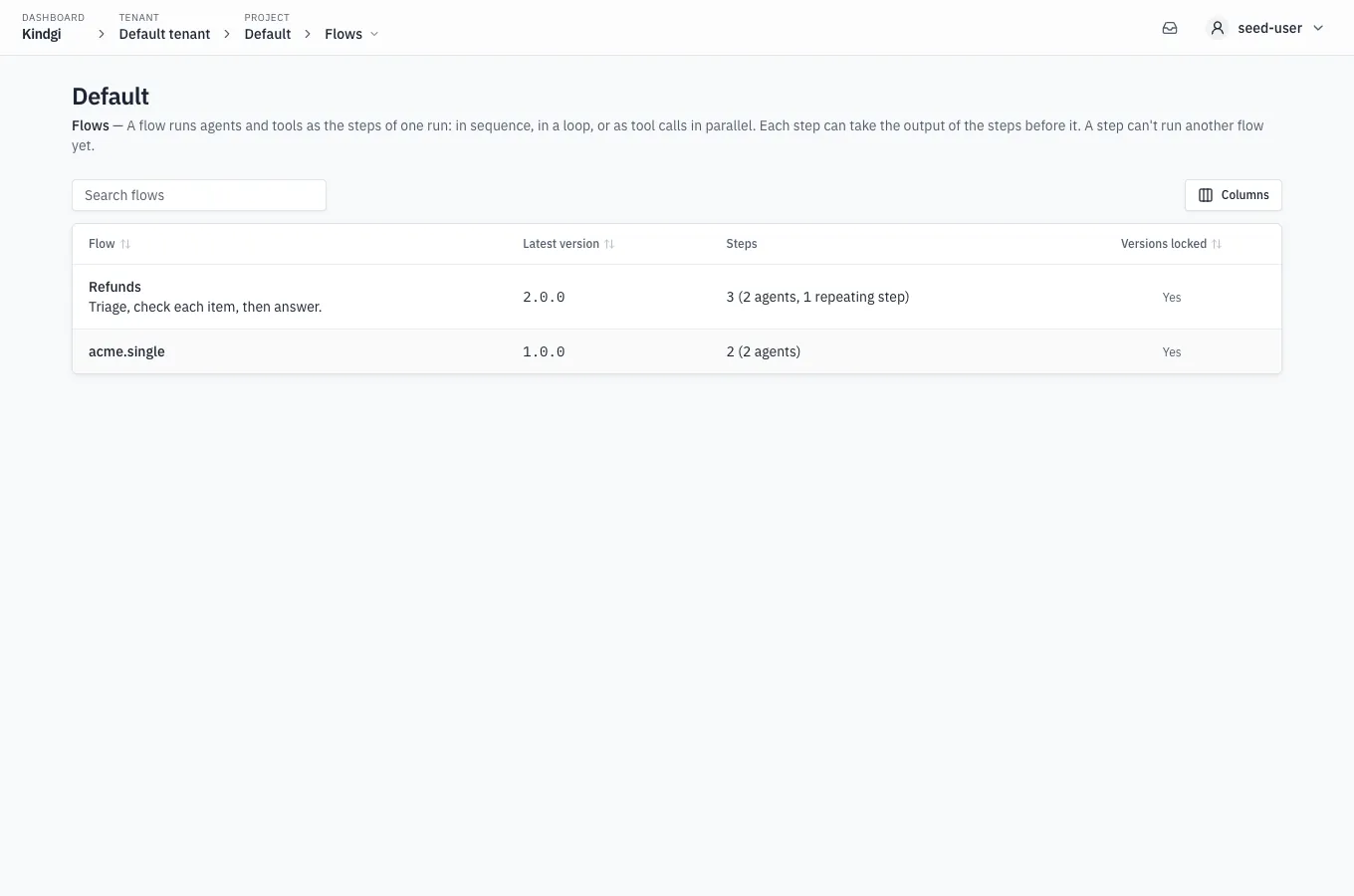
Section titled “In the console”A project's Flows page lists its flows: "A flow runs agents and tools as the steps of one run: in sequence, in a loop, or as tool calls in parallel. Each step can take the output of the steps before it. A step can't run another flow yet." Each row has:
- the flow's name and description, and its latest version;
- Steps: how many, and what they are, such as "3 (2 agents, 1 repeating step)";
- Versions locked: "Yes" when the version locked its agent and tool versions when it was published, "No, latest at each run" when it didn't, or "Nothing to lock". Pointing at the answer says what it means.
A flow whose every version is retired is marked retired. The list has a
search box, sorts by a column's header, and Columns chooses which
columns it shows. With no flows, it says where they come from: "No flows
yet. They come from your pack: deploy it to this project with kindgi deploy." Under kindgi dev, it names the pack's folder instead: "No flows
yet. Under kindgi dev, they come from your pack's flows folder: add one
there, and kindgi dev loads it."
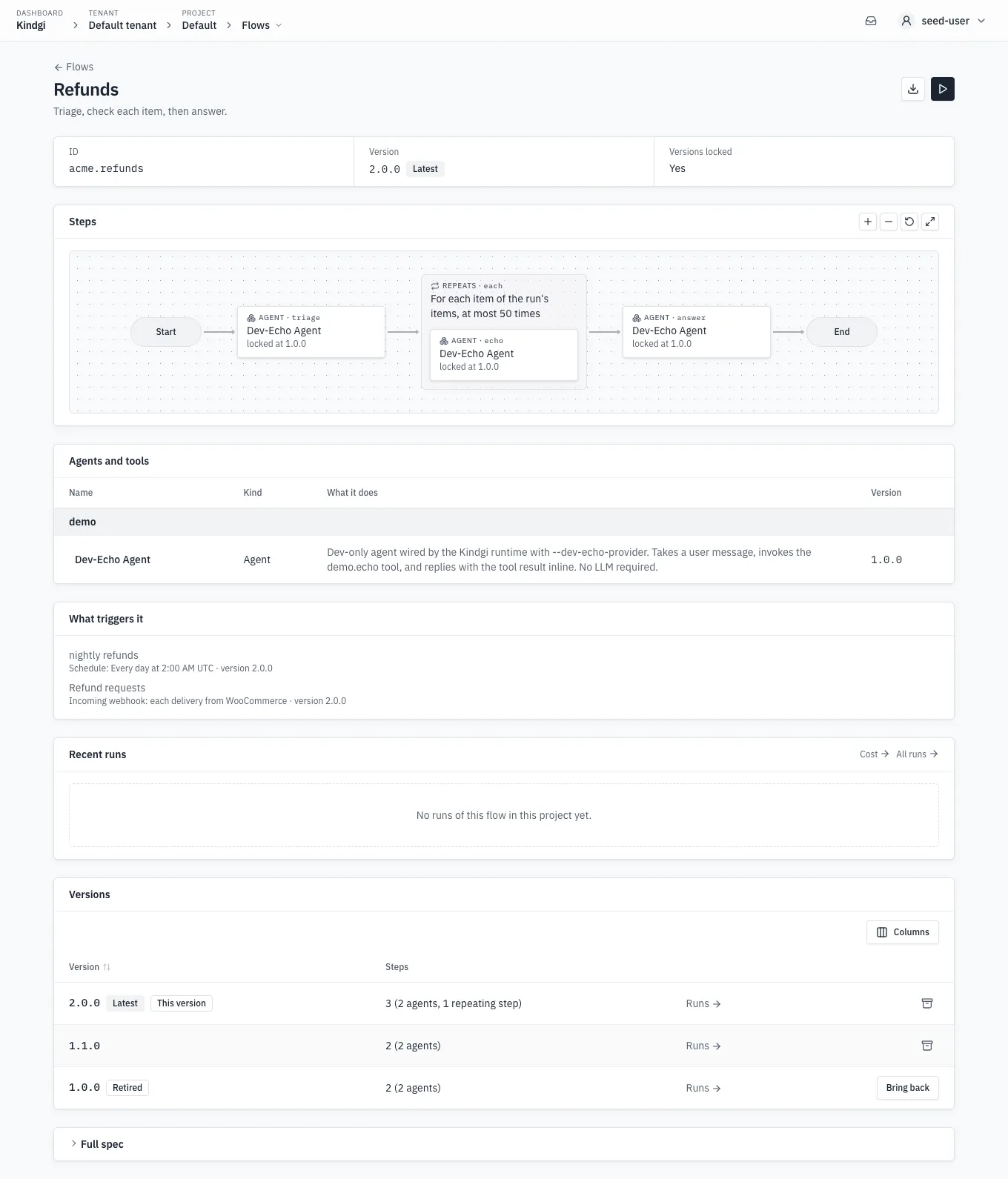
A flow's page has the flow's name and description, and two icons: Download its JSON, and Start a run while a version is in use, only to people who may run the flow. Below them are its ID, the Version it shows, and Versions locked. The version is tagged Latest, "The newest version: runs use it unless they name another.", or Retired. An older one says which is the latest: "Latest is 2.0.0". Then:
- Steps: that version drawn from Start to End. Each step is a box with what it runs, by name, and at which version, such as "locked at 1.0.0". A repeating step says how it repeats, "For each item of the run's items, at most 50 times", with its own steps inside it. Selecting a step opens its agent at the version it runs, or its tool. Zoom in, Zoom out, Show the whole flow and Full screen are at the section's top.
- Agents and tools: each agent and tool it runs, with what it does and its version, or "Latest at each run" when nothing is locked.
- What triggers it: the schedules, incoming webhooks and mail triggers that start it, each with the version it starts, such as "Schedule: Every day at 2:00 AM UTC · version 2.0.0" or "Mail trigger: new mail in the company's Gmail, inbox · version 2.0.0". With none, it says "No schedule, incoming webhook or mail trigger: people and apps start it."
- Recent runs: its latest runs in this project, each with when it started, its status, version and how long it took. Cost → and All runs → open the cost and runs pages filtered to the flow.
- Versions: every version, tagged Latest, Retired, or This version for the one shown, each with its steps and Runs →, the runs list filtered to that version.
- Full spec: the version's definition, as the runtime sent it.
For flow admins, each version in use has Retire: the archive icon at the row's end, with the word only on hover. It asks first, saying what changes:
Retire 1.0.0?Runs that name no version keep using 2.0.0.Runs that name 1.0.0 are refused, a schedule's included; runs already going finish. It stays listed here as retired, with Bring back.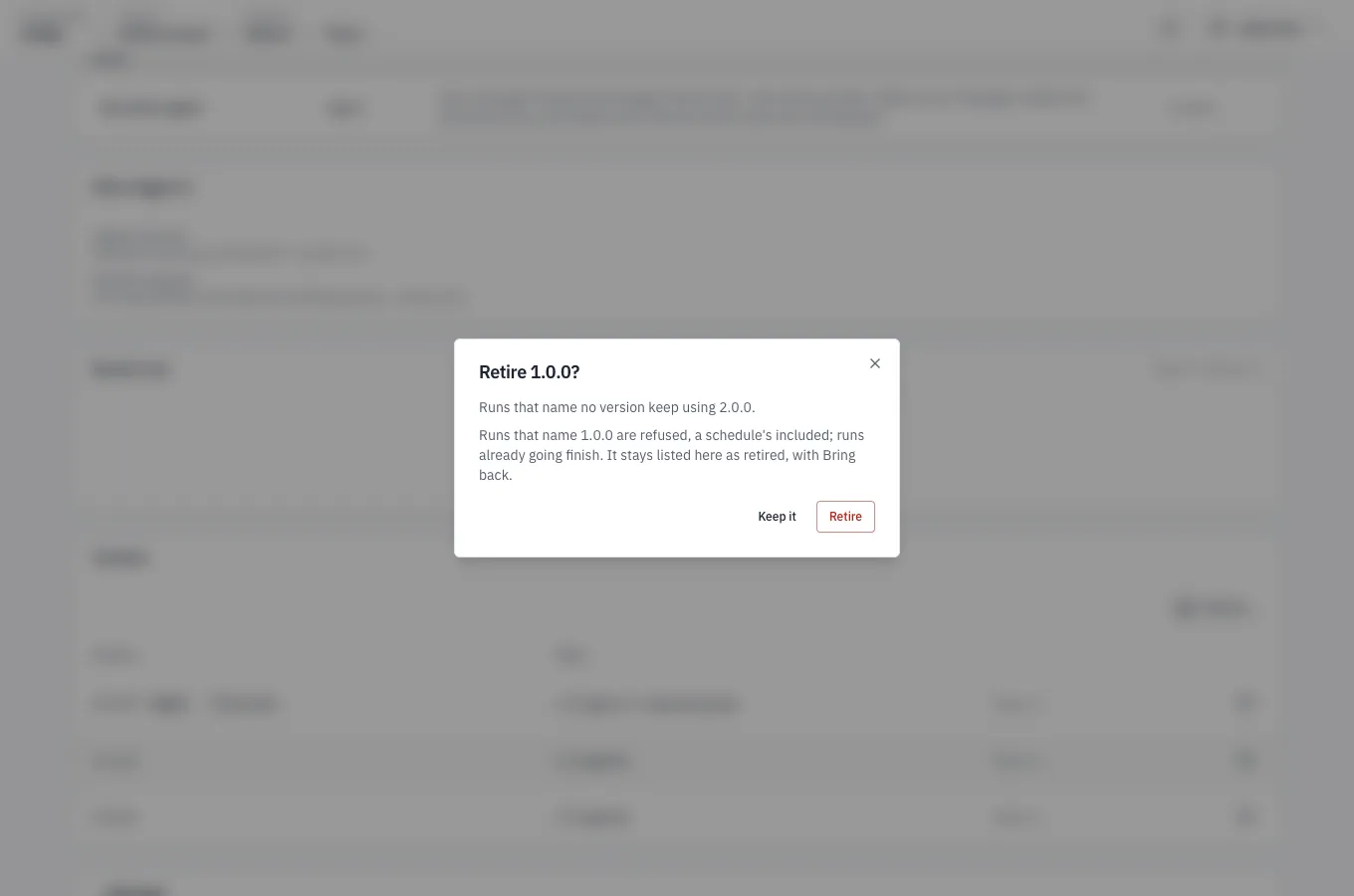
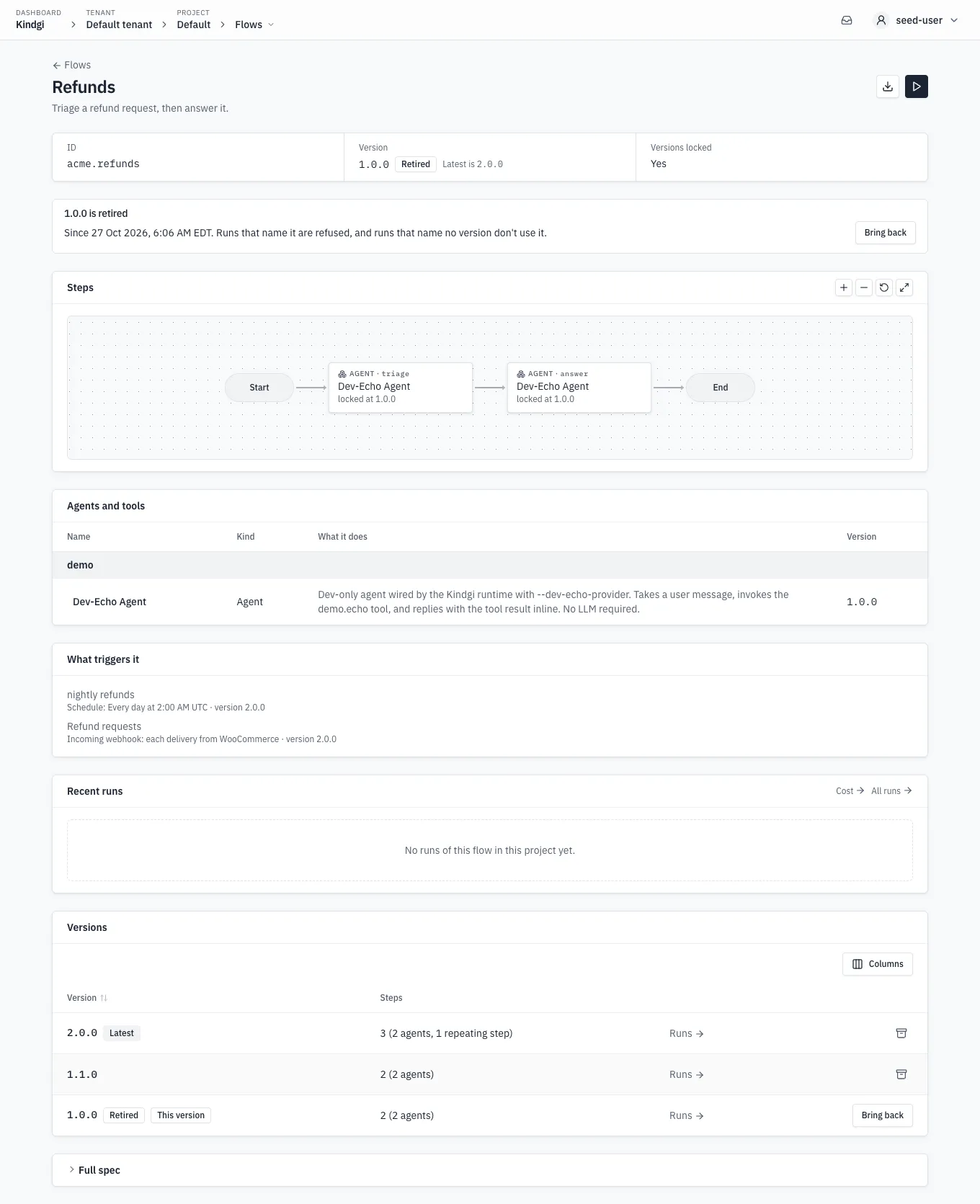
Retiring the latest says which version runs that name none use instead, such as "Runs that name no version use 1.1.0 instead." While the dialog is still open, Bring it back undoes it. Later, the version's row has Bring back, and the version's own page says "1.0.0 is retired", since when, and "Runs that name it are refused, and runs that name no version don't use it.", with Bring back.
Retiring a flow's only version in use says "It is the only version in use: the Flows list shows the flow as retired, and runs that name no version are refused until a version is brought back or published." Its page then says "Every version of this flow is retired": "The Flows list shows it as retired, and runs that name no version are refused. Bring a version back under Versions, or publish a new one."
Under kindgi dev, Retire and Bring back are off: "the pack's files are
this flow's versions. Change the flow there, and kindgi dev reloads it."